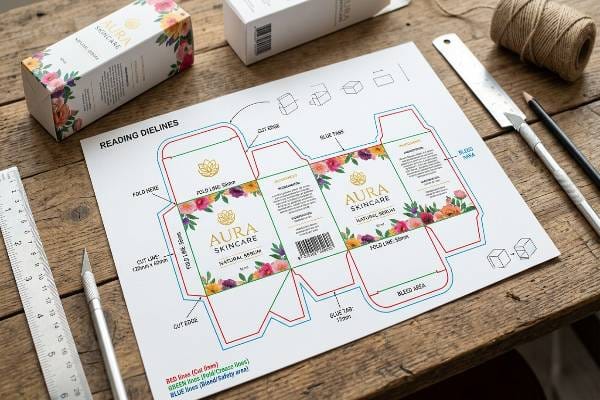
A bad file delays your product launch by weeks. You send artwork, we reject it, and everyone gets frustrated. Let's fix that pre-press bottleneck right now.
Reading dielines involves interpreting standard pre-press vector outlines used in packaging design. Dielines are 2D flat templates indicating where cardboard material will be cut, folded, or glued. These standardized color-coded stroke lines guarantee automated die-cutting machines execute physical structural modifications accurately.
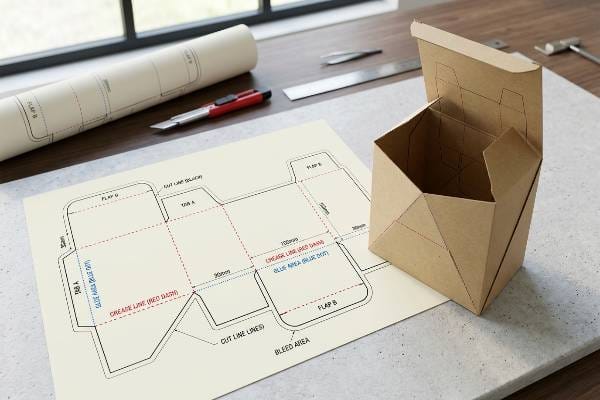
I see the same prepress mistakes every single day. If you understand these lines, your designer won't waste three days fixing bleeding margins.
What do die lines look like?
Open a PDF from your structural designer and it looks like a neon blueprint. Staring at overlapping colored strokes is confusing if you don't know the factory code.
Die lines look like overlapping colored vector paths overlaid on a blank canvas. These structural templates typically utilize high-contrast spot colors like magenta, cyan, or green to distinguish between cutting, creasing, and bleed zones. Using distinct spot colors prevents printing plates from accidentally rendering the template lines.
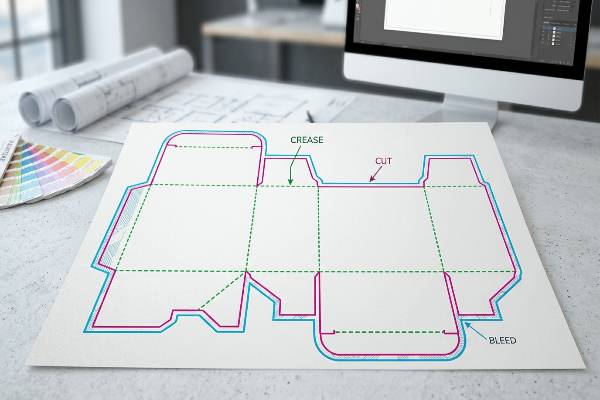
The Neon Blueprint of Cardboard Structures
A client from New York insisted on drawing their own template lines in standard CMYK black last year. Total disaster. Our RIP software read the lines as printable artwork instead of mechanical instructions. We printed 500 header cards with ugly black outlines stamped right over their logo. I had to scrap the whole batch and eat the cost. That drove me crazy.
Now, I strictly enforce spot color separations1. When you look at a professional template from my ArtiosCAD software, it looks like a wireframe. You'll see a solid red line. That means the steel blade cuts entirely through the 32ECT (Edge Crush Test) B-Flute board. You'll see a green line. That means a rounded creasing rule crushes the paper fibers so it folds cleanly without snapping the kraft liner.
I tell every agency designer to turn on the "Overprint" attribute in Adobe Illustrator. If you leave it on default "Knockout", you get a white hairline gap where the cut happens. Die-cutters have a mechanical shift tolerance of roughly 0.04 inches (1 mm). If your artwork doesn't bleed past that red cut line by at least 0.125 inches (3.175 mm), you end up with naked brown cardboard showing on the edge of your premium cosmetic display. It looks cheap. We use a 260% Total Ink Limit on those bleed areas to keep the edges crisp without turning the board into mush.
| Line Type | Standard Factory Color | Machine Action | Design Implication |
|---|---|---|---|
| Cut Line | Solid Red / Magenta | Steel blade slices through corrugated board | Artwork must bleed past this line2 |
| Crease Line | Solid Green / Cyan | Blunt rule crushes fibers for 90-degree folding | Keep essential logos 0.125 inches (3.175 mm) away3 |
| Bleed Line | Solid Blue / Black | Indicates the absolute edge of printed ink | Fill this zone with background color |
| Glue Area | Hatched / Shaded | Unprinted raw paper for adhesive application | Never put ink or varnish here |
I run preflight checks on every file to catch that knockout error before plate burning. If you send me a messy file, I will convert it into a clean ArtiosCAD 3D model and send it back. I can show you a video of this software stripping out bad vectors.
What is a dieline in packaging?
Think of it as the skeleton of your box. Without it, your beautiful graphics are just flat posters that won't hold a single product.
A dieline in packaging is a master structural template dictating the exact physical dimensions and mechanical folds of a flat material. Packaging dielines serve as the fundamental digital bridge connecting 2D graphic design software to 3D physical manufacturing, ensuring precision alignment during high-speed automated die-cutting processes.
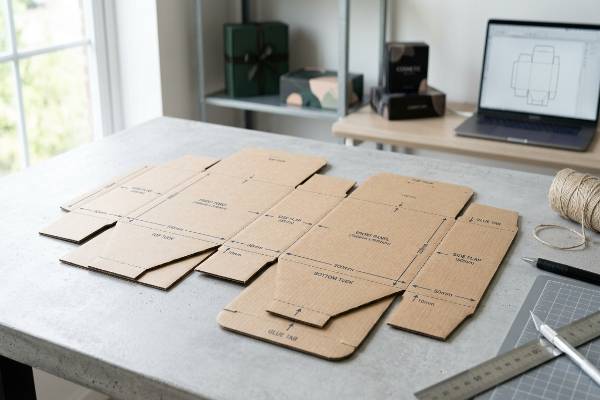
The Bridge Between Adobe Illustrator and the Die-Cutter
You can have the best graphics in the world, but if the dieline is wrong, your display will collapse in a Florida warehouse. I learned this the hard way early on. A brand sent a dieline they bought off a cheap stock website for a heavy beverage pallet display. It didn't account for the thickness of double-wall EB-Flute corrugated board. When we folded it, the internal pressure tore the hinges right off. We wasted a full week fixing the geometry while the client panicked over the delay.
A real packaging dieline calculates the "caliper" (thickness) of the paperboard4. When my engineers build a template for a dump bin holding 50 lbs (22.68 kg) of dog food, they add precise micro-adjustments to the folding allowances. This ensures the 0.25 inches (6.35 mm) thick cardboard actually wraps around itself without buckling or tearing the printed surface.
It also dictates the glue flaps. If a designer puts spot UV coating or heavy ink over a glue flap on the dieline, the water-based factory glue won't stick. The display literally pops open on the retail floor. I strictly engineer "Gloss Keep-Out Zones5" on my templates. We pull all varnish masks back exactly 0.125 inches (3.175 mm) from the cut edges and glue tabs. Your graphic designer just needs to drop their artwork into my empty canvas layer, and my factory handles the brutal physics of keeping it standing.
| Packaging Component | Dieline Requirement | Common Designer Mistake | Factory Consequence |
|---|---|---|---|
| Fold Allowances | Compensate for board caliper | Using 0 allowance for thick corrugated | Board tears at corners during assembly |
| Glue Flaps6 | Must be raw, unprinted Kraft | Covering flap with heavy ink/varnish | Glue fails, display collapses in store |
| Load-Bearing Walls | Grain direction alignment7 | Orienting flutes horizontally | Box compression failure under weight |
| Retailer Price Channels | 1.25 inches (3.175 cm) clearance | Placing critical text in the channel | Store shelves block the brand message |
That is why I provide the standardized template before you even start designing. I give your team the exact empty canvas tailored to your specific flute thickness. It prevents the back-and-forth emails and ensures the structure survives the drop test.
What are the rules for dieline?
Break the rules and your production stops. Machines don't care about your artistic vision; they only understand exact mathematical vectors and precise clearances.
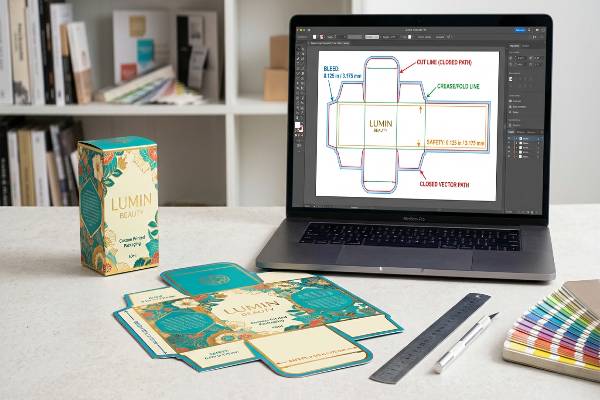
The rules for dielines dictate that all vectors must be closed continuous paths on a dedicated non-printing layer. Dieline rules mandate maintaining a minimum 0.125 inch (3.175 mm) bleed margin outside cut lines and a 0.125 inch (3.175 mm) safety zone inside crease lines to accommodate mechanical shifting.
Strict Compliance for High-Speed Production
If you ignore the safety zones, somebody gets fired. I had a client out of Chicago trying to fit an oversized logo right up to the crease line of a counter PDQ tray. I told them to shrink it. They refused, thinking they knew better. During the die-cutting run, the paper shifted by 0.04 inches (1 mm), which is totally normal. Half of their logo got crushed into the fold and became unreadable. They blamed me, but the math doesn't lie.
Here is the absolute reality of the shop floor. You need a 0.125 inch (3.175 mm) bleed8 past the red cut line. You need a 0.125 inch (3.175 mm) safety margin inside the green crease line. No logos, no legal text, no barcodes in that safety zone. Period.
Next rule: No clipping masks or rasterized lines. My Kongsberg digital cutting table reads vectors. If you send me a JPEG of a line, the machine just sits there stupidly. All paths must be joined. If your designer leaves tiny gaps between line segments, the steel blade physically leaves gaps in the cardboard. The store employee tries to punch out the header card, and it rips a huge chunk of printed paper off because the cut wasn't continuous. Follow the rules, and you get razor-sharp edges every time.
| Dieline Rule | Technical Specification | Reason for Rule |
|---|---|---|
| The Bleed Rule | Extend artwork 0.125 inches (3.175 mm) past cut | Prevents white paper edges from machine shift |
| The Safety Zone Rule | Keep logos 0.125 inches (3.175 mm) inside folds | Prevents critical text from being crushed or hidden |
| The Vector Rule | 100% closed vector paths9, 1pt stroke thickness | CNC machines cannot read raster images or gaps |
| The Layer Rule | Place dieline on a locked, separate top layer10 | Prevents lines from accidentally merging with artwork |
I enforce these rules because a display should never look like trash due to a tiny shift. If your agency does not understand these prepress tolerances, let me handle the conversion. Ask me for the footage of our Kongsberg table cutting a perfect sample.
What does a dotted line indicate on a dieline?
Not every line is a clean slice. Sometimes you need the cardboard to tear away cleanly or fold back on itself without breaking completely apart.
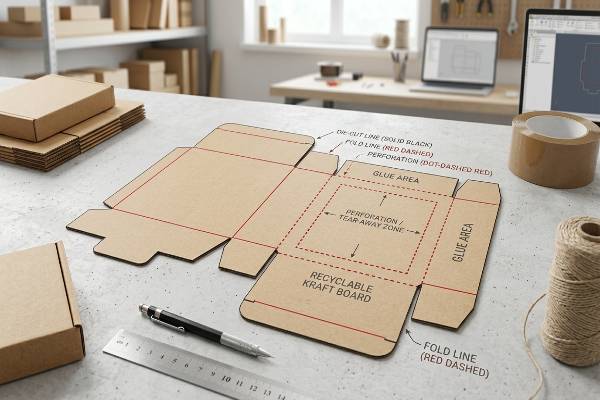
A dotted line indicates a perforation or a specialized tear-away zone on a dieline. Dotted lines instruct the die-cutter to use a segmented steel blade, creating alternating cuts and intact paper ties. This specific perforation technique allows end-users to manually detach cardboard sections without requiring external cutting tools.
The Physics of Perforations and Tear-Aways
Getting a dotted line wrong ruins the unboxing experience. I see brands mess this up constantly. Two years ago, a retail ready packaging (RRP) job failed spectacularly. The perforation was too weak. The boxes vibrated in the back of a semi-truck crossing the US, and the dotted lines popped open. Thousands of heavy shampoo bottles spilled everywhere before they even reached the distribution center. Total nightmare.
We don't guess with dotted lines. We engineer a specific "Nicking Ratio11" based on the exact board grade. If you use a strong 44ECT board, a standard 50/50 cut-to-tie ratio is too tough for a store clerk to rip open by hand. They end up using a box cutter, slicing your actual product inside. For heavy shipper displays, I use a 3mm cut with a 1mm tie. It holds together during the brutal ISTA 3A transit vibration testing, but still rips cleanly on the shelf.
A dotted line can also mean a reverse fold or a score line for thick corrugated where a standard crush crease would snap the paper. We use a perforated score12 to relieve the surface tension of the Kraft liner. This stops the ugly cracking you see on cheap displays when they fold 180 degrees. It keeps your high-fidelity litho print looking flawless.
| Dotted Line Application | Ideal Cut/Tie Ratio | Primary Use Case | Risk if Engineered Poorly |
|---|---|---|---|
| Tear-Away Shipper (RRP)13 | 3mm cut / 1mm tie | Easy-open cases for Walmart/Target shelves | Pops open in transit or requires a knife |
| Coupon Tear-Off | 1mm cut / 1mm tie | Consumer interaction on sidekick displays | Tears unevenly, ruining the brand graphic |
| Tension Relief Score14 | 4mm cut / 2mm tie | 180-degree folds on thick B-Flute board | Corrugated board bursts or cracks at the seam |
| Vent Holes | Custom segmented | Fresh produce pallet displays | Structural collapse due to moisture buildup |
This delicate balance between transport strength and easy tearing is why I run physical vibration tests before mass production. I engineer the nicks specifically for your cardboard grade. If you want proof, I will send you a physical white sample to rip open yourself.
Conclusion
Mastering these prepress layouts stops costly delays and ensures your retail execution is flawless. Stop guessing with your artwork files. Reach out today and Get a Free Quote.
Understanding spot color separations is crucial for avoiding costly printing mistakes and ensuring professional, high-quality packaging results. ↩
Understanding why artwork must bleed past the cut line helps ensure your packaging design prints without unwanted white edges or errors. ↩
Learning about logo placement near crease lines prevents distortion or loss of important branding during folding and assembly. ↩
Understanding how caliper is calculated ensures your packaging is structurally sound and prevents costly errors during production. ↩
Learning about Gloss Keep-Out Zones helps you avoid adhesive failures and ensures your packaging stays intact on the retail floor. ↩
Understanding the importance of raw, unprinted Kraft glue flaps helps prevent glue failure and ensures your display remains intact in stores. ↩
Learning about grain direction alignment can help you avoid box compression failures and improve the structural integrity of your packaging. ↩
Understanding the necessity of a proper bleed ensures your artwork prints correctly and avoids costly production errors, especially in high-speed environments. ↩
Understanding why closed vector paths are crucial helps ensure your artwork is compatible with CNC machines, preventing costly production errors. ↩
Learning about this practice can help you avoid accidental merging of dieline and artwork, ensuring clean and professional print results. ↩
Understanding Nicking Ratio helps ensure your packaging is both durable during transit and easy to open, preventing costly product spills and damage. ↩
Learning about perforated scores can help you maintain the visual quality of your packaging, avoiding unsightly cracks and preserving your brand's image. ↩
Learn how to optimize Tear-Away Shipper designs to ensure easy opening for retail staff while preventing accidental opening during transit. ↩
Discover how Tension Relief Score can prevent board cracking and bursting, ensuring durable and reliable packaging for heavy-duty applications. ↩