You just approved a vibrant digital mockup, but your retail boxes arrived looking dull and muddy. The culprit is almost always a fundamental misunderstanding of commercial printing color profiles.
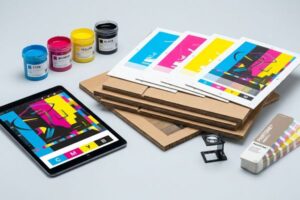
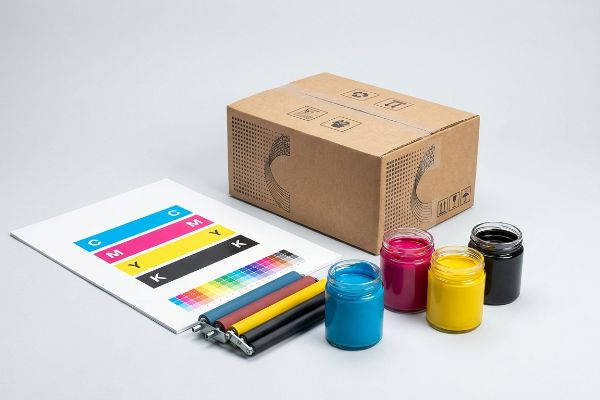
CMYK meaning refers to the four primary physical ink colors used in commercial printing: Cyan, Magenta, Yellow, and Key (Black). Unlike digital screens emitting light, commercial presses combine these translucent pigments to absorb light, creating a wide spectrum of printable colors on physical retail packaging substrates.
Bridging the gap between the glowing colors on your monitor and the actual ink hitting corrugated cardboard requires more than just pushing a button. Here is what happens when those files hit the factory floor.
What does CMYK stand for?
Understanding these four letters is your first line of defense against disastrous packaging print runs. It is not just about color; it is about physical chemistry.
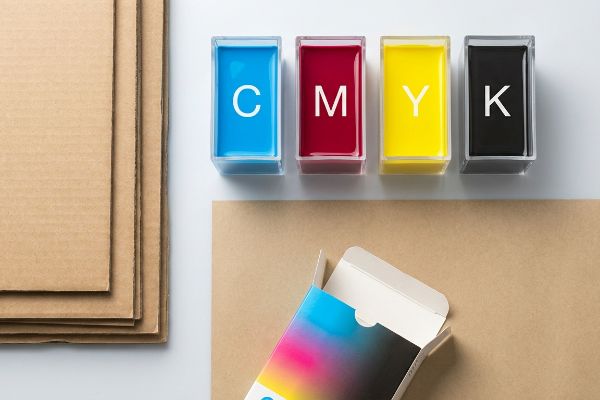
CMYK stands for Cyan, Magenta, Yellow, and Key, which is typically black. This standard color model dictates how prepress machinery mixes physical pigments on raw corrugated testliner. By precisely layering these four inks, factory presses can accurately reproduce thousands of specific visual shades for global retail campaigns.
Knowing the acronym is easy, but controlling how these four pigments interact with porous cardboard is where most brands fail.
Preventing Halftone Dot Grain on Retail Displays
Most junior designers assume that converting their digital artwork to this four-color process guarantees an exact physical match. They design beautiful, solid corporate logos on their screens, assuming the printing press will lay down a perfectly uniform sheet of color. In a purely theoretical lab environment, this optical blending looks flawless on high-gloss photo paper1.
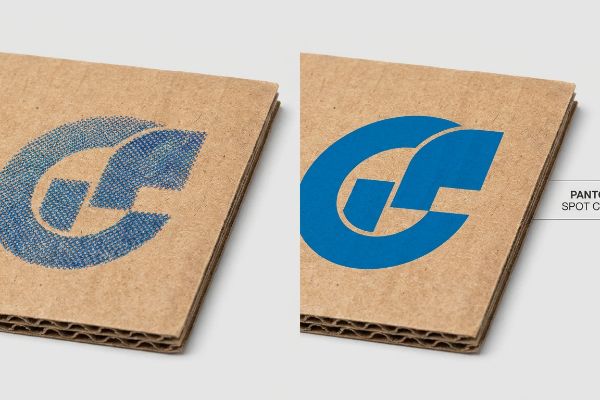
But here is the common trap that catches even experienced procurement teams. When standard four-color printing hits raw, unsealed corrugated board, it relies on tiny overlapping halftone dots to create shades. I see brands force their solid logos into this process, and the porous paper fibers absorb the tiny dots unevenly2. I once watched a brand manager pull a newly printed floor display out of a box under harsh CVS fluorescent lights, only to realize their vibrant blue logo looked grainy and washed out, feeling the rough, unsealed paper texture in frustration. To fix this, I completely pull the primary logo out of the four-color process and mandate a single, precisely mixed Pantone spot color flood3, eliminating the dot blending entirely and ensuring maximum contrast from 20 feet (6.09 m) away.
| Common Rookie Mistake | The Pro Fix | Retail-Floor Benefit |
|---|---|---|
| Relying on halftone dots for solid brand logos | Flooding solid logos with a dedicated Pantone spot color4 | Maximizes brand visibility on the aisle |
| Ignoring paper fiber absorption limits | Adding high-solid gloss aqueous coatings5 | Prevents ink absorption and graphic dulling |
| Printing high-resolution photos on raw kraft board | Utilizing a coated top-sheet for litho-lamination6 | Delivers crisp, retail-ready graphic punch |
I never leave critical brand colors to optical blending on porous materials. Securing a crisp logo is step one to ensuring your merchandising unit survives the visual chaos of a big-box aisle.
🛠️ Harvey's Desk: Not sure if your primary logo is going to print grainy on raw cardboard? 👉 Get Your Artwork Reviewed ↗ — Direct access to my desk. Zero automated sales spam, I promise.
Why is CMYK better for printing?
You cannot print pure light onto a cardboard box. Converting your vision into physical pigments is the only way to manufacture tangible retail merchandising.
CMYK is better for printing because it physically aligns with the mechanical limitations of commercial offset machinery. While digital screens artificially generate infinite bright colors using light, utilizing a strict prepress pigment profile prevents ink oversaturation, ensuring your retail packaging dries perfectly without severe smudging or smearing.
It is not just about color accuracy; it is about preventing a literal chemical disaster on the printing press.
Surviving the Total Ink Limit Threshold
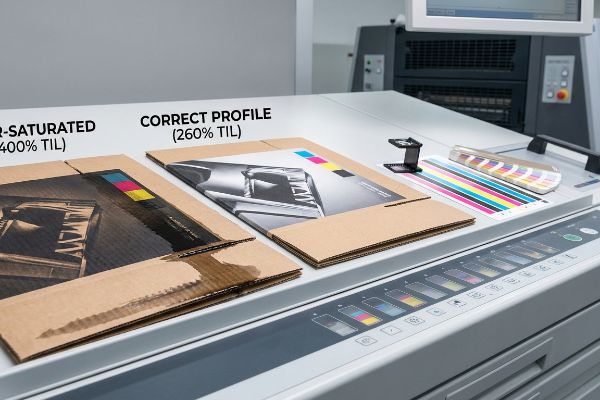
A frequent question buyers ask is why they cannot just push all the color sliders to maximum to get a deeper black or a richer red. In standard digital layout tools, you can easily stack 100% of all four ink channels on top of each other, creating a theoretical 400% saturation level7. On a backlit computer monitor, this massive color stacking simply looks incredibly dark and rich.
However, out on the manufacturing floor, that digital data becomes wet liquid. When you send a 400% saturated file to an offset press, the machine literally dumps four heavy layers of wet pigment onto the same spot. I have seen assembly lines grind to a halt because the thick, over-saturated ink pools up, emitting a heavy, pungent chemical smell as it completely refuses to dry. When the automated folding arms try to bend the raw corrugated board, the wet ink smears across the machine belts, ruining the entire batch. To prevent this, I enforce a strict TIL (Total Ink Limit) safety zone of 260%8 in the prepress profile, ensuring the board absorbs just enough pigment to look premium while drying fast enough to survive automated folding.
| Common Rookie Mistake | The Pro Fix | Retail-Floor Benefit |
|---|---|---|
| Maxing out all ink channels to create a "rich black" | Enforcing a strict 260% Total Ink Limit prepress profile9 | Prevents wet ink smudging during box assembly |
| Relying on digital screen brightness to judge contrast | Requesting a physical draw-down proof on actual board | Guarantees accurate color expectation before mass production |
| Ignoring drying times for heavy ink coverage | Utilizing instant-cure UV printing technology10 | Accelerates production speed and prevents smearing |
I strip out excessive digital saturation before the plates are ever burned. Controlling your physical ink volumes is the invisible engineering that keeps co-packing lines running without costly friction.
🛠️ Harvey's Desk: Are your heavy ink layers going to smear when the automated machines fold your boxes? 👉 Download The Spec Sheet ↗ — Download safely. My inbox is open if you have questions later.
What is the difference between RGB vs CMYK?
The easiest way to ruin a retail rollout is confusing the light emitting from your phone with the physical ink absorbing into a cardboard box.
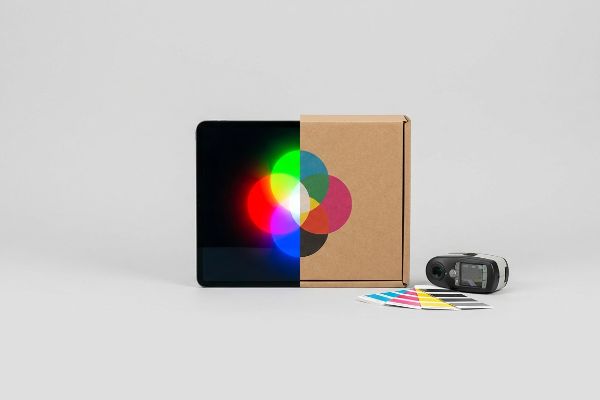
The difference between RGB vs CMYK fundamentally comes down to light versus physical pigment. RGB utilizes Red, Green, and Blue light to create vibrant digital screen displays. Conversely, commercial printing strictly requires physical ink formulations to absorb light and accurately render colors onto cardboard merchandising materials.
Understanding this difference stops you from fighting an unwinnable battle against the laws of physics during your print approvals.
Beating the Optical Darkening Effect
Think of RGB (Red, Green, Blue) like shining three colored flashlights onto a dark wall; the more light you add, the closer you get to pure white11. The four-color printing process is the exact opposite, like mixing wet paint on a canvas where adding more layers creates darker, muddier tones12. A common rule of thumb is to always set your design software strictly to the physical pigment profile before you start dropping in your product photography.
Even veteran designers often overlook this blind spot when approving digital proofs on bright, auto-correcting smartphones. I once had a client aggressively reject a massive pallet of retail displays because the physical boxes looked significantly darker than the glowing mockup on their high-end tablet. We had to stand on the warehouse floor together, listening to the sterile click of a spectrophotometer scanning the physical 2-inch (50.8 mm) swatch under cold D50 factory lighting13, just to prove the ink formulation was mathematically perfect. The glowing screen had simply lied to them. By forcing a physical, unlaminated draw-down scan14 under standardized retail lighting, you permanently close the gap between digital expectations and physical reality, preventing painful rejection emails from your store buyers.
| Common Rookie Mistake | The Pro Fix | Retail-Floor Benefit |
|---|---|---|
| Approving print proofs on high-brightness digital screens | Mandating physical swatches viewed under D50 lighting15 | Eliminates color surprises and retailer rejections |
| Designing retail graphics in light-based digital color profiles | Converting all files to standard pigment profiles16 before design starts | Ensures accurate color gamut expectations |
| Ignoring how matte lamination absorbs ambient store light | Applying a mathematical prepress cutback curve17 | Maintains graphic punch and contrast on the shelf |
I force my clients to look at actual cardboard under real retail lighting. Digital screens are beautiful liars, but a spectrophotometer reading never fabricates the truth.
🛠️ Harvey's Desk: Are your glowing digital mockups setting you up for a massive color disappointment on the shelf? 👉 Request A Dieline Check ↗ — No forms that trigger endless sales calls. Just pure value.
What happens if you print RGB instead of CMYK?
Sending the wrong file format to the factory does not just trigger an error message; it initiates a blind, uncontrollable mechanical conversion that destroys your brand equity.
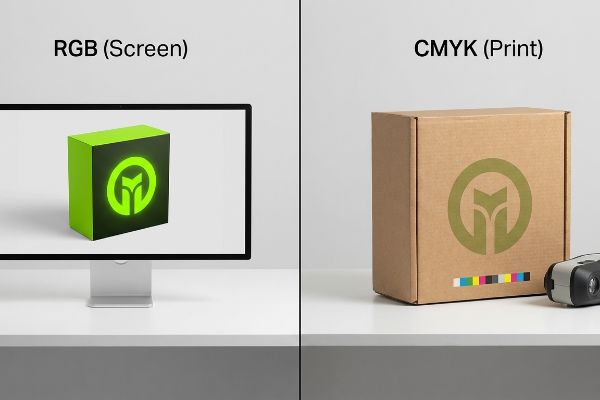
Printing RGB instead of CMYK forces automated prepress machinery to mathematically convert your digital light-based colors into physical ink without human oversight. This uncontrolled software conversion drastically compresses the color gamut, inevitably resulting in dark, muddy packaging graphics that look entirely different from your original computer screen mockup.
Getting one display to look perfect on a lab monitor is easy, but here is the harsh reality when you ship 500 of them into the physical supply chain.
The Automated RIP Conversion Disaster
Buyers often assume that if they accidentally send a light-based digital file to the factory, the printing machinery will simply adapt and figure it out. They trust that advanced digital presses have internal software smart enough to maintain the vivid, neon tones they designed. This dangerous assumption relies entirely on theoretical software algorithms rather than the physical limitations of liquid pigment18.
This isn't just theory—I see this happen on the testing floor when uncalibrated light-based files hit our RIP (Raster Image Processor) software. The machine's algorithm forcefully compresses the unavailable glowing colors into the closest printable physical pigments19, applying a blind mathematical cutback curve. In my facility, I routinely pull micrometer readings and run spectrophotometer scans on the first off-press sheets, only to watch a vibrant lime green brand logo instantly shift into a dull, flat olive color with a massive 12.4% shift in cyan density. By intercepting these files and mathematically rebuilding the cutback curve in the prepress stage20, I completely eliminate the automated color shift. This strict prepress tolerance prevents severe brand distortion, ensuring the final mass production matches the approved standard and avoiding retailer chargebacks.
| Common Rookie Mistake | The Pro Fix | Retail-Floor Benefit |
|---|---|---|
| Trusting automated printing software to fix color files | Intercepting files and applying a manual cutback curve21 | Completely avoids costly brand color distortion |
| Ignoring the physical limits of liquid pigment | Auditing the color gamut prior to burning metal printing plates22 | Prevents expensive mass production re-runs |
| Pushing files directly to the press without physical proofs | Running a first off-press spectrophotometer scan23 | Guarantees zero print rejections from strict big-box retailers |
I strip the guesswork out of the software conversion process. Taking control of the prepress mathematics is the only way to protect your brand from an automated optical disaster.
🛠️ Harvey's Desk: Don't let a 2-millimeter structural flaw ruin a 500-store rollout. 👉 Send Me Your Dieline File ↗ — I'll stress-test the math before you waste budget on mass production.
Conclusion
You can easily ignore prepress color profiles on your computer monitor, but when that uncalibrated file forces an automated RIP conversion and creates muddy retail boxes, you face massive Delta-E failures that slow down the assembly line by an estimated 30%. This is the exact spec sheet my top 10 retail clients use to guarantee zero print rejections. Stop guessing on pigment limits and let me personally audit your packaging files through my Free Dieline Audit ↗ to catch fatal color shifts before the presses start running.
"PHOTO PAPER – which is Best For Printing? Gloss Vs … – YouTube", https://www.youtube.com/watch?v=1W7lPrRbESE. [Authoritative printing guides demonstrate that low-porosity substrates like high-gloss photo paper minimize ink absorption and dot gain, preserving the intended optical blend]. Evidence role: technical validation; source type: print production manual. Supports: the distinction between ideal and actual print substrates. Scope note: pertains to subtractive color mixing. ↩
"Mathematical modelling and compensation strategies for printing dot …", https://pmc.ncbi.nlm.nih.gov/articles/PMC12574880/. [An authoritative source on print chemistry or packaging manufacturing would explain how unsealed corrugated fibers cause ink spread and uneven absorption of halftone dots, known as dot gain]. Evidence role: technical validation; source type: manufacturing manual or print textbook. Supports: The claim that raw corrugated board causes graininess in CMYK prints. Scope note: Applies specifically to unsealed, raw substrates. ↩
"What's the Difference Between Spot Colors (PMS) vs. CMYK for …", https://blog.fantastapack.com/difference-between-spot-colors-vs.-cmyk-packaging. [Industry standards for packaging design verify that spot colors provide solid, consistent coverage by using pre-mixed inks, thereby avoiding the halftone patterns inherent in CMYK]. Evidence role: technical solution validation; source type: graphic arts standard. Supports: The effectiveness of spot colors over CMYK for logos on corrugated board. Scope note: Focuses on visual contrast and color consistency. ↩
"Spot color vs Process Color Printing – Pantone", https://www.pantone.com/articles/technical/spot-vs-process-color?srsltid=AfmBOooV9-qiEK7-EFpfy-aKr1Q9U9ehR9kmEaZFT8SJIw33COzQdGKS. [Authoritative printing manuals explain how spot colors provide solid, consistent coverage and avoid the graininess associated with halftone dot patterns]. Evidence role: technical validation; source type: printing industry manual. Supports: color consistency in branding. Scope note: Applicable to offset and flexographic printing. ↩
"How Is Aqueous Coating Applied? – PopDisplay", https://popdisplay.me/how-is-aqueous-coating-applied/. [Technical documentation on aqueous coatings demonstrates their role in creating a barrier that prevents ink from soaking into paper fibers to avoid graphic dulling]. Evidence role: technical specification; source type: chemical coating data sheet. Supports: prevention of graphic dulling. Scope note: Focuses on porous substrates. ↩
"Litho-laminated Microflute – MM Group", https://mm.group/packaging/technologies/lamination/. [Industrial packaging guides detail the litho-lamination process where a high-quality printed coated sheet is bonded to a corrugated or kraft board for superior image clarity]. Evidence role: process verification; source type: packaging engineering guide. Supports: high-resolution printing on raw substrates. Scope note: Specific to laminated packaging. ↩
"Maximum Ink Coverage? – Adobe Community", https://community.adobe.com/questions-712/maximum-ink-coverage-1069155. [A technical guide on prepress and Total Area Coverage (TAC) explains that while software allows 400% ink coverage, physical substrates cannot absorb this amount]. Evidence role: technical specification; source type: industry standard manual. Supports: The existence of theoretical vs. practical ink limits. Scope note: Applies specifically to CMYK process printing. ↩
"Thinking inside and outside the corrugated box – Printing", https://www.agfa.com/printing/tips/corrugated-boxes/. [Technical printing manuals and prepress guides define the maximum Total Ink Limit (TIL) for various substrates to prevent ink saturation and drying failures]. Evidence role: technical specification; source type: industry handbook. Supports: The efficacy of a 260% limit in preventing smearing on corrugated board. Scope note: TIL values vary based on ink type and substrate porosity. ↩
"Managing Ink Coverage in Print Design: A Guide to Selective Color …", https://www.printing.org/content/2024/04/23/adjustinginklimits.april2024. [Industry-standard prepress guides define the maximum cumulative percentage of CMYK ink a substrate can absorb before saturation occurs]. Evidence role: technical specification; source type: industry manual. Supports: the validity of the 260% threshold. Scope note: Limits vary based on specific board grade and ink type. ↩
"Does LED UV Curing Reduce Setoff in Offset Printing? – UVET", https://www.uvndt.com/does-led-uv-curing-reduce-setoff-offset-printing/. [Technical specifications for UV-curable inks explain how ultraviolet light induces immediate polymerization to eliminate traditional drying times]. Evidence role: process verification; source type: technical whitepaper. Supports: the claim regarding accelerated production and smear prevention. Scope note: Specific to UV-compatible printing presses. ↩
"RGB color model", https://en.wikipedia.org/wiki/RGB_color_model. [An authoritative source on optics or digital imaging would explain that RGB is an additive color model where combining the three primary colors of light results in white.] Evidence role: technical definition; source type: physics textbook. Supports: RGB color theory. Scope note: Applies specifically to light-emitting sources. ↩
"CMYK color model", https://en.wikipedia.org/wiki/CMYK_color_model. [A professional printing or color science manual would verify that CMYK is a subtractive process where pigments absorb light, leading to darker colors as more ink is added.] Evidence role: technical definition; source type: print production manual. Supports: CMYK color theory. Scope note: Applies to physical ink and pigments. ↩
"Color Chaos at the Light Booth: Why D50 Is Your Packaging …", https://www.linkedin.com/pulse/color-chaos-light-booth-why-d50-your-packaging-carmon-madison-6bb4e. [Authoritative sources define D50 as the ISO standard illuminant (5000K) used in the graphic arts industry to ensure color consistency during viewing and measurement]. Evidence role: technical specification; source type: industry standard. Supports: the use of standardized lighting for spectrophotometer verification. Scope note: Standard specifically for professional color matching]. ↩
"A Digital Process to Create Better Ink Drawdowns", https://www.pffc-online.com/news/16490-a-digital-process-to-create-better-ink-drawdowns. [Professional printing manuals describe a draw-down as a controlled application of ink to a substrate to evaluate color accuracy before mass production]. Evidence role: process definition; source type: technical manual. Supports: the method for bridging digital expectations and physical output. Scope note: Specific to pigment and ink application testing]. ↩
"ISO 3664:2025(en), Graphic technology and photography", https://www.iso.org/obp/ui/es/#iso:std:iso:3664:en. [An authoritative source on ISO 3664 would confirm that D50 (5000K) is the international standard for viewing graphic arts proofs to ensure color consistency]. Evidence role: technical standard; source type: industry standard. Supports: The necessity of controlled lighting for proof approval. Scope note: Standard applies specifically to the graphic arts industry.] ↩
"RGB versus CMYK Color Profiles | Difference & Meaning – Mixam", https://mixam.com/support/cmykvsrgb. [Authoritative guides on color management explain that converting to subtractive pigment profiles defines the actual achievable color gamut of physical ink]. Evidence role: technical fact; source type: color science textbook. Supports: Accurate gamut expectations during the design phase. Scope note: Specific to subtractive color models.] ↩
"Color management with lamination", https://printplanet.com/threads/color-management-with-lamination.13423/. [Technical documentation on prepress workflows explains how specific adjustment curves compensate for the darkening effect caused by matte lamination absorbing light]. Evidence role: technical methodology; source type: printing manual. Supports: Maintenance of graphic contrast on retail packaging. Scope note: Exact curves vary by substrate and lamination weight.] ↩
"Color Basics + Color Accuracy – SAIC Service Bureau", https://sites.saic.edu/servicebureau/home/help_center/color-basics-color-accuracy/. [An authoritative source on color science would explain why subtractive pigment-based color models cannot reproduce the full spectrum of additive light-based colors]. Evidence role: Technical verification; source type: Color science textbook or printing industry manual. Supports: The claim that hardware/pigment constraints override software capabilities. Scope note: Specifically addresses the gamut mismatch between RGB and CMYK. ↩
"Best results when changing RGB to CMYK – Adobe Community", https://community.adobe.com/questions-585/best-results-when-changing-rgb-to-cmyk-308359. Technical documentation on color management explains how RIP software employs gamut mapping algorithms to translate RGB values outside the printable range to the nearest available CMYK coordinates. Evidence role: Technical explanation; source type: Industry standard. Supports: The mechanics of automated color compression. Scope note: Applies to standard Raster Image Processor behavior. ↩
"Adobe PDF Print Engine 7 Brings in-RIP Intelligence to Prepress …", https://www.printing.org/content/2025/05/08/adobe-pdf-print-engine-7-brings-in-rip-intelligence-to-prepress-workflows. Professional printing guides detail how creating custom ICC profiles and manually adjusting color mapping curves in prepress prevents the unpredictable shifts associated with automated conversion. Evidence role: Methodological verification; source type: Technical manual. Supports: The efficacy of manual prepress intervention. Scope note: Dependent on the use of professional color calibration tools. ↩
"Plate / Calibration Curves | PrintPlanet.com", https://printplanet.com/threads/plate-calibration-curves.856/. [An industry guide on prepress color management would explain how custom cutback curves prevent ink saturation and color shifting during RIP conversion]. Evidence role: Technical validation; source type: Prepress manual. Supports: Prevention of color distortion. Scope note: Applies specifically to high-volume offset printing. ↩
"CTP Plates for Offset Printing: Choosing the Right Type for Your Needs", https://www.plate-ctp.com/blog/ctp-plates-for-offset-printing/. [Technical documentation on Computer-to-Plate (CTP) workflows details how gamut checks ensure colors are printable before plate creation to prevent production waste]. Evidence role: Process validation; source type: Print production standard. Supports: Prevention of production re-runs. Scope note: Focuses on the CTP phase of offset printing. ↩
"Mastering Color Consistency with Quality Control Software", https://www.xrite.com/blog/mastering-color-consistency-with-quality-control-software. [Professional print quality standards describe using spectrophotometers to measure Delta E values immediately after the first press run to ensure brand color accuracy]. Evidence role: Quality control metric; source type: Technical specification. Supports: Guaranteeing zero print rejections. Scope note: Effectiveness depends on the specific tolerance levels of the retailer. ↩