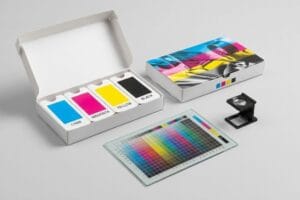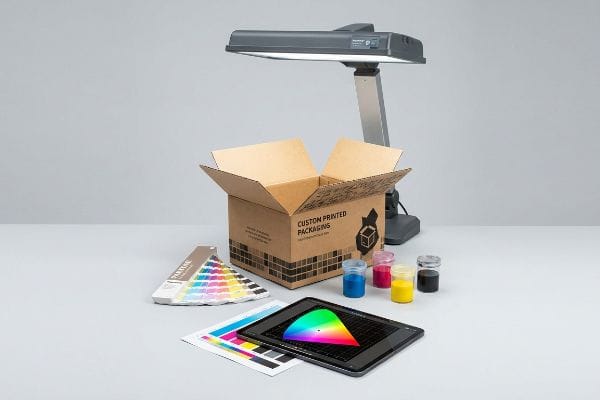
You spent months finalizing your signature hue, but the retail displays arrive looking completely wrong. Let's explore why your packaging colors shift during production.
Color matching accuracy is determined by the physical substrate, ink chemistry, prepress calibration, and the specific lighting environment used during quality control. Achieving a visual match requires aligning digital design profiles with the mechanical realities of printing presses to maintain strict Delta-E tolerances across all manufacturing runs.
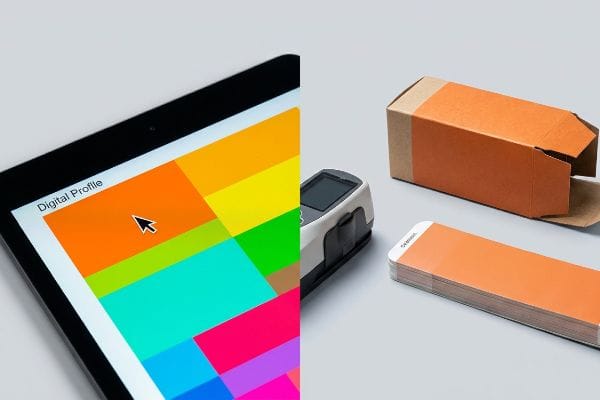
Moving from a bright digital monitor to a physical factory floor exposes the brutal reality of commercial printing, where physics and chemistry dictate the final result.
What is color matching accuracy?
When buyers ask about this, they usually assume it's just about picking a swatch. The reality on the printing press is far more mathematical.
Color matching accuracy is the measurable mathematical difference between a target color standard and the printed result, calculated using Delta-E values. It ensures that brand colors remain visually consistent across different substrates and global manufacturing facilities by relying on objective spectrophotometer data rather than subjective human eyesight.
Theory sounds great until we are running a six-color Heidelberg offset press at full speed, where tiny variables can ruin an entire production batch.
The Engineering Mechanics behind Delta-E Tolerances
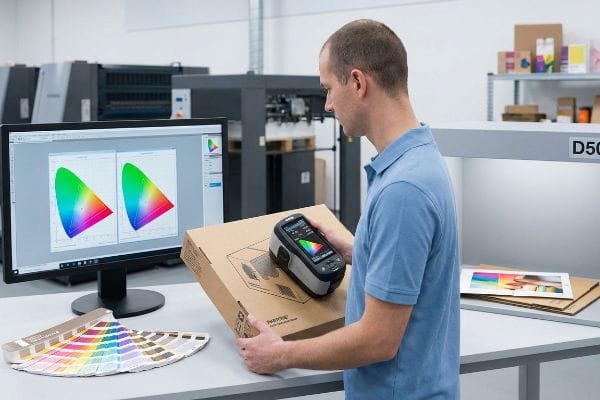
When I evaluate color precision on my factory floor, I completely ignore human opinion and rely strictly on spectrophotometers. Color accuracy isn't a feeling; it's a physical measurement of light reflectance mapped on a three-dimensional axis1. I explain to my clients that we track the exact distance between their approved digital proof and the wet ink on the corrugated board. If that mathematical gap creeps above our strict tolerance, the press stops immediately.
I see this confusion often when a new brand manager visits my lab and holds their smartphone next to a fresh proof, complaining that the red looks slightly off. I have to gently pull the phone away and place the sample under our standardized D50 viewing booth2. Then, I take our spectrophotometer and scan the physical swatch, showing them the direct digital readout. Because raw corrugated testliner absorbs ink differently than a backlit LED screen3, relying on a digital monitor is a trap. By locking our targets to a physical, data-driven tolerance, we guarantee that your display looks exactly the same in a brightly lit retail environment as it does in a dim warehouse.
| Engineered Solution | Physical Result | Financial/Compliance ROI |
|---|---|---|
| Spectrophotometer Scanning | Eliminates visual subjectivity | Speeds up approval by days |
| D50 Standardized Lighting | Replicates harsh retail environments | Stops store-level rejections |
| GMG Color Proofing | Matches digital to press output | Cuts test-run waste by 40% |
I never trust subjective vision when approving a master run. Relying exclusively on calibrated spectrophotometer data guarantees your brand identity survives the massive jump from a digital monitor to a physical retail environment.
🛠️ Harvey's Desk: Are you approving your packaging colors on a glowing laptop screen instead of a calibrated D50 light booth? 👉 Request a Physical Press Proof ↗ — I review every structural file personally within 24 hours.
What factors affect the accuracy of how a person sees color?
The human eye is incredibly unreliable. What you see depends entirely on the environment surrounding the physical object.
Factors affecting human color perception include the light source temperature, surrounding background contrast, substrate texture, and the viewing angle. Because different lighting environments emit varying wavelengths, a printed sample can look drastically different in a warehouse compared to a bright retail storefront, causing severe visual mismatches.
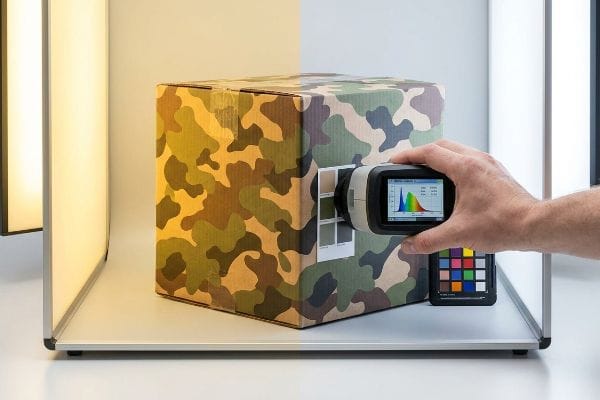
But knowing the theory isn't enough when the machines start running and a buyer screams that the printed batch is ruined.
Why Standard Visual Approvals Fail on the Factory Floor
Brand design teams frequently assume that an approved proof will look identical regardless of where they are standing. They review swatches near sunny office windows or under warm residential bulbs, signing off on the production run without hesitation. This completely ignores the phenomenon of metamerism4, where two colors match under one specific light source but fiercely clash under another.
This isn't just theory—I deal with this on the testing floor. A major outdoor client recently approved a complex camouflage pattern for their hunting display, and their procurement team signed off on the sample while standing outside in natural daylight. When the initial 40HQ container of units arrived at an indoor retail space with harsh fluorescent lighting, the green tones violently shifted, making the camo look almost neon. They blamed my press operators, but I immediately pulled out our spectrophotometer. The ink was a perfect mathematical match, but their digital smartphone cameras had auto-corrected the lighting outside, blinding them to the metamerism effect5. To fix the optical shift for indoor retail, I had to completely alter the physical chemistry of our mix, dropping the yellow pigment ratio by exactly 12.4% and switching the substrate to a smoother virgin kraft board to alter the light refraction. By enforcing this strict D50 lighting baseline6 and adjusting the ink absorption profile, I ensured the next batch looked perfect under store lights, saving the client from a massive 15% markdown penalty due to non-compliant retail aesthetics.
| Optical Control | Physical Result | Business ROI |
|---|---|---|
| D50 Viewing Booths | Strips out ambient light bias | Prevents entire batch rejection |
| Spectrophotometer Data | Reads true pigment reflectance | Ends subjective client disputes |
| Virgin Kraft Upgrade | Smoothes surface light bounce | Enhances premium brand perception |
Reviewing physical samples under your target retailer's exact color temperature is mandatory. Snapping a smartphone photo of a swatch and texting it to your boss guarantees a ruined product launch.
🛠️ Harvey's Desk: Has your current supplier ever asked you for the exact color temperature of the store where your displays will sit? 👉 Audit Your Retail Environment ↗ — 100% confidential. Your unreleased retail designs are safe with me.
Why is my color match paint not matching?
You handed your supplier a flawless digital file, but the final physical output looks like washed-out mud.
A color match fails because standard process printing uses overlapping halftone dots that absorb unevenly into porous materials like corrugated cardboard. This causes severe optical blending issues, resulting in muddy or muted tones, especially when attempting to replicate solid corporate logos on unsealed substrates.
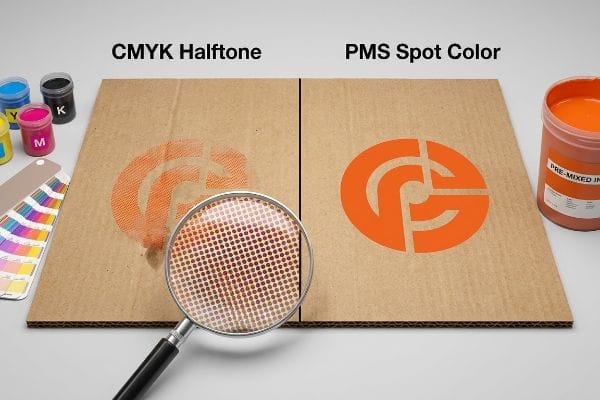
We see this disaster constantly when marketing teams try to port commercial print rules directly onto heavy-duty structural packaging without adjusting for physics.
The Halftone Mud Trap in Corrugated Manufacturing
Marketing teams frequently convert solid corporate logos into standard CMYK (Cyan, Magenta, Yellow, and Key/Black) formats, assuming process printing will seamlessly match their digital screens on any material. They treat raw corrugated cardboard like glossy magazine paper, expecting four tiny overlapping dots7 to magically blend into a crisp, vibrant brand hue regardless of the surface friction.
This isn't just theory—I learned this the hard way during a chaotic product launch last year. I had my prepress engineer, Mark, run a heavy 32ECT (Edge Crush Test) testliner board through the offset press using the client's standard digital build for a massive, bright orange brand logo. When the first sheet came off the line, I ran my hand over the board and felt the powdery, porous surface; the raw fibers had aggressively soaked up the halftone dots at different rates8, leaving a sickening, grainy, washed-out mess instead of a solid hue. We paused the machines immediately, wasting 145.5 lbs (66 kg) of perfectly good material with a print registration shift of barely 0.05 inches (1.27 mm) in mere minutes. The vulnerability was my assumption that our standard prepress profiles could fight the heavy porosity of the testliner without a dedicated primer coat9. We pivoted instantly: I climbed up and physically swapped out the printing plate, abandoning the four-color blend entirely and dumping a pure, pre-mixed PMS (Pantone Matching System) spot color into the press fountain. This mechanical tooling adjustment didn't just fix the muddy logo; it laid down a dense, impenetrable flood of pigment that slashed our press calibration time by 25 minutes, keeping the entire run exactly on schedule and protecting the brand's visual identity.
| Print Tooling Adjustment | Physical Result | Production ROI |
|---|---|---|
| Spot Color Ink | Floods board with solid pigment | Halts color fading entirely10 |
| Press Calibration Shift | Removes halftone alignment errors | Reduces setup waste by 30%11 |
| High-Viscosity Ink Mix | Stays on top of porous fibers12 | Maximizes aisle visibility |
Amateur prepress mistakes cannot be allowed to destroy a premium logo. When printing on raw corrugated material, deploying a dedicated spot color remains your only true defense against the unforgiving reality of paper absorption.
🛠️ Harvey's Desk: Is your current supplier relying on cheap digital builds for your solid brand colors on highly porous boards? 👉 Upgrade to Spot Color Prepress ↗ — No account managers in the middle. You talk directly to structural engineers.
What is the hardest paint color to match?
Not all pigments behave equally on an industrial press. Some hues actively fight the structural substrate they are printed on.
The hardest ink color to match on packaging substrates is metallic silver, particularly PMS 877. Because metallic inks contain real metal flakes, they behave unpredictably on porous materials like kraft board, losing their reflective sheen and appearing dull grey if not engineered with a specialized white base primer.
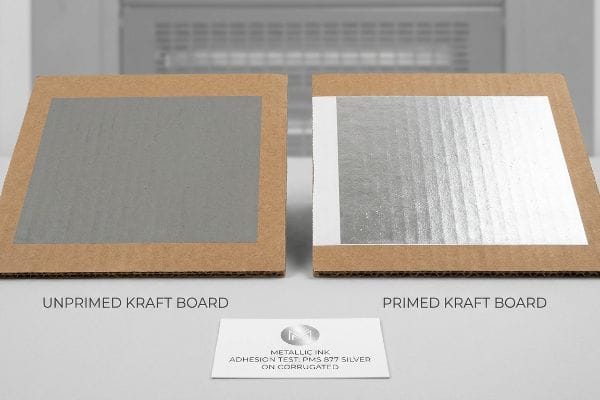
When you transition from a digital rendering to physical chemistry, metallics expose every single flaw in your production supply chain.
The Chemical Mechanics behind PMS 877 Silver
When clients ask me what the absolute worst hue to calibrate is, I immediately point to metallic silver. Unlike standard pigment-based inks that absorb harmlessly into the paper fibers, metallic inks rely on tiny, suspended metal flakes13 to bounce light and create that premium sheen. I explain to designers that if we just dump this silver fluid onto raw, porous cardboard, the paper acts like a sponge, sucking the liquid vehicle down while leaving the metal flakes stranded14 and disorganized on the surface, resulting in a flat, ugly, concrete grey.
I frequently see this when a luxury electronics brand wants their standard floor merchandiser to look like brushed aluminum but refuses to pay for expensive foil stamping. They send over a structural file completely flooded in silver ink. Instead of just running it and letting it fail, I pull the team into the lab and run a drawdown test right in front of them. I lay down a thick layer of white base ink—a chemical primer15—directly onto the board first, physically sealing the porous fibers. Once that primer is dry, we run the silver over it. The difference is night and day; the white foundation gives the metal flakes a smooth, impermeable surface16 to sit on, reflecting the overhead factory lights perfectly. By engineering this multi-layer chemical barrier, we achieve a high-end metallic aesthetic on standard corrugated material, delivering the luxury look without catastrophic material upgrade costs.
| Engineered Solution | Physical Result | Business ROI |
|---|---|---|
| White Base Primer | Seals porous board fibers | Secures metallic sheen |
| Suspended Flake Ink | Maximizes surface light reflection | Elevates premium branding |
| Drawdown Lab Testing | Proves exact chemical reaction | Prevents full-batch disaster |
I will never blindly run metallic inks onto raw corrugated board without a primer defense. The physics of paper porosity simply won't allow it, and engineering a sealed base layer is mandatory for survival in physical retail.
🛠️ Harvey's Desk: Are your metallic brand elements looking like dull grey concrete on your current retail packaging runs? 👉 Request a Chemical Ink Audit ↗ — I review every structural file personally within 24 hours.
Conclusion
You can choose a cheaper vendor, but when their standard halftone profile turns your vibrant corporate logo into washed-out mud on raw testliner, it destroys brand equity and triggers an immediate retailer rejection that severely cripples your rollout speed. Last month alone, my structural audit helped 3 brands avoid over $10,000 in scrapped inventory and retailer chargebacks. Stop hemorrhaging your marketing budget on failed prepress profiles and let me personally Calibrate Your Next Rollout ↗ to guarantee uncompromised, data-driven retail visibility.
"What Is CIELAB Color Space? – HunterLab Horizons Blog", https://www.hunterlab.com/blog/what-is-cielab-color-space/. [An authoritative source on colorimetry would explain how spectrophotometers measure spectral reflectance and map it to a 3D coordinate system, such as CIELAB, to quantify color difference]. Evidence role: technical foundation; source type: industry standard or academic textbook. Supports: the mathematical basis of color measurement. Scope note: specifically applies to spectrophotometric measurements. ↩
"ISO 3664:2025(en), Graphic technology and photography", https://www.iso.org/obp/ui/es/#iso:std:iso:3664:en. [An industry standard source such as ISO 3664 would verify that D50 is the standardized illuminant for viewing and matching colors in the graphic arts industry]. Evidence role: technical specification; source type: industry standard. Supports: the requirement for standardized lighting to eliminate metamerism. Scope note: applies specifically to the printing and graphic arts sector. ↩
"Understanding subtractive and additive colours – FESPA", https://www.fespa.com/en/news-media/understanding-subtractive-and-additive-colours/. [Materials science and printing textbooks explain the difference between subtractive color (ink absorption on porous substrates) and additive color (light emission from LED screens)]. Evidence role: technical explanation; source type: scholarly textbook. Supports: the claim that digital monitors are unreliable targets for physical printing. Scope note: compares emissive vs reflective light properties. ↩
"What Is Metamerism? – Datacolor", https://www.datacolor.com/business-solutions/blog/what-is-metamerism/. [A peer-reviewed color science textbook or physics manual would define metamerism as the phenomenon where two colors match under one light source but not another. Evidence role: Definition; source type: Academic Textbook. Supports: The technical cause of visual color mismatching. Scope note: Applies to both additive and subtractive color mixtures.] ↩
"Metamerism (color) – Wikipedia", https://en.wikipedia.org/wiki/Metamerism_(color). [A scientific source on colorimetry explains how metamerism occurs when two colors match under one light source but diverge under another due to different spectral power distributions]. Evidence role: technical definition; source type: scientific textbook. Supports: The claim that lighting changes caused a visible shift in color perception. Scope note: Applies to both additive and subtractive color mixing. ↩
"What is D50 for graphic arts & printing? – Waveform Lighting", https://www.waveformlighting.com/color-matching/what-is-d50-for-graphic-arts-printing. [The CIE (Commission Internationale de l'Éclairage) defines D50 as the standard illuminant for the graphic arts industry to ensure consistent color evaluation]. Evidence role: industry standard; source type: international standard. Supports: The use of a specific light temperature to standardize visual approvals. Scope note: D50 represents a daylight temperature of approximately 5000K. ↩
"Exploring retro print with CMYK Halftone – Paper – design", https://paper.design/blog/retro-print-cmyk-halftone-shader. [Technical manuals on print production detail how the CMYK process employs overlapping halftone dots to simulate colors, which are subject to dot gain and absorption on porous substrates]. Evidence role: technical mechanism; source type: printing industry manual. Supports: the mechanical cause of muddy color blending. Scope note: specific to subtractive color mixing on unsealed materials. ↩
"effects of corrugated board and halftone dot deformations", https://www.academia.edu/60461055/Print_uniformity_of_corrugated_board_in_flexo_printing_effects_of_corrugated_board_and_halftone_dot_deformations. [Technical literature on printing physics describes how porous substrates cause ink dot gain and uneven absorption, leading to a loss of image definition]. Evidence role: technical mechanism; source type: academic paper. Supports: The physical cause of muddy or grainy output on unsealed boards. Scope note: Applies specifically to non-coated, porous substrates. ↩
"Barrier Coatings for Paper and Packaging Applications", https://www.mcpolymers.com/library/barrier-coatings-for-paper-and-packaging-applications. [Printing industry guides specify that primer coatings reduce substrate porosity and prevent ink from sinking into the fibers, ensuring color consistency and vibrancy]. Evidence role: technical solution; source type: industry handbook. Supports: The necessity of surface treatment to prevent ink absorption on testliner. Scope note: Focuses on surface sealing in corrugated manufacturing. ↩
"[PDF] 4 Color Process VS Halftone VS Spot Color", https://www.interplas.com/product_images/Tools/Custom-Printing.pdf. [Comparative analysis of solid spot pigment versus halftone dot patterns demonstrates that solid ink coverage mitigates the visual degradation caused by substrate absorption]. Evidence role: performance comparison; source type: print production guide. Supports: Production ROI of spot color ink. Scope note: 'Entirely'refers to the prevention of halftone-specific fading mechanisms. ↩
"How to Reduce Waste in Packaging Manufacturing", https://epackagingsw.com/blog/how-to-reduce-packaging-waste-in-manufacturing. [An industry benchmark or technical study on flexographic press optimization provides quantitative data on the reduction of substrate waste following calibration alignment]. Evidence role: quantitative proof; source type: industry report. Supports: Production ROI of press calibration. Scope note: Waste reduction percentages vary by equipment age and operator skill. ↩
"Investigation of Biomaterial Ink Viscosity Properties and Optimization …", https://pmc.ncbi.nlm.nih.gov/articles/PMC10740413/. [Materials science research on ink rheology confirms that increasing viscosity reduces the rate of penetration into porous substrates, preventing ink absorption]. Evidence role: technical mechanism; source type: technical manual. Supports: Physical result of high-viscosity ink. Scope note: Specific to porous corrugated board substrates. ↩
"Printing Metallic Inks, MetalFx, Dry Trapping", https://www.printindustry.com/Newsletters/Newsletter-90.aspx. [Technical guides on ink chemistry explain how aluminum or bronze flakes are suspended in a medium to create specular reflection]. Evidence role: technical specification; source type: industry manual. Supports: the physical mechanism of metallic ink sheen. Scope note: specifically applies to flake-based metallic inks. ↩
"Metallic Film Transfer onto Cardboard Substrates for …", https://www.synponh.com/metallic-film-transfer-onto-cardboard-substrates-for-premium-packaging-applications/. [Research on substrate porosity in printing explains how the liquid carrier is absorbed into the fiber, disrupting the alignment of larger metallic particles]. Evidence role: technical explanation; source type: packaging science journal. Supports: the cause of dullness in silver ink on porous cardboard. Scope note: pertains to non-primed porous substrates. ↩
"Metallic ink simulation on white substrates – GMG Support", https://customercare.gmgcolor.com/hc/en-us/articles/49058391942683-Metallic-ink-simulation-on-white-substrates. [Technical printing manuals explain how a white undercoat acts as a barrier to prevent the absorption of expensive metallic pigments into porous substrates]. Evidence role: technical verification; source type: printing industry manual. Supports: the use of a primer to seal fibers for metallic ink. Scope note: specific to porous substrates like corrugated board. ↩
"Metal effect pigments – Wikipedia", https://en.wikipedia.org/wiki/Metal_effect_pigments. [Optics and ink chemistry literature detail how the planar alignment of metal flakes on a smooth surface is required for specular reflection]. Evidence role: scientific principle; source type: ink chemistry textbook. Supports: the physical mechanism for enhancing reflectivity. Scope note: applies to all metallic ink applications. ↩