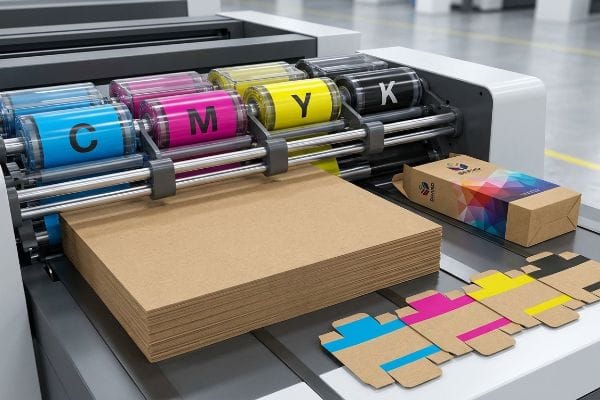
You designed a stunning retail display on your screen, but if you don't understand how ink actually mixes on paperboard, your final product will look like a muddy disaster.
CMYK (Cyan, Magenta, Yellow, Key) is a subtractive color model used in commercial printing. It stands for the four primary ink plates used to produce images on physical substrates. Unlike digital screens that emit light, this process absorbs light, mixing these specific pigments to create full-color retail packaging.
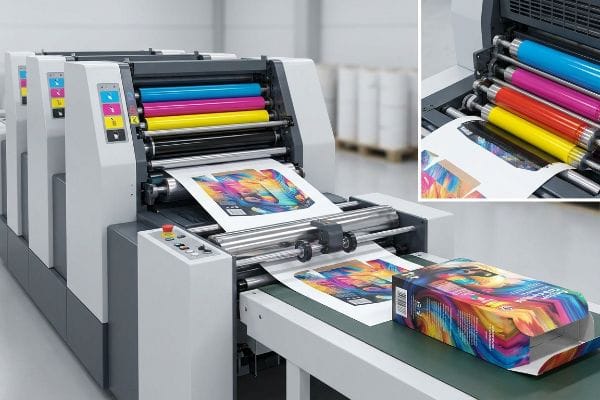
Knowing the acronym is just the starting line; understanding how these four inks behave on a high-speed factory floor is what actually protects your brand's visual identity.
Do Professional Printers Use CMYK or RGB?
When you transition from digital mockups to physical retail floors, the rules of color reproduction completely change.
Yes. Professional printers use CMYK because manufacturing machinery requires physical inks to reproduce artwork. While designers build concepts using light-based pixels, factories rely on subtractive pigment models and strict calibration methods to ensure brand consistency across massive runs of corrugated cardboard and retail marketing materials.
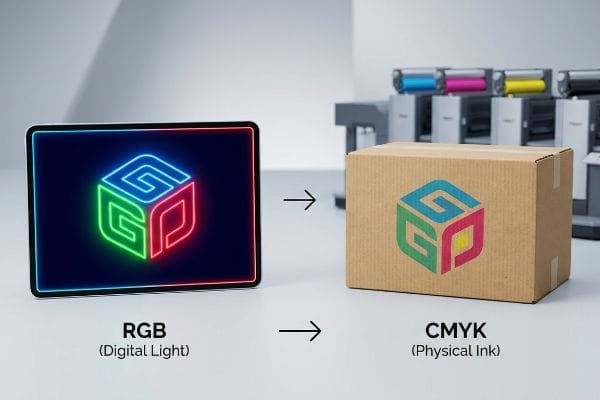
But simply converting a file format doesn't guarantee your display will look correct under harsh store lighting.
Why Commercial Factories Reject RGB Formats
The standard beginner approach is submitting digital artwork exactly as it looks on a glowing computer monitor. They assume commercial printing presses can magically replicate neon colors and bright digital hues. However, physical manufacturing requires translating that digital light into overlapping layers of wet ink1 on porous paper.
Even veteran designers often overlook this blind spot, sending me beautiful files that are completely unprintable. In my facility, when a client insists on running an uncalibrated file, I have to stop the press. I remember one specific run where the heavy 32ECT (Edge Crush Test) board2 absorbed the mismatched ink, creating a sticky, foul-smelling mess of wet PVA (Polyvinyl Acetate) glue and misaligned pigments. The printed top-sheet looked dull and washed out, completely ruining the brand's visual punch. We use the G7 Grayscale calibration method3 to lock in consistency, ensuring that the four physical ink plates map perfectly to the design. By forcing a strict prepress conversion, I eliminate these expensive press-stops and guarantee your corrugated displays pop exactly as intended, saving thousands in wasted material.
| Common Rookie Mistake | The Pro Fix | Retail-Floor Benefit |
|---|---|---|
| Submitting monitor-calibrated files | Mandating G7 Grayscale prepress4 | Prevents washed-out shelf presence |
| Expecting neon hues on cardboard | Designing within printer color gamuts | Avoids costly retailer rejections |
| Ignoring substrate absorbency | Calibrating specifically for 32ECT board5 | Maintains crisp brand visibility |
I never let uncalibrated files reach my printing presses. By intercepting these errors in prepress, I prevent massive delays on the factory floor and guarantee your marketing campaign ships on time.
🛠️ Harvey's Desk: Not sure if your artwork is safely converted for commercial presses? 👉 Send Me Your Flat Dieline File ↗ — Direct access to my desk. Zero automated sales spam, I promise.
What Are the 4 Colors of CMYK?
Every image printed on a physical box is constructed from just four foundational building blocks.
The 4 colors of CMYK are Cyan, Magenta, Yellow, and Key (Black). These primary process inks are applied as microscopic overlapping halftone dots on the paperboard. By controlling the density and spacing of these dots, printers visually trick the human eye into seeing a full continuous spectrum.
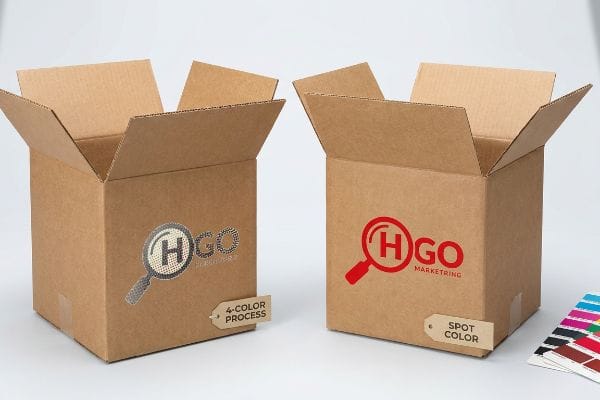
Understanding these four plates is critical, but relying on them for everything can actually destroy your brand's core logo.
The Trap of CMYK Halftone Mud on Corrugated Board
Many marketing teams convert their solid corporate logos into these four process inks, assuming the blending will seamlessly match their digital brand guidelines6. They trust that standard four-color printing is sufficient for every graphical element7 on a floor display.
It's a common trap that catches even experienced procurement teams when they review physical proofs. Here is the reality: when printing on raw, porous corrugated testliner, standard four-color printing relies on tiny overlapping halftone dots8 that absorb unevenly into the paper fibers. I've rubbed my thumb across a freshly printed logo only to feel the powdery roughness of halftone grain failing to seal into the board. When viewed under harsh fluorescent retail lighting from twenty feet away, this optical blending fails mechanically, resulting in a muddy, washed-out logo. To fix this, I mandate a spot color flood protocol for primary logos9, replacing the dots with a single, perfectly mixed ink. This simple pivot completely eliminates halftone grain and guarantees high-contrast visibility, driving faster impulse sales in the aisle.
| Common Rookie Mistake | The Pro Fix | Retail-Floor Benefit |
|---|---|---|
| Printing logos in 4-color process | Using a dedicated spot color ink10 | Stops visual muddying on shelves |
| Ignoring paperboard absorbency | Flooding solid pigment on testliner11 | Maximizes 20-foot visual disruption |
| Relying on optical dot blending | Mandating pre-mixed brand inks | Accelerates shopper brand recognition |
I refuse to let premium brands settle for grainy logos on their merchandisers. Upgrading critical elements to a solid pigment ensures your display dominates the retail aisle with absolute clarity.
🛠️ Harvey's Desk: Are you worried your brand colors will look muddy on rough cardboard? 👉 Request A Color Consultation ↗ — Download safely. My inbox is open if you have questions later.
How Do I Know If My Colors Are CMYK?
Checking your file before it leaves your computer is the only way to avoid catastrophic printing surprises.
Checking if colors are CMYK requires inspecting your document's color mode setting within professional design software. In programs like Illustrator or Photoshop, navigate to the document setup menu and verify the primary workspace. Ensuring this mode is active guarantees accurate translation when plates are burned for mass production.
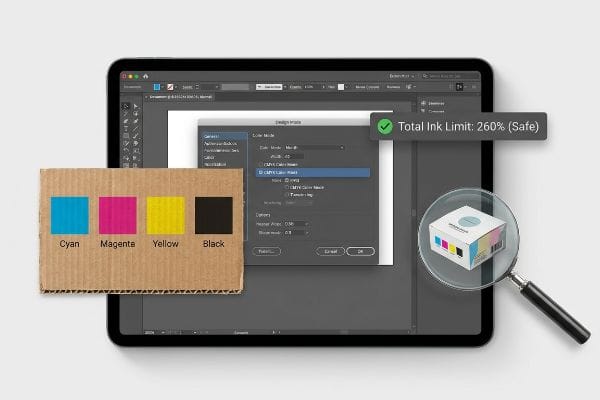
But just glancing at a software menu doesn't protect you from hidden layers and improper ink limits that break factory equipment.
Preflight Checks and Total Ink Limits
A common practice is simply clicking the right software setting and assuming the entire file is ready for the press. Designers often believe that as long as the document mode is correct, the specific ink values assigned to individual vector shapes will automatically sort themselves out during production.
Think of it like baking: just because you have the right four ingredients doesn't mean you can dump unlimited amounts of them into the bowl. When files aren't properly preflighted, designers often create rich blacks by maxing out all four channels to 100%. I once had to peel apart a batch of freshly printed litho-sheets because the TIL (Total Ink Limit) exceeded 300%. The heavy wet ink never cured, causing the sheets to stick together with a loud, tearing rip as the paper fibers violently separated. We use specialized prepress software to automatically detect and flag any elements exceeding a strict 260% TIL safety zone12. By mathematically cutting back these ink densities before plating, I eliminate smudging and ensure your display components fold without cracking, keeping your assembly line moving smoothly.
| Common Rookie Mistake | The Pro Fix | Retail-Floor Benefit |
|---|---|---|
| Maxing out rich black values | Enforcing a strict 260% TIL limit13 | Prevents ink smudging during transit14 |
| Skipping prepress software checks | Running automated preflight scans | Eliminates expensive misprints |
| Ignoring wet ink curing times | Mathematically cutting back density | Speeds up co-packing assembly |
I aggressively audit every file to ensure ink limits are mathematically sound before a single drop hits the paper. This preemptive strike protects your budget and keeps the production line moving.
🛠️ Harvey's Desk: Not sure if your rich blacks are too heavy for corrugated board? 👉 Get A Preflight Audit ↗ — No forms that trigger endless sales calls. Just pure value.
What Happens If You Print RGB Instead of CMYK?
Sending the wrong format to a commercial press triggers a chain reaction of automated conversions that completely distort your packaging.
Printing an RGB file instead of CMYK forces the prepress software to automatically substitute missing colors, resulting in severe visual distortion. Because light-based gamuts are much wider than physical ink gamuts, vibrant digital hues will instantly compress into dull, muddy, and unpredictable shades on the final physical retail display.
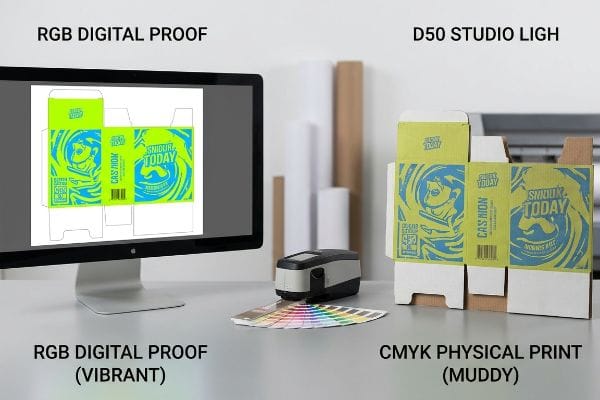
Getting one display to look acceptable on a backlit monitor is easy, but here is the harsh reality when you ship 500 of them directly to big-box stores.
Why Standard Conversions Fail on the Factory Floor
Brands frequently rely on the automatic color conversion tools built into standard design software15, assuming the computer knows exactly how to translate light into pigment16. They sign off on digital PDF proofs, expecting the final corrugated display to perfectly mirror the brightness of their high-end smartphones.
In my facility, I routinely see the devastation this causes when procurement teams bypass physical color matching. This isn't just theory—I see this happen on the testing floor when a smartphone auto-correct assumption meets raw material physics. A client once approved a vibrant lime green based on an email proof, but when the automated RIP (Raster Image Processor) software forced it into a four-color output, it mathematically compressed the spectrum17. When I scanned the resulting physical draw-down with our spectrophotometer under strict D50 lighting, the Delta-E variation spiked to 4.818. The physical board looked like bruised olive skin, completely severing the brand's visual identity. I pulled the micrometer readings and proved we didn't need a massive redesign; we just needed to mandate a physical swatch scanning protocol and mathematically adjust the cutback curves. By enforcing this calibration tolerance, I ensure the color matches exactly, preventing retail buyers from rejecting the entire shipment and saving clients $4,120 in wasted logistical fees on a standard run.
| Common Rookie Mistake | The Pro Fix | Retail-Floor Benefit |
|---|---|---|
| Approving colors on smartphones | Using a spectrophotometer match19 | Guarantees shelf-ready brand consistency |
| Trusting automated RIP conversions | Mathematically adjusting prepress curves20 | Stops catastrophic retailer rejections |
| Ignoring lighting environment | Evaluating proofs under D50 lighting21 | Maximizes visual pop in-store |
I never trust digital screens when approving mass production runs for high-stakes retail rollouts. Using clinical optical tools to bridge the gap between digital theory and physical reality is the only way to protect your brand equity.
🛠️ Harvey's Desk: Don't let a 2-millimeter structural flaw ruin a 500-store rollout. 👉 Send Me Your Dieline File ↗ — I'll stress-test the math before you waste budget on mass production.
Conclusion
You can choose a cheaper vendor, but when an uncalibrated file hits the press and triggers a massive Delta-E spike, it results in a muddy shipment that guarantees immediate retailer rejection and wipes out your entire profit margin. Over 500 brand managers use my prepress checklist to avoid these exact fatal early-stage mistakes. Stop risking your retail launch on digital guesses and let me personally run your artwork through my Free Dieline Pre-Flight Audit ↗ to catch fatal errors before mass production begins.
"Additive & Subtractive Color Models > DINFOS Pavilion > Article", https://pavilion.dinfos.edu/Article/Article/2355687/additive-subtractive-color-models/. Technical documentation on color theory explains the transition from additive light (RGB) to subtractive pigments (CMYK) required for physical printing. Evidence role: technical foundation; source type: printing industry manual. Supports: the necessity of color space conversion for manufacturing. Scope note: Applies to standard offset and digital inkjet printing. ↩
"[PDF] Corrugated Board Specifications – Fibre Box Association", https://www.fibrebox.org/assets/2025/09/Walmart_Corrugated-Board_Specifications_Automation_Packaging_Standards.pdf. Explanation of the Edge Crush Test (ECT) standard for measuring the stacking strength of corrugated cardboard. Evidence role: Technical specification; source type: Manufacturing industry standard. Supports: The use of a specific board grade in commercial retail displays. Scope note: Specific to corrugated packaging materials. ↩
"[PDF] G7 Method for Indigo Press Calibration and Proofing", https://digitalcommons.calpoly.edu/cgi/viewcontent.cgi?article=1015&context=grc_fac. Detailed explanation of the G7 methodology for achieving visual consistency across different printing presses and substrates by focusing on gray balance. Evidence role: Technical standard; source type: Professional printing organization/IDEAlliance. Supports: The method used to lock in color consistency. Scope note: Focuses on the standardization of gray-scale values. ↩
"G7+ Certifications | PRINTING United Alliance", https://www.printing.org/library/technical-excellence/certifications/g7plus. Verification of G7 as a standardized grayscale calibration method used to ensure visual consistency across different printing devices. Evidence role: technical standard; source type: industry manual. Supports: G7 prepress efficacy. Scope note: focuses on grayscale color consistency. ↩
"The effect of colorants on the content of heavy metals in recycled …", https://bioresources.cnr.ncsu.edu/resources/the-effect-of-colorants-on-the-content-of-heavy-metals-in-recycled-corrugated-board-papers/. Technical documentation on 32ECT (Edge Crush Test) board specifications and how its porosity affects ink absorption and color calibration. Evidence role: technical specification; source type: packaging material guide. Supports: requirement for substrate-specific calibration. Scope note: limited to corrugated cardboard. ↩
"Brand Identity Guideline colors not matching", https://graphicdesign.stackexchange.com/questions/70196/brand-identity-guideline-colors-not-matching. Color science documentation explains the technical discrepancy between additive RGB digital colors and subtractive CMYK process colors. Evidence role: technical explanation; source type: color theory manual. Supports: the difficulty of achieving seamless digital-to-print color matches. Scope note: general color reproduction. ↩
"The CMYK Color Model: Principles, Applications in Packaging Printing", https://www.packaging.vip/empirical-knowledge/the-cmyk-color-model-principles-applications-in-packaging-printing/?srsltid=AfmBOooorQKlGelGhaL1Wm8lRmZb2vtFBir0pPANfrTCqTfQ93Pl0ZRJ. Technical printing guides outline why process CMYK often fails to meet corporate brand standards on porous corrugated substrates compared to spot colors. Evidence role: technical limitation; source type: printing industry standard. Supports: the insufficiency of four-color printing for high-fidelity brand graphics. Scope note: specific to corrugated board substrates. ↩
"Corrugated Box Printing Evolution with Aqueous Inks", https://splashjet-ink.com/evolution-of-aqueous-packaging-inks-a-smarter-approach-to-corrugated-box-printing/. Technical explanation of how process inks form halftones and how substrate porosity affects dot gain and absorption. Evidence role: technical specification; source type: printing industry handbook. Supports: the mechanism of halftone application on porous board. Scope note: applicable to uncoated corrugated testliner. ↩
"What Is Spot Color For Packaging Printing?", https://bpkc.com/blogs/blog/what-is-spot-color-for-packaging-printing. Industry standard comparison between spot (PMS) colors and CMYK halftone process for packaging logos on porous materials. Evidence role: best practice; source type: graphic arts manual. Supports: the effectiveness of solid ink fills over halftones for contrast. Scope note: primarily used for high-contrast brand elements. ↩
"Spot Color Printing vs. CMYK Printing – The Visual Pak Companies", https://www.visualpak.com/spot-color-printing-vs-cmyk-printing/. Technical explanation of how spot colors prevent the halftone 'muddying'effect caused by CMYK dot gain on porous corrugated substrates. Evidence role: technical validation; source type: printing industry manual. Supports: the claim that spot colors improve visual clarity on shelves. Scope note: Specific to absorbent packaging materials. ↩
"Corrugated Base Papers: Liner and Fluting Explained", https://www.dunapack-packaging.com/company/news-and-blog/detail-view/types-of-containerboard-what-you-should-know-about-liners-and-flutings/. Technical guide on the process of flooding ink to counteract the high absorbency of testliner paperboard to maintain color saturation. Evidence role: process specification; source type: packaging engineering guide. Supports: the method for maximizing visual disruption on corrugated board. Scope note: Pertains to testliner grade substrates. ↩
"Understanding Printing Industry specifications; TAC; Total Ink …", https://www.colourphil.co.uk/gcr-ucr-total-ink.shtml. Technical verification of the 260% Total Ink Limit as a standard threshold to prevent ink saturation and drying issues in offset lithography. Evidence role: technical specification; source type: printing industry handbook. Supports: the validity of the 260% TIL safety threshold. Scope note: Limits vary depending on paper substrate and ink type. ↩
"Managing Ink Coverage in Print Design: A Guide to Selective Color …", https://www.printing.org/content/2024/04/23/adjustinginklimits.april2024. Authoritative printing manuals specify Total Ink Limit (TIL) thresholds to ensure proper drying and absorption. Evidence role: technical specification; source type: industry standard; Supports: the use of a 260% limit to prevent ink saturation; Scope note: limits may vary based on substrate. ↩
"Adjusting the Ink Limit – Download Center – Roland DG", https://downloadcenter.rolanddg.com/contents/manuals/VW6_English/ivj1716863462743.html. Technical guides on print production explain how exceeding ink limits causes 'set-off'or smudging on the back of sheets. Evidence role: causal explanation; source type: technical manual; Supports: the benefit of TIL limits in preventing smudging; Scope note: primarily applicable to offset printing. ↩
"How To Convert RGB To CMYK – Thomas Group Printing", https://thomasgroupprinting.com/how-to-convert-rgb-to-cmyk/?srsltid=AfmBOopG_afdclaG2jdQb2-g2Gf3u3_5RLAUIqn2X3-N4bpAb-byw9CH. Technical documentation from software vendors explaining how color management systems automatically map RGB values to CMYK profiles. Evidence role: technical verification; source type: software documentation. Supports: The existence and function of automated conversion tools. Scope note: Applies to industry-standard tools like Adobe Creative Cloud. ↩
"Additive vs. Subtractive Color Models | HunterLab (EN)", https://www.hunterlab.com/en/blog/additive-vs-subtractive-color-models/. Scientific explanation of the physics between additive light-based color (RGB) and subtractive ink-based color (CMYK). Evidence role: conceptual foundation; source type: color science textbook. Supports: The fundamental physical difference that causes color shifts. Scope note: General principles of color theory. ↩
"How to convert RGB to CMYK in Photoshop without changing colors …", https://www.youtube.com/watch?v=yUgxd_Gmyb0. Technical documentation on color management explaining how RIP software maps wide-gamut RGB colors into a narrower CMYK space. Evidence role: technical mechanism; source type: color science textbook. Supports: the claim that automated conversion causes spectral compression. Scope note: specific results depend on the ICC profile used. ↩
"Delta E 101", http://zschuessler.github.io/DeltaE/learn/. Industry standards for color difference (CIE Lab) defining the perceptibility of Delta E values. Evidence role: metric validation; source type: international standard. Supports: the assertion that a 4.8 Delta-E shift constitutes a significant visual distortion. Scope note: threshold for 'perceptible'varies between experts and laypeople. ↩
"What Is a Colorimeter / Spectrophotometer in Printing and Packaging?", https://www.linshangtech.com/tech/colorimeter-spectrophotometer-in-printing-packaging-tech1524.html. Technical explanation of how spectrophotometers provide objective, numerical measurements of color to eliminate human error in brand consistency. Evidence role: technical validation; source type: industry standard; Supports: effectiveness of spectrophotometers over visual approval; Scope note: applicable to commercial packaging. ↩
"ColorLogic ZePrA – Premedia and Print Workflow Solutions", https://www.fusionsystems.com/ink-optimization. Technical analysis of how manual curve adjustments compensate for specific substrate and ink interactions that automated Raster Image Processors (RIP) may miscalculate. Evidence role: process validation; source type: printing technical manual; Supports: superiority of manual curve adjustment over automated conversions; Scope note: specific to high-precision packaging. ↩
"Standard lighting conditions for wide format printers and their many …", https://colorbase.com/blog-standard-lighting-conditions-for-wide-format-printers-and-their-many-markets/. Verification that D50 is the international standard illuminant for viewing printing proofs to ensure color accuracy. Evidence role: industry standard; source type: ISO specification; Supports: use of D50 lighting for visual pop and accuracy; Scope note: standard for graphic arts and photography. ↩