You need a retail display campaign launched yesterday, but traditional printing methods demand weeks of plate manufacturing. The modern supply chain requires speed, and traditional presses simply cannot keep up.
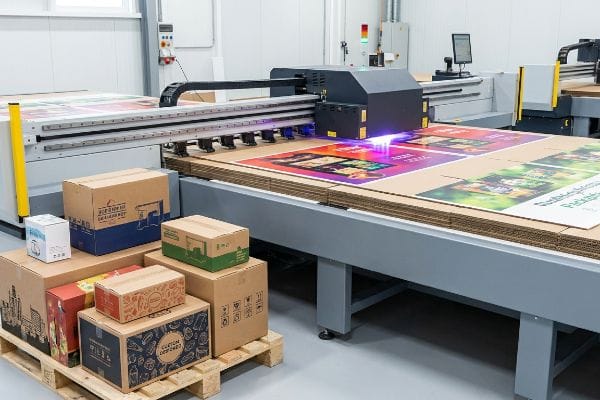
Digital printing is a modern manufacturing process that transfers electronic files directly onto corrugated packaging without physical plates. Bypassing traditional setup methods, digital printing utilizes specialized UV (Ultraviolet) inkjet heads to instantly cure liquid polymers onto paperboard, enabling rapid prototyping, variable data execution, and agile retail campaigns.
Knowing the textbook definition is fine, but to actually leverage this technology on the production floor without blowing your packaging budget, we need to examine exactly how the machines operate.
What is the meaning of digital printing?
Understanding the mechanics behind plate-free technology separates agile brands from those trapped in slow procurement cycles.
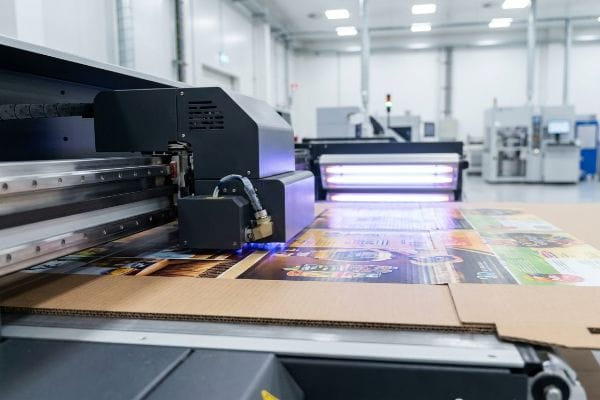
The meaning of digital printing refers to the direct application of liquid inks onto structural substrates using computer-controlled print heads. Instead of pressing wet ink with metal rollers, this method polymerizes UV-curable ink instantly upon board contact, preventing moisture absorption and delivering ultra-crisp retail graphics.
That instantaneous curing process sounds flawless, but applying it to physical retail fixtures requires strict prepress discipline.
The Instant Polymerization Advantage
Many graphic designers treat corrugated board like standard commercial paper. They assume traditional liquid inks will dry smoothly on raw, porous 32 ECT (Edge Crush Test) testliner1 without any mechanical intervention.
I see this trap constantly when new brands submit digital files expecting magazine-quality gloss. They ignore the fact that raw paper fibers absorb liquid like a sponge. I remember a client who insisted on running an unsealed kraft board through a basic digital press. The harsh smell of uncured ink lingered because the pigment bled deep into the flutes2, leaving a muddy, washed-out logo that failed the 30-foot visual retail test.
By switching to direct-to-board UV flatbed digital printing, I used specialized light arrays to instantly cure the ink into a solid polymer film3 the millisecond it hit the substrate. This completely bypassed the fiber absorption problem4, removed the sticky friction of wet ink during handling, and eliminated weeks of expensive plate manufacturing.
| Common Rookie Mistake | The Pro Fix | Retail-Floor Benefit |
|---|---|---|
| Printing liquid inks on unsealed kraft | Direct UV polymerization5 | Crisp logos from 30 feet |
| Paying for metal plates on short runs | Plate-free digital flatbed files6 | Saves weeks of launch time |
| Ignoring paper moisture absorption | Instant surface curing7 | Prevents muddy graphics |
I refuse to let poor ink absorption ruin a brand launch. Implementing instant UV curing directly on the factory floor allows me to bypass traditional prepress bottlenecks, keeping your agile retail campaigns completely plate-free and vibrant.
🛠️ Harvey's Desk: Not sure if your artwork will absorb into the raw testliner? 👉 Let Me Review Your File ↗ — Direct access to my desk. Zero automated sales spam, I promise.
What are examples of digital printing?
Applying this technology correctly allows brands to prototype rapidly and execute highly specific regional marketing strategies.
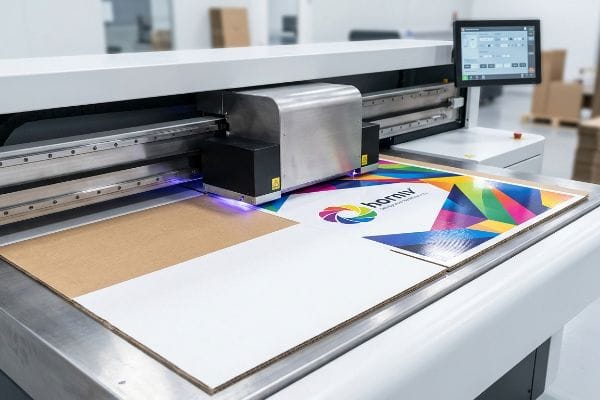
Examples of digital printing include rapid 24-hour white sample prototyping, variable data barcodes on master cartons, and short-run regional promotional displays. Because it requires zero tooling setup, brands use digital output to test high-fidelity graphics on physical retail-ready packaging before committing to massive volume production runs.
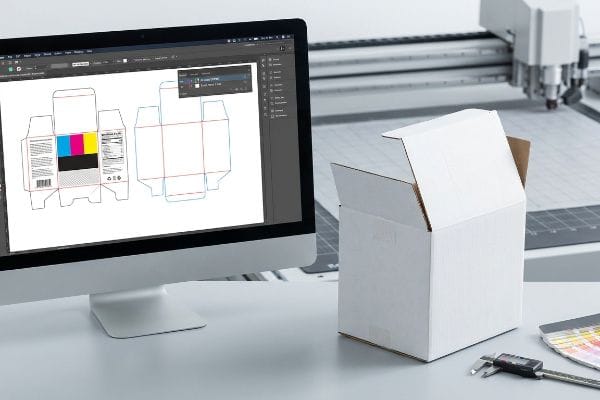
While the speed of these applications is impressive, bridging the gap between a computer screen and a physical cutting table introduces unique challenges.
Executing the 24-Hour White Sample
Procurement teams often rely on digital printing strictly for cosmetic surface graphics8. They assume that if the artwork file looks correct on their monitor, the physical display will automatically cut and assemble perfectly on the manufacturing floor.
"Can you just print my PDF and cut it out?" Buyers ask me this every week. The harsh reality is that automated CAD (Computer-Aided Design) cutting tables, like our Kongsberg C-series, do not read visual artwork lines; they read mechanical spot colors9. I once watched a junior designer sweat over a ruined digital prototype because their cut paths were accidentally merged with the CMYK (Cyan, Magenta, Yellow, and Key/Black) artwork layer.
The loud, aggressive hum of the CNC vacuum table masked the fact that the blade was ignoring the dieline entirely, resulting in a perfectly printed but completely uncut slab of board. I now mandate strict pre-flight separation, ensuring mechanical strokes are cleanly mapped10 before the digital print hits the cutting bed.
| Common Rookie Mistake | The Pro Fix | Retail-Floor Benefit |
|---|---|---|
| Merging cut lines with CMYK art | Isolating structural vector paths11 | Frictionless display assembly |
| Assuming machines read visual lines | Mapping specific spot colors12 | Eliminates miscut prototypes |
| Skipping physical structural tests | 24-hour digital white sampling13 | Confirms shelf fit instantly |
I never trust a flat digital rendering to prove structural integrity. By routing every digital print through a dedicated CNC cutting bed, I mathematically verify your assembly tolerances before you waste capital on a doomed production run.
🛠️ Harvey's Desk: Are your cut lines hiding inside your artwork layer? 👉 Check Your File Setup ↗ — Download safely. My inbox is open if you have questions later.
What are the disadvantages of digital printing?
Despite its incredible speed and flexibility, bypassing traditional printing plates introduces severe limitations when handling massive brand color floods.
Disadvantages of digital printing involve color matching inconsistencies on solid floods, higher per-unit costs for massive volumes, and restricted finishing options. Digital technology heavily relies on overlapping CMYK halftone dots, which often produce grainy, muddy results on porous corrugated boards instead of the smooth density provided by mixed spot inks.
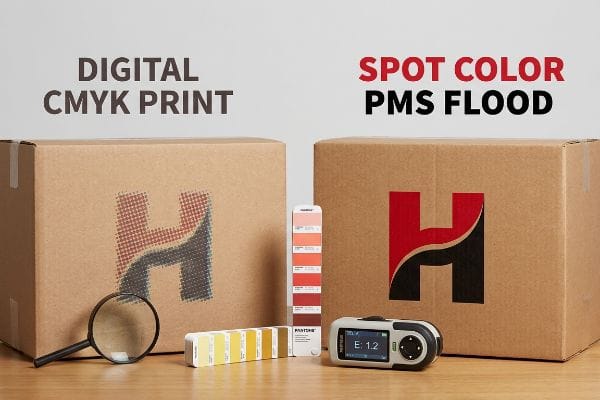
Knowing these limitations on paper is one thing, but experiencing a color failure under harsh retail lighting is a completely different nightmare.
The Halftone Mud Hazard
Marketing teams frequently convert solid corporate logos into standard digital CMYK formats. They blindly assume that process printing will seamlessly match the brilliant, illuminated colors14 they approved on their digital screens.
Think of digital printing like trying to paint a wall with a handful of colored sand instead of a solid bucket of paint. When printing on raw, porous testliner, those tiny overlapping halftone dots absorb unevenly into the fibers15. Even veteran designers often overlook this blind spot when porting their brand guidelines to corrugated substrates.
I had a client nearly lose their minds when their signature red end-cap arrived looking washed-out and muddy. You could feel the rough, unsealed texture of the board where the digital dots had simply sunk away. My rule of thumb is simple: if you have a massive, continuous brand background, never rely on digital dot blending; you must utilize dedicated PMS (Pantone Matching System) spot color floods16 to achieve maximum visual density.
| Common Rookie Mistake | The Pro Fix | Retail-Floor Benefit |
|---|---|---|
| Using CMYK for brand logos | Spot color Pantone floods17 | Accurate brand color matching |
| Trusting backlit computer screens | Physical spectrophotometer scans18 | Survives harsh retail lighting |
| Flooding porous board digitally | Pre-sealing with aqueous primer19 | Stops ink from sinking |
I will not let your flagship brand colors turn to mud under big-box fluorescent lights. When I see large solid backgrounds in a file, I actively flag the digital limitations and pivot the strategy to secure your visual equity.
🛠️ Harvey's Desk: Is your brand logo secretly converting to a muddy CMYK breakdown? 👉 Request A Color Audit ↗ — No forms that trigger endless sales calls. Just pure value.
What is the difference between digital printing and normal printing?
Choosing between modern direct-to-board technology and traditional high-volume lithography dictates your entire supply chain timeline and structural stability.
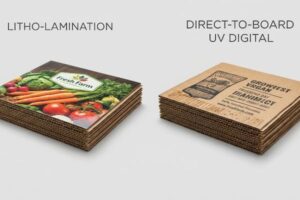
The difference between digital printing and normal printing lies in the mechanical application method. Normal litho-lamination requires wet adhesives and expensive metal plates to mount pre-printed sheets onto corrugated structures. Digital printing sprays UV-cured ink directly onto the board, bypassing plates, eliminating moisture warp, and drastically accelerating production.
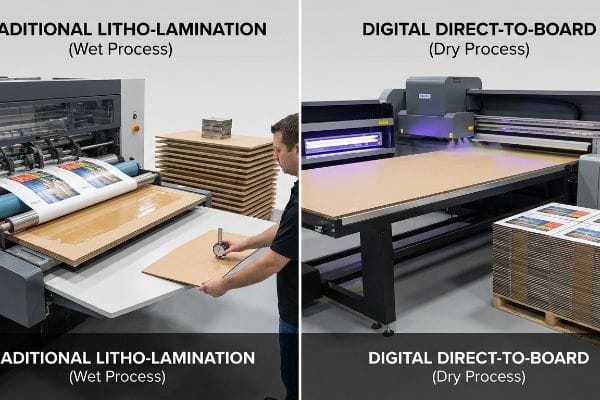
But knowing the theory isn't enough when the machines start running and humidity levels shift.
Why Standard Litho-Lamination Warps on the Factory Floor
Buyers frequently treat traditional litho-lamination and digital printing as identical structural processes, focusing purely on the visual output. They assume that mounting a high-quality printed top-sheet to a rigid B-flute board using normal printing methods results in a perfectly flat panel.
In my facility, I routinely see the hidden chemical danger of normal litho-lamination: the PVA (Polyvinyl Acetate) adhesive. When this wet water-based glue is applied across a massive 60-inch (152.4 cm) side panel, the porous linerboard aggressively absorbs the moisture. As the PVA dries and cures in the ambient factory air, it shrinks, creating an immense surface tension that causes the entire display panel to painfully warp and bow inwards like a giant potato chip. This isn't just theory—I test this using strict flatness gauges on the staging floor.
Digital printing avoids this moisture entirely by curing dry UV polymer directly onto the board20. But when massive production volumes force us into normal litho-lamination, I ruthlessly enforce a 24-hour dead-weight pressure cure, maintaining a strict 0.04-inch (1.01 mm) flatness tolerance21. By mathematically balancing this tension with a thin duplex back-liner, I prevent severe base buckling that would otherwise trigger an immediate retailer rejection and weeks of costly manual rework, saving you thousands in avoidable chargebacks.
| Common Rookie Mistake | The Pro Fix | Retail-Floor Benefit |
|---|---|---|
| Ignoring PVA adhesive shrinkage | 24-hour dead-weight pressure cure | Panels stand perfectly straight |
| Running unbalanced one-sided litho | Adding a duplex back-liner | Prevents structural bowing |
| Assuming digital and normal react alike | UV direct-to-board printing | Eliminates wet glue entirely |
I measure tolerances in millimeters because warped cardboard destroys retail compliance. By controlling the exact moisture chemistry of normal printing versus the dry speed of digital, I guarantee your structural geometry remains flawlessly square upon arrival.
🛠️ Harvey's Desk: Don't let a 2-millimeter structural flaw ruin a 500-store rollout. 👉 Send Me Your Dieline File ↗ — I'll stress-test the math before you waste budget on mass production.
Conclusion
You can source cheap litho-lamination from a disorganized vendor, but when wet PVA glue causes your 60-inch (152.4 cm) side panels to warp like potato chips, it creates massive friction that slows down the co-packing assembly line by an estimated 30% and triggers immediate big-box rejections. Over 500 brand managers use my prepress checklist to avoid these exact fatal early-stage mistakes. Stop guessing on your structural tolerances and let me personally run your artwork through my Free Dieline Audit ↗ to identify critical failure points before mass production begins.
"Understanding Shipping Box Strength – EcoEnclose", https://www.ecoenclose.com/blog/understanding-shipping-box-strength/?srsltid=AfmBOoqBBO3Bz9sSZK-h0JJCJIP4OEASMrUHFdCHCUrtSzVX_7cWdcV4. [An industry standard or materials science source would verify the porosity levels and absorbent nature of 32 ECT grade testliner in corrugated packaging]. Evidence role: Technical specification; source type: Material data sheet. Supports: The claim that this specific board grade is porous and affects ink drying. Scope note: Applies to standard uncoated testliner. ↩
"Investigation of Strength and Migration of Corrugated Cardboard …", https://www.researchgate.net/publication/346137096_Investigation_of_Strength_and_Migration_of_Corrugated_Cardboard_Boxes. Technical printing manuals explain how the porous nature of unsealed linerboard allows ink to migrate via capillary action into the fluting of corrugated cardboard, degrading image sharpness. Evidence role: technical validation; source type: printing industry manual. Supports: the claim that unsealed substrates cause ink bleeding and loss of resolution. Scope note: Specific to corrugated cardboard structures. ↩
"Understanding the UV Curable Process and Application – ColDesi", https://coldesi.com/uv-printers/understanding-the-uv-curable-process-and-application/. [A technical manual or chemical study on UV-curable inks explains how UV light triggers a rapid polymerization reaction that converts liquid monomers into a solid film]. Evidence role: Technical verification; source type: Technical specification. Supports: The chemical process of instant ink solidification. Scope note: Applies specifically to UV-curable ink chemistries. ↩
"UV Printing vs. Solvent-Based Printing: A Comprehensive Guide to …", https://www.decotechgroup.com/uv-printing-vs-solvent-based-printing. [Comparative industrial research demonstrates that UV-cured inks form a surface layer on porous substrates, preventing the deep fiber penetration typical of solvent-based inks]. Evidence role: Comparative performance; source type: Industry white paper. Supports: The claim that polymerization prevents ink absorption into fibers. Scope note: Performance may vary depending on substrate porosity. ↩
"How to Stop Ink Bleeding in UV Printers? – Andresjet", https://www.andresjet.com/blogs/knowledge/how-to-stop-ink-bleeding-in-uv-printers. [An authoritative source on UV curing technology would explain how instant polymerization prevents ink absorption into porous substrates like unsealed kraft paper]. Evidence role: technical mechanism; source type: industrial printing manual. Supports: effectiveness of UV polymerization on absorbent surfaces. Scope note: specific to UV-curable inks. ↩
"What to Know About Print Runs: Short Run vs. Large Volume Printing", https://www.ambrosetheprinter.com/blog/what-to-know-about-print-runs-short-run-vs-large-volume-printing. [Industry benchmarks compare the turnaround times of plate-based offset printing versus plate-free digital flatbed processes for short-run orders]. Evidence role: comparative metric; source type: printing industry report. Supports: reduction in procurement and launch cycles. Scope note: lead time varies by volume. ↩
"How To Avoid Ink Bleed in Large Digital Printing Machines", https://www.assetliquidity.net/blog/how-to-avoid-ink-bleed-large-digital-printing. [Technical documentation on ink curing would verify that immediate polymerization prevents the ink from soaking into the substrate, thereby avoiding blurring or 'muddy'graphics]. Evidence role: physical property; source type: materials science journal. Supports: prevention of ink bleed on porous materials. Scope note: focuses on substrate porosity. ↩
"Structural vs. Graphic Design in Packaging", https://brownpackaging.com/structural-vs-graphic-design-in-packaging/. [Industry white papers on packaging procurement can verify the common trend of using digital printing for visual verification rather than structural validation]. Evidence role: supporting industry practice; source type: industry report. Supports: common usage patterns of digital printing in procurement. Scope note: focused on retail packaging workflows. ↩
"Spot color vs. process color | Adobe", https://www.adobe.com/creativecloud/design/discover/spot-vs-process-color.html. [Industry standards for pre-press production verify that automated cutting systems identify cut paths via specific spot color channels rather than visual RGB or CMYK graphics. Evidence role: Technical validation; source type: Industry standard manual. Supports: The distinction between visual artwork and mechanical cut paths. Scope note: Specific to automated CAD cutting hardware.] ↩
"How to print and cut process – CNC cutting equipment – YouTube", https://www.youtube.com/watch?v=e8e7a5PmSiY. [Industry technical guides for digital finishing detail the necessity of pre-flight separation to ensure cut paths (mechanical strokes) are correctly aligned with printed graphics to avoid registration errors]. Evidence role: technical process validation; source type: technical manual. Supports: industry best practices for digital cutting workflows. Scope note: Applicable to CNC and flatbed cutting systems]. ↩
"From Light to Ink: Understanding RGB, CMYK, and File Prep for Artists", https://circle-arts.com/from-light-to-ink-understanding-rgb-cmyk-and-file-prep-for-artists/. [An authoritative guide on prepress for digital die-cutting would explain why separating vector paths from CMYK artwork is necessary to prevent machine errors]. Evidence role: technical verification; source type: technical manual. Supports: proper file preparation for digital printing. Scope note: specific to vector-based cutting software. ↩
"How to Create Cut Paths and Spot White for Roland Printers …", https://www.youtube.com/watch?v=H2WWzz3OHuQ. [Technical documentation for digital cutting tables explains how designated spot colors are used as identifiers for the machine to distinguish between cut, crease, and bleed lines]. Evidence role: technical specification; source type: hardware documentation. Supports: accuracy in automated prototyping. Scope note: applicable to most professional digital cutting systems. ↩
"Quick Turnaround Graphic Overlay Prototyping", https://www.chinaprintingonline.com/quick-turnaround-graphic-overlay-prototyping/. [Industry standards for rapid prototyping describe the use of unprinted 'white samples'to verify structural integrity and fit within a 24-hour window]. Evidence role: industry standard; source type: professional printing service guide. Supports: speed of structural verification. Scope note: turnaround depends on facility equipment. ↩
"Why Your Colors Look Different on Screen and in Print – Packamor", https://www.packamor.com/blogs/knowledge-hub/why-your-colors-look-different-on-screen-and-on-paper-a-designers-guide-to-printing?srsltid=AfmBOopxda8P96ZXgO6gGvgtiM7H-he7erUHmZWFZ2Y96FYdRcMjwpaE. [Technical documentation on color theory explains the fundamental difference between additive RGB light used in screens and subtractive CMYK inks used in printing, proving the inability to match brilliance]. Evidence role: technical validation; source type: color theory manual. Supports: the claim that digital screen colors cannot be perfectly replicated by CMYK process printing. Scope note: refers specifically to the gamut limitation of standard process inks. ↩
"effects of corrugated board and halftone dot deformations", https://www.academia.edu/60461055/Print_uniformity_of_corrugated_board_in_flexo_printing_effects_of_corrugated_board_and_halftone_dot_deformations. [Technical documentation on ink-substrate interaction describes how the porosity of testliner leads to uneven dot gain and absorption of halftone patterns]. Evidence role: factual verification; source type: technical printing manual. Supports: the claim that digital halftone dots behave poorly on porous corrugated boards. Scope note: specifically regarding raw testliner substrates. ↩
"CMYK vs. Spot Colors in Packaging Printing", https://meyers.com/meyers-blog/cmyk-vs-spot-colors-in-packaging-printing-what-cpg-brands-need-to-know/. [A technical printing guide explains how spot colors provide a uniform, opaque layer of ink that avoids the graininess and lack of density inherent in CMYK halftone blending]. Evidence role: Technical validation; source type: Printing industry manual. Supports: The use of PMS for maximum visual density. Scope note: Specifically applies to solid brand color applications on porous substrates. ↩
"Pantone vs CMYK Printing: What's the Difference & When to Use Each", https://www.media-village.co.uk/print/pantone-vs-cmyk-printing/. [An authoritative source on color management would explain how spot colors provide a consistent ink formulation and wider gamut compared to the process-based CMYK additive method.] Evidence role: technical validation; source type: industry standard manual. Supports: The necessity of spot colors for brand consistency. Scope note: Specifically applies to high-fidelity brand reproduction. ↩
"Colorimeters vs. Spectrophotometers: Which is the Best Tool for …", https://sperdirect.com/blogs/news/colorimeters-vs-spectrophotometers-which-is-the-best-tool-for-measuring-color-consistency?srsltid=AfmBOoqL64whBPqa5vv5PKV8MdrWT4nDWBz3rLOagKfQPioakxaBbZfI. [Technical documentation on colorimetry would demonstrate that spectrophotometers measure spectral power distribution to ensure color consistency under varied lighting environments regardless of screen calibration.] Evidence role: technical validation; source type: scientific paper or industry guide. Supports: The superiority of physical measurement over digital screen trust. Scope note: Focused on environmental lighting conditions. ↩
"BREAKING THE RELIANCE OF AQUEOUS INKJET ON …", https://www.specialistprinting.com/articles/breaking-the-reliance-of-aqueous-inkjet-on-specialist-substrates/. [Printing substrate guides would explain how aqueous primers create a surface barrier on porous materials to prevent ink absorption and maintain color saturation.] Evidence role: technical validation; source type: manufacturer specification or printing textbook. Supports: The efficacy of primers in preventing ink sink. Scope note: Pertains to digital inkjet printing on porous boards. ↩
"Litho-Laminated vs. Digital Printing: An Industrial Buyer's Guide to …", https://mdmpkg.com/litho-laminited-vs-digital-printing-premium-corrugated-packaging-2/. [Technical documentation on UV-curable inks explains how the polymerization process eliminates water-based adhesives, thereby preventing substrate warping]. Evidence role: technical verification; source type: industry whitepaper. Supports: Moisture avoidance in digital printing. Scope note: Specific to UV-LED and UV-mercury curing systems. ↩
"What materials are used in your cardboard displays?", https://popdisplay.me/what-materials-are-used-in-your-cardboard-displays/. [Quality control manuals for retail point-of-purchase displays define the maximum allowable deviation from flatness to ensure structural stability and retail compliance]. Evidence role: specification validation; source type: quality standard. Supports: The precision required for dead-weight pressure curing. Scope note: Tolerance levels may vary by specific retailer requirements. ↩