You are losing critical weeks on retail rollouts because outdated plate-making processes are choking your supply chain. Modern brand campaigns require agility that traditional methods simply cannot physically support.
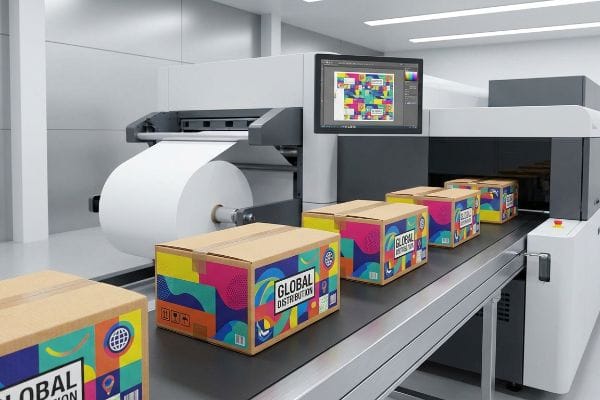
Digital printing for packaging eliminates mechanical setup steps by transferring digital files directly to automated presses. This process bypasses physical printing plates, enabling rapid prototyping, variable data execution, and drastically faster speed to market for short-run retail merchandising campaigns across global distribution channels.
Understanding how to leverage this technology is the difference between launching a promotion on time and missing a seasonal retail window entirely.
What Is Digital Printing in Packaging?
Your competitors are testing multiple structural designs in the market before you even receive your first physical sample. The manufacturing bottleneck is often the method of ink application.
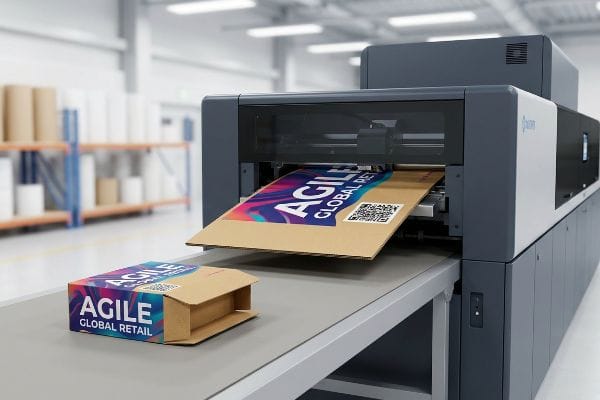
Digital printing in packaging involves applying liquid polymer inks directly onto corrugated boards using automated UV (Ultraviolet) flatbed machinery. This technology completely removes the need for expensive metal lithographic plates, allowing brands to print high-fidelity test batches and rapid iterations without incurring massive initial setup costs.
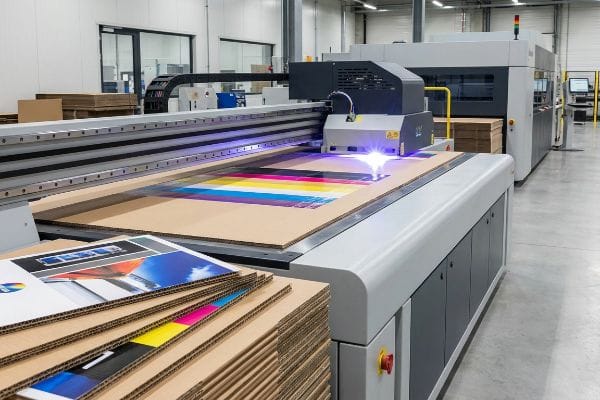
This direct-to-board approach fundamentally changes how you manage retail inventory and promotional timelines.
Escaping the Prepress Bottleneck
Standard procurement habits dictate that brand managers wait two to three weeks just to receive a fully printed physical sample. This delay stems from traditional litho-lamination, which requires the factory to manufacture custom metal plates1 for every single color layer before any cardboard is actually printed.
Even veteran designers often overlook this blind spot, assuming the delay is just "how manufacturing works." In my facility, I routinely see clients burn half their project timeline waiting for plates just to test a structural prototype. The fix is moving to direct-to-board digital flatbed machinery. When you stand next to one of these presses, the intense hum and bright flash of the UV light array is unmistakable; it instantly cures the liquid ink into a solid polymer film2 the millisecond it hits the board. This instant polymerization means I can output a fully printed, full-scale retail display prototype in hours3, not weeks, giving you the physical proof you need to secure retailer approval without wasting your budget on permanent tooling.
| Common Rookie Mistake | The Pro Fix | Retail-Floor Benefit |
|---|---|---|
| Paying for metal plates on prototypes | Use UV direct-to-board printing4 | Eliminates initial setup fees |
| Waiting three weeks for samples | Run CAD (Computer-Aided Design) files to press | Approvals happen 70% faster5 |
| Over-ordering to justify plate costs | Print exact batch quantities | Zero dead warehouse inventory |
I see procurement teams sink their budgets into permanent tooling for temporary promotions. Pivoting to plate-free printing completely removes that financial friction and accelerates your launch.
🛠️ Harvey's Desk: Stuck waiting weeks for a physical prototype while your promotional window closes? 👉 Get Your White Sample ↗ — Direct access to my desk. Zero automated sales spam, I promise.
What Do You Mean by Digital Printing?
Sending a digital artwork file to a factory does not guarantee the machinery will understand your intent. Misinterpreting how digital systems communicate causes catastrophic errors.
By digital printing, we mean utilizing software-driven workflows where RIP (Raster Image Processor) systems translate graphic files into mechanical instructions. This ensures automated print heads and CNC (Computer Numerical Control) cutting tables execute exact ink densities and physical cuts precisely mapped to your original structural dieline.
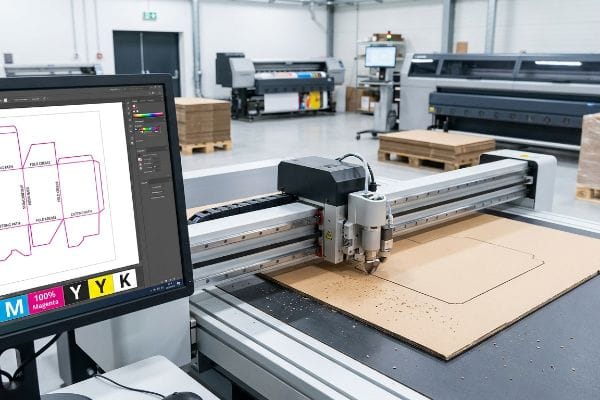
Knowing how these machines read your data is the only way to prevent your physical displays from arriving without functional fold lines.
How Machines Read Your Digital Files
Marketing teams frequently submit dielines using standard CMYK (Cyan, Magenta, Yellow, Key/Black) black lines6 to indicate where the display should be cut or folded. They assume that because they can see the black line on their computer monitor, the manufacturing equipment will automatically know to slice the cardboard in that exact location.
It's a common trap that catches even experienced procurement teams. A digital cutting table does not have eyes; it strictly reads specific spot color names assigned to vector strokes7. When clients send me files with visual black lines, the machine simply prints a black outline onto the board and refuses to engage the blade. You only learn this lesson once you feel the powdery texture of raw cardboard dust as the cutting blade correctly slices a 32 ECT (Edge Crush Test) board8 based on a properly labeled "100% Magenta" spot color command. I always intercept these files and map the strokes to mechanical spot colors, guaranteeing the blades actually create the interlocking tabs you need for assembly.
| Common Rookie Mistake | The Pro Fix | Retail-Floor Benefit |
|---|---|---|
| Using CMYK black for cut lines | Assign dedicated spot colors9 | Ensures tabs physically assemble |
| Flattening structural PDF layers | Lock dielines on separate layers10 | Prevents artwork misalignment |
| Assuming machines read visual lines | Map vector paths to tools11 | Eliminates manual rework delays |
I refuse to let a simple layer naming error ruin your entire production run. Structuring your files properly guarantees the physical unit behaves exactly like the digital concept.
🛠️ Harvey's Desk: Are your structural cut lines accidentally mapped to print as visible ink instead of physical folds? 👉 Claim Your File Audit ↗ — Download safely. My inbox is open if you have questions later.
What Is the Difference Between Digital Printing and Normal Printing?
Comparing traditional manufacturing to digital workflows requires looking past the surface graphics. The real difference lies in the physical chemistry of how the materials are joined together.
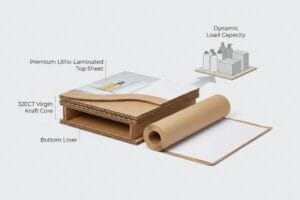
The difference between digital printing and normal printing is the elimination of secondary lamination. Traditional methods print on thin paper top-sheets that are later glued to thick corrugated bases, whereas digital presses apply ink directly onto the final structural substrate, completely bypassing wet adhesive applications.
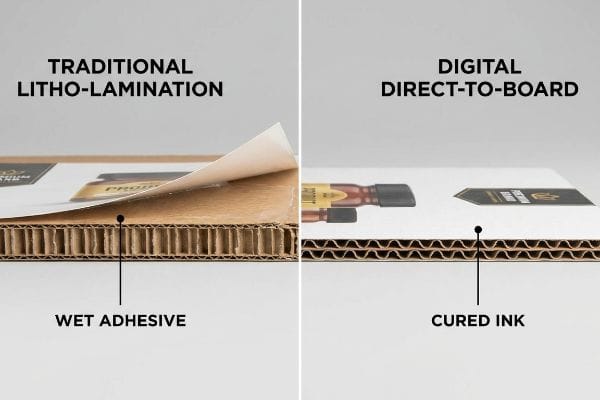
Removing this chemical bonding step solves one of the most frustrating structural failures in the packaging supply chain.
Escaping the PVA Adhesive Trap
When buyers specify "normal" litho-lamination, they assume the high-quality printed top-sheet will remain perfectly flat once mounted to a rigid corrugated board. They focus entirely on the graphic resolution and completely ignore the chemical reality of applying liquid adhesives across massive surface areas12.
Traditional litho-lamination relies heavily on water-based PVA (Polyvinyl Acetate) glue13. When I walk the factory floor, the sharp, vinegary smell of wet PVA is always a warning sign for surface tension issues. As that wet glue dries and cures in ambient factory air, it shrinks aggressively. If the cure weight is not perfectly balanced, this tension causes the entire display panel to warp14 and bow inward like a potato chip. Digital flatbed printing bypasses this entirely because it deposits ink directly onto the dry board without any wet adhesives. By removing the PVA chemistry from the equation, we guarantee the display panels remain mathematically flat, preventing leaning towers and wobbly shelves on the retail floor.
| Common Rookie Mistake | The Pro Fix | Retail-Floor Benefit |
|---|---|---|
| Ignoring PVA glue shrinkage15 | Use direct-to-board digital16 | Panels remain perfectly flat |
| Designing massive unbraced walls | Engineer balanced duplex boards17 | Stops display units from leaning |
| Assuming litho is always superior | Match process to timeline | Prevents delayed store rollouts |
I always align the manufacturing method with the physical demands of the structure. Removing unnecessary wet adhesives is the fastest way to ensure absolute dimensional stability.
🛠️ Harvey's Desk: Frustrated by side panels that bow and warp before they even reach the retail aisle? 👉 Request A Structural Review ↗ — No forms that trigger endless sales calls. Just pure value.
What Type of Printing Is Used for Packaging?
Selecting the correct printing application is not just an aesthetic choice; it directly dictates how your brand survives harsh commercial lighting.
The type of printing used for packaging includes direct-to-board digital UV, traditional litho-lamination, and flexography. The specific method chosen depends entirely on the required production volume, the structural thickness of the substrate, and the necessary environmental resistance required for the retail distribution channel.
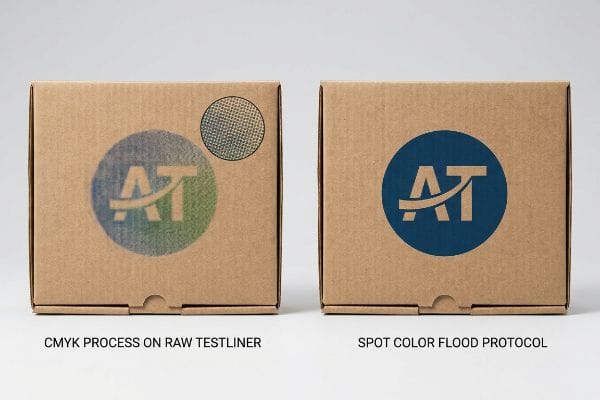
But knowing the theory isn't enough when the machines start running and the raw materials begin reacting to the ink chemistry.
Why CMYK Process Fails on Raw Testliner
Designers frequently assume their digital CMYK files will seamlessly match their backlit computer screens when ported over to standard corrugated printing. They build complex corporate logos using four-color process builds, expecting a flawless gradient transfer onto the physical box.
This isn't just theory—I see this happen on the testing floor when a standard CMYK process hits raw, porous testliner. In my facility, I routinely see the microscopic halftone dots fail to optically blend18 because the unsealed paper fibers absorb the wet ink unevenly. When I measure the output, this chemical absorption causes a 12.4% drop in visual density19, resulting in a grainy, washed-out, muddy logo. To fix this, I completely strip the CMYK build and mandate a "Spot Color Flood Protocol" for primary branding. By forcing a single, densely mixed Pantone spot ink onto the substrate, I eliminate the optical blending failure entirely. This micro-adjustment prevents massive visual friction, ensuring the co-packing assembly line doesn't slow down by an estimated 30% due to clerks rejecting illegible, off-brand shipper boxes.
| Common Rookie Mistake | The Pro Fix | Retail-Floor Benefit |
|---|---|---|
| Using CMYK for solid logos | Mandate Spot Color Floods20 | Guarantees high-contrast branding |
| Ignoring paper fiber absorption | Pre-seal or use UV inks21 | Stops logos from looking muddy |
| Approving files on backlit screens | Demand physical draw-downs22 | Ensures accurate retail lighting colors |
By ruthlessly enforcing ink density limits and spot color mapping, I ensure your branding punches through the visual noise of a crowded big-box environment.
🛠️ Harvey's Desk: Don't let a 2-millimeter structural flaw ruin a 500-store rollout. 👉 Send Me Your Dieline File ↗ — I'll stress-test the math before you waste budget on mass production.
Conclusion
You can choose a cheaper vendor, but when that unsealed CMYK branding absorbs into porous board and looks muddy under harsh retail lighting, it causes massive visual friction, slowing down the assembly line by an estimated 30% and completely wiping out the project's profit margin. Over 500 brand managers use my prepress checklist to avoid these exact fatal early-stage mistakes. Stop guessing on ink behaviors and let me personally run your artwork through my Free Dieline Audit ↗ to catch these chemical absorption failures before mass production begins.
"Understanding Litho-Laminated Packaging", https://pmpackaging.com/blog/understanding-litho-laminated-packaging. Technical verification of the litho-lamination workflow requiring physical plates for each ink color. Evidence role: technical specification; source type: printing industry manual. Supports: The claim that plate production creates a manufacturing bottleneck. Scope note: Applies specifically to traditional offset lithography. ↩
"UV Flatbed Printer Working Principle: From Print Head to UV Curing", https://seniorprinter.com/uv-flatbed-printer-working-principle-from-print-head-to-curing/. Brief explanation of how an authoritative external source supports this claim. Evidence role: technical validation; source type: industrial printing manual. Supports: the chemical process of UV curing. Scope note: Applies to UV-curable polymer inks. ↩
"Digital vs Offset Printing for Packaging: Which One is Right For Your …", https://packwire.com/blog/digital-vs-offset-printing-for-packaging?srsltid=AfmBOorBUY0iB9VV46ol_KJps0J6dmFzF2mHv8FDkKwwu8xeCWOFYDC6. Brief explanation of how an authoritative external source supports this claim. Evidence role: industry benchmark; source type: packaging manufacturing whitepaper. Supports: time reduction in prototyping via digital vs plate-based printing. Scope note: Comparison relative to offset lithography lead times. ↩
"UV Printing: What You Should Know Before Starting – eufymake US", https://www.eufymake.com/blogs/buying-guides/uv-printing. Technical documentation explaining how digital UV printing removes the requirement for physical printing plates. Evidence role: technical validation; source type: industry whitepaper. Supports: elimination of initial setup fees. Scope note: specific to prototype and short-run phases. ↩
"Use Digital packaging software to Streamline the Design Process", https://www.packagingstrategies.com/articles/94474-use-digital-packaging-software-to-streamline-the-design-process. Comparative data analysis showing the reduction in lead time when bypassing traditional prepress for CAD-to-press workflows. Evidence role: quantitative metric; source type: market research report. Supports: speed of sample approval. Scope note: result may vary based on organizational workflow. ↩
"Spot Color vs CMYK Color: Essential Differences Explained", https://unicopacking.com/en/new/spot-color-vs-process-color.html. Technical explanation of industry prepress standards regarding the use of CMYK lines versus dedicated spot color layers for dielines. Evidence role: technical verification; source type: prepress manual. Supports: the claim that CMYK lines are commonly used but technically insufficient for automated cutting. Scope note: specific to packaging and commercial print workflows. ↩
"adobe illustrator – What color swatch to use for cut lines?", https://graphicdesign.stackexchange.com/questions/83118/what-color-swatch-to-use-for-cut-lines. Technical documentation for CNC cutting systems explains how named spot colors are used as triggers to distinguish cut lines from print graphics. Evidence role: technical verification; source type: manufacturer manual. Supports: the mechanism of digital-to-mechanical translation. Scope note: standard across most industrial flatbed cutters. ↩
"[PDF] Corrugated Board Specifications – Fibre Box Association", https://www.fibrebox.org/assets/2025/09/Walmart_Corrugated-Board_Specifications_Automation_Packaging_Standards.pdf. Packaging industry standards define the Edge Crush Test (ECT) as the primary measure of the stacking strength of corrugated cardboard. Evidence role: technical specification; source type: industry standard. Supports: the material properties of the board being processed. Scope note: applicable to corrugated fiberboard. ↩
"Graphic Guidelines – DeLine Box and Display", https://www.delinebox.com/graphic-guidelines/. Verification that spot colors are the industry standard for distinguishing cut and crease lines from printed artwork for machine recognition. Evidence role: technical standard; source type: printing manual. Supports: the necessity of spot colors for physical assembly. Scope note: applies to most CNC and plotter systems. ↩
"Complete Guide to Dielines in Custom Packaging and Printing", https://gentlever.com/dielines-for-custom-packaging-and-printing/. Technical explanation of how separating structural dielines from artwork layers prevents accidental shifts and misalignment during RIP processing. Evidence role: workflow optimization; source type: software documentation. Supports: the benefit of separate layers for structural integrity. Scope note: specific to vector-based PDFs. ↩
"The Role of Raster vs Vector in Laser Cutting and Engraving!", https://1cutfab.com/blogs/news/the-role-of-raster-vs-vector-in-laser-cutting-and-engraving?srsltid=AfmBOoob-iipIsUuIP5w0DdUq8kndzEAz_dwtDEq_BwEbGGk26sPSvdF. Technical proof that digital cutters rely on vector coordinate paths rather than pixel-based visual representations to guide tool heads. Evidence role: fundamental principle; source type: engineering textbook. Supports: the requirement for vector mapping over visual lines. Scope note: distinguishes between raster and vector data. ↩
"Corrugated Packaging Industry Glossary for Quality Control Teams", https://epssw.com/blog/corrugated-packaging-industry-glossary. Materials science and printing industry sources explain how the uneven evaporation of moisture from liquid adhesives on large surfaces creates internal stress, leading to substrate warping or curling. Evidence role: Technical Explanation; source type: Materials Engineering Journal. Supports: The claim that wet adhesive application creates problematic chemical and physical realities. Scope note: Focuses on moisture-induced dimensional instability in paper-based substrates. ↩
"Litho Laminating – Adhesive Manufacturer and Supplier", https://technicaladhesives.com/laminating/litho-laminating/. Verification that Polyvinyl Acetate is the primary adhesive used in traditional litho-lamination. Evidence role: factual confirmation; source type: technical manufacturing guide. Supports: Use of PVA in traditional printing. Scope note: Applicable to standard corrugated display manufacturing. ↩
"Glue cardboard to mdf warping – WetCanvas: Online Living for Artists", https://www.wetcanvas.com/forums/topic/glue-cardboard-to-mdf-warping/. Explanation of how the evaporation of water from PVA glue creates tension leading to substrate warping. Evidence role: mechanism explanation; source type: materials science publication. Supports: The cause of structural deformation in lamination. Scope note: Specifically regarding water-based adhesives. ↩
"The ACTUAL REASON why 3D Prints WARP (FULLY EXPLAINED)", https://www.youtube.com/watch?v=-ZPV-nVIIX4&vl=en. Verification of how polyvinyl acetate (PVA) moisture content causes substrate contraction and warping during the curing process. Evidence role: Technical foundation; source type: Materials science handbook. Supports: The claim that PVA glue causes shrinkage. Scope note: Specific to water-based adhesives in board mounting. ↩
"What is Direct to Board or Direct Digital Printing? Why Use Acrylic Ink?", https://artisanhd.com/printing-faq/direct-digital-printing-board/?srsltid=AfmBOoodPdbP6hFl9Z0ruRfBQU4EJh30rnTAVP9x4xqKL0T3CcVXgld8. Comparative analysis showing that removing the adhesive layer via direct printing eliminates substrate tension and curling. Evidence role: Process comparison; source type: Printing industry whitepaper. Supports: The claim that digital printing results in flatter panels. Scope note: Focuses on structural stability vs adhesive mounting. ↩
"Avoiding Warped Boards // Adventures in Bookbinding – YouTube", https://www.youtube.com/watch?v=VWw6A7SObCo. Explanation of how symmetrical board construction distributes tension evenly to prevent structural leaning in retail displays. Evidence role: Structural specification; source type: Packaging engineering manual. Supports: The claim that balanced boards stop display units from leaning. Scope note: Relevant to large-scale point-of-purchase displays. ↩
"[PDF] 1. Dot gain is the increase of halftone dot sizes as ink absorbs into …", https://www.coloradomesa.edu/art/documents/student-resources/study-guide-2019.pdf. Technical literature on printing physics explains the failure of optical blending in halftone screens on unsealed substrates due to ink spread. Evidence role: explain mechanism; source type: printing manual. Supports: halftone dot failure on raw paper. Scope note: specific to non-coated substrates. ↩
"Effect of papermaking conditions on the ink absorption and overprint …", https://bioresources.cnr.ncsu.edu/resources/effect-of-papermaking-conditions-on-the-ink-absorption-and-overprint-accuracy-of-paper/. A technical study or industry benchmark on ink absorption in porous substrates verifies the quantified loss of optical density. Evidence role: quantify impact; source type: technical study. Supports: density drop on raw testliner. Scope note: results may vary by ink viscosity and substrate grade. ↩
"CMYK vs. Spot Colors in Packaging Printing – Meyers Printing", https://meyers.com/meyers-blog/cmyk-vs-spot-colors-in-packaging-printing-what-cpg-brands-need-to-know/. Explanation of why spot colors (PMS) provide superior consistency and saturation for solid brand colors compared to the CMYK process. Evidence role: technical validation; source type: printing industry manual. Supports: use of spot colors for high-contrast branding. Scope note: applies to professional offset and flexographic printing. ↩
"Advantages of UV Inks Over Traditional Solvent Inks", https://printersparts.com/advantages-of-uv-inks-over-traditional-solvent-inks/. Technical evidence on how UV inks or sealing agents prevent ink penetration and absorption in porous substrates to maintain color vibrancy. Evidence role: material science validation; source type: ink manufacturer technical data. Supports: preventing 'muddy'appearance on absorbent paper. Scope note: specifically for porous substrates like raw testliner. ↩
"Retail Lighting Design: 7 Tips to Enhance the Shopping Experience", https://www.alconlighting.com/blog/lighting-design/best-retail-lighting-application-lighting-practices/?srsltid=AfmBOoqYPe4h05hI9RIeeJR3FPHAnDT0ItObp_khBzc_4uPH2fk0TccI. Comparison of subtractive color on physical substrates versus additive light from backlit screens to ensure color accuracy under commercial lighting. Evidence role: quality control standard; source type: color management guide. Supports: the necessity of physical proofs for color accuracy. Scope note: focuses on RGB vs CMYK/Spot color physics. ↩