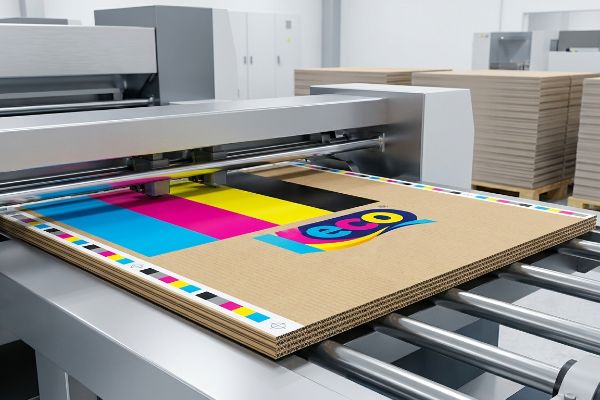
You just received an email from your factory rejecting your artwork because the color profile is wrong. If you approve the incorrect format, your entire retail campaign will look faded.
CMYK (Cyan, Magenta, Yellow, Key/Black) is a subtractive color model used exclusively in commercial printing. Unlike digital screens that emit light, this physical ink process mixes four primary pigments on corrugated board to mask ambient light, accurately reproducing vibrant brand graphics for high-impact retail display rollouts.
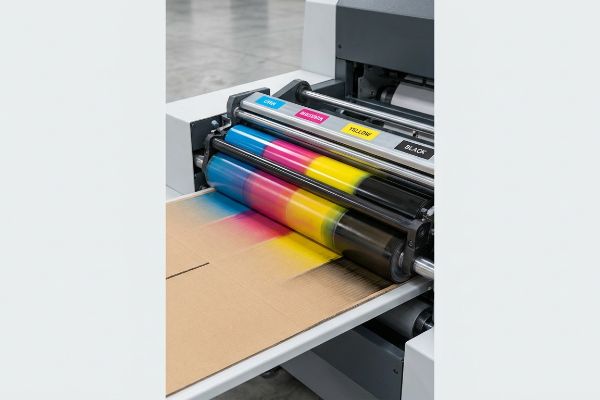
But understanding the acronym is only the first step; knowing how these four inks interact with raw paperboard dictates whether your display pops on the aisle or blends into the background.
What's the difference between CMYK and RGB?
Your graphic designer works on a backlit monitor, but your corrugated merchandiser lives under harsh fluorescent store lights.
The difference between CMYK and RGB lies in their physical output. RGB (Red, Green, Blue) uses light to create colors on digital screens, while CMYK relies on physical ink absorption into substrates like paperboard. Translating digital files requires specific prepress calibration to prevent muddy visual results.
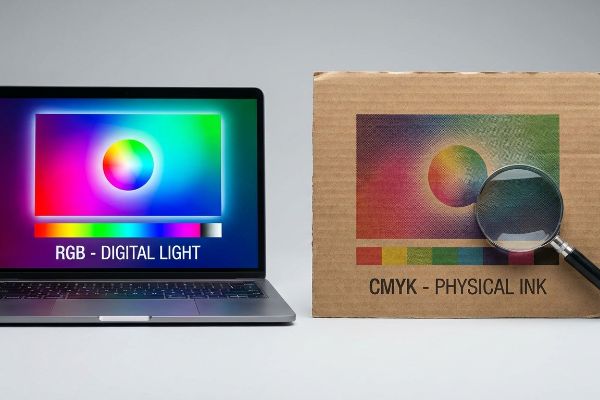
Relying on a monitor to dictate your final retail packaging is a fast track to brand dilution.
How the difference between CMYK and RGB Impacts Corrugated Board
Marketing teams frequently finalize their corporate logos and structural graphics using standard digital monitors tuned to bright display profiles. They assume this digital vibrancy will seamlessly transfer to their final point-of-purchase merchandisers. However, commercial printing relies on tiny, overlapping halftone dots1 of physical ink that must absorb into porous paper fibers.
Even veteran brand managers often fall into the trap of assuming a simple software conversion fixes everything. I frequently see teams convert a digital logo directly into process colors, hoping for the best. When that flat file hits my factory floor and the wet ink sinks into unsealed 32ECT (Edge Crush Test) testliner, the optical dot blending fails mechanically2. The crisp digital logo turns into a grainy, washed-out mud puddle. You can literally smell the heavy ink saturation as the wet paper fibers struggle to hold the pigment, forcing us to halt the press and run a spot color flood just to salvage the visual contrast.
| Common Rookie Mistake | The Pro Fix | Retail-Floor Benefit |
|---|---|---|
| Trusting digital screen colors | Mandate Pantone spot colors for logos3 | Ensures high-contrast brand visibility |
| Ignoring paperboard porosity4 | Request physical draw-down swatches5 | Prevents washed-out halftone mud |
| Approving digital PDF proofs | Review physical ink print samples | Guarantees accurate aisle aesthetics |
I never let digital screens dictate physical production. By locking down spot color protocols before plating, I eliminate the guesswork and ensure your displays look sharp from twenty feet away.
🛠️ Harvey's Desk: Not sure if your digital artwork is safely calibrated for physical paperboard absorption? 👉 Let Me Check Your Color Profile ↗ — Direct access to my desk. Zero automated sales spam, I promise.
What does the CMYK mean?
Those four letters represent physical liquid volume, not just theoretical hues on a color wheel.
Meaning CMYK technically refers to the precise combination of Cyan, Magenta, Yellow, and Key inks applied to physical packaging. Each color operates on a percentage scale from zero to one hundred. Printers layer these distinct halftone dots to build complex imagery directly onto retail-ready display boards.
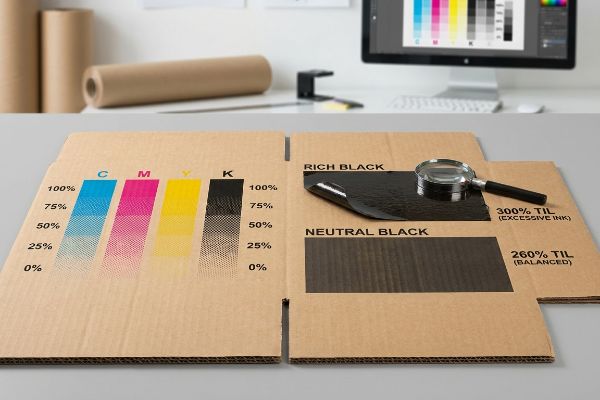
Understanding these percentages is the key to preventing massive printing defects during high-speed manufacturing runs.
What does the CMYK mean for Total Ink Limits
Graphic designers usually stack multiple color layers in their artwork files to achieve rich, deep shadows. They build complex backgrounds by setting high percentage values for all four process colors simultaneously. While this looks stunning in a digital workspace, it ignores the physical capacity of the substrate to absorb moisture6.
A common trap that catches experienced procurement teams is pushing the TIL (Total Ink Limit) past 300%7 to achieve a "rich black." When you apply that much liquid volume to a standard B-flute corrugated board—which measures about 0.125 inches (3.17 mm) thick8—the paper fibers physically drown. I've had to reject entire batches on the floor because the oversaturated top sheet became so wet and heavy that it started peeling away from the fluting, making a sticky, messy tearing sound as it jammed the automated die-cutter. We enforce a strict 260% limit in our prepress profiles to keep the board dry, crisp, and structurally sound for assembly.
| Common Rookie Mistake | The Pro Fix | Retail-Floor Benefit |
|---|---|---|
| Pushing limits above 300% | Enforce a strict 260% safety zone | Keeps display structures rigid |
| Using 100% of all four inks | Use GCR (Gray Component Replacement) | Reduces ink smudging during transit |
| Ignoring ink drying times | Engineer a balanced prepress profile | Speeds up the co-packing line |
I always mathematically throttle back heavy ink limits during the prepress phase. Stripping out unnecessary liquid volume protects the board's structural integrity and keeps your rollout on schedule.
🛠️ Harvey's Desk: Are your heavy graphic shadows secretly compromising the compression strength of your cardboard displays? 👉 Get a Prepress Ink Audit ↗ — Download safely. My inbox is open if you have questions later.
Why is CMYK best for printing?
Commercial printing machinery is engineered around this exact four-color process because it mathematically controls pigment spread.
CMYK is best for printing because it utilizes a subtractive color mixing process specifically engineered for white or kraft paperboard backgrounds. This method allows commercial offset and digital presses to layer translucent ink dots systematically, achieving massive high-resolution graphic reproduction without oversaturating the raw corrugated paper fibers.
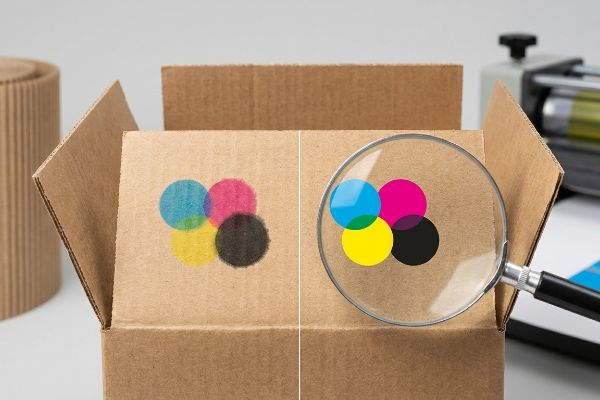
The physics of applying liquid to porous surfaces requires a system that expects and manages material expansion.
Why is CMYK best for printing on Corrugated Surfaces
The standard approach in package engineering relies on the predictable behavior of process colors when interacting with distinct paper substrates. By dividing complex imagery into four separate printing plates9, factories can precisely control the exact pressure and volume of ink hitting the board. This separation is required to manage the natural bleeding of wet liquids10.
Think of dropping watercolor paint onto a paper towel; the dot naturally expands outward. This is called dot gain11. Even seasoned design agencies forget to account for this physical spread when submitting files. When I run an uncalibrated file on the press, the tiny dots bleed into each other, turning a sharp photographic image into a blurry mess. You can see the heavy ink pooling on the surface, completely ruining the brand's premium aesthetic. I fix this by applying a mathematical cutback curve in our prepress RIP12 (Raster Image Processor) software, shrinking the digital dots so they expand to the perfect size upon hitting the physical paperboard.
| Common Rookie Mistake | The Pro Fix | Retail-Floor Benefit |
|---|---|---|
| Ignoring paper dot gain | Apply a prepress cutback curve13 | Delivers ultra-crisp retail graphics |
| Using uncalibrated files | Sync artwork to factory press profiles14 | Prevents blurry product images |
| Assuming ink stays static | Engineer for physical pigment spread15 | Maintains premium brand aesthetics |
I refuse to let natural fiber absorption degrade your marketing assets. By controlling the exact physical spread of every dot, I guarantee your graphics pop sharply off the shelf.
🛠️ Harvey's Desk: Worried your high-resolution photography will turn into a blurry mess on porous testliner? 👉 Request a RIP Software Check ↗ — No forms that trigger endless sales calls. Just pure value.
How do I convert my image to CMYK?
Clicking a dropdown menu in your design software is only a digital simulation of a highly physical manufacturing process.
Converting an image to CMYK requires changing your design software's color mode before exporting prepress files. You must select specific ICC (International Color Consortium) profiles that match the factory's exact printing press parameters. This mathematical conversion ensures your digital artwork translates seamlessly into physical ink percentages.
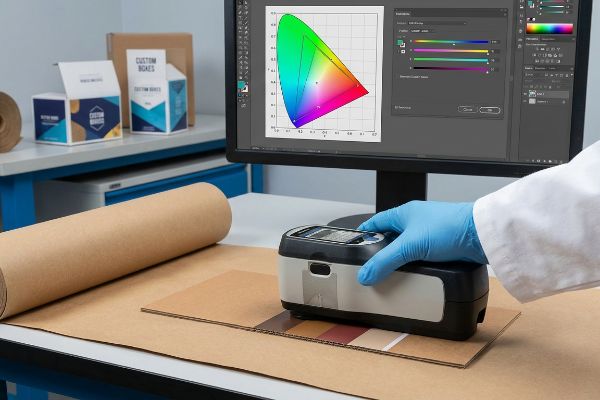
But knowing the theory isn't enough when the machines start running and massive pallets of cardboard are on the line.
Why Standard Image Conversion Fails on the Factory Floor
Brand managers often assume that converting their files to standard SWOP (Specifications for Web Offset Publications) profiles16 completely fulfills their color management responsibilities. They trust that the software's mathematical translation will perfectly output their specific brand colors across all global manufacturing facilities. This widespread assumption creates a massive blind spot regarding ambient lighting and physical substrate variations17.
In my facility, I routinely see clients approve digital conversions based on how the file looks on their smartphone, completely ignoring the physical reality of metamerism18. When I measure these generic conversions with a physical spectrophotometer under D50 lighting19, I often find a severe 5.3% color shift. If we mass-produce that file and stack a 150 lbs (68 kg) loaded display on the floor, the unit will look entirely different under a retailer's harsh fluorescent canopy compared to natural sunlight. I strip out the guesswork by scanning physical draw-downs and tweaking the prepress curves based on the exact virgin kraft liner we are using. By enforcing this strict physical calibration, I ensure the co-packing assembly team doesn't unbox mismatched components, saving clients thousands in manual rework and eliminating costly retailer rejections before they happen.
| Common Rookie Mistake | The Pro Fix | Retail-Floor Benefit |
|---|---|---|
| Trusting smartphone screens | Use spectrophotometer scanning20 | Ensures perfect brand color matching |
| Ignoring ambient retail lighting | Calibrate to D50 lighting standards21 | Prevents visual shifts in-store |
| Using generic software profiles | Profile directly to the physical board22 | Eliminates costly print rejections |
I never trust digital auto-conversions when thousands of units are at stake. Grounding your color profiles in physical spectrophotometer data is the only way I secure true brand consistency.
🛠️ Harvey's Desk: Don't let a 5-percent color shift ruin a 500-store rollout. 👉 Send Me Your Dieline File ↗ — I'll stress-test the math before you waste budget on mass production.
Conclusion
You can choose a cheaper vendor who ignores ink calibration, but when oversaturated paperboard collapses in a humid warehouse, slowing down your assembly line by an estimated 30%, it wipes out your entire margin. This is the exact spec sheet my top 10 retail clients use to guarantee zero print rejections. Stop guessing on tolerances and let me personally run your artwork through my Free Dieline Pre-Flight Audit ↗ to catch fatal color errors before mass production.
"Halftone", https://en.wikipedia.org/wiki/Halftone. [A technical manual on commercial printing would explain how halftoning uses varying dot sizes to simulate continuous tones and how ink interacts with porous substrates]. Evidence role: Technical mechanism; source type: Industry textbook. Supports: The physical process of ink output. Scope note: Specifically relates to subtractive color printing. ↩
"[PDF] 1. Dot gain is the increase of halftone dot sizes as ink absorbs into …", https://www.coloradomesa.edu/art/documents/student-resources/study-guide-2019.pdf. [Technical manuals on corrugated printing explain how high ink absorption in unsealed substrates causes excessive dot gain, which disrupts the optical blending of CMYK colors.] Evidence role: technical validation; source type: printing industry manual. Supports: why digital conversions to process colors look muddy on unsealed board. Scope note: Specific to non-coated, porous paperboard. ↩
"PMS vs CMYK for Packaging: Which Is Better? – PAX Solutions", https://pax.solutions/corrugated-packaging/pms-vs-cmyk-for-packaging/. [An authoritative source on color management would explain why spot colors provide superior consistency and contrast compared to process colors on absorbent substrates]. Evidence role: technical justification; source type: printing industry standard. Supports: use of spot colors for brand visibility. Scope note: Applies to brand identity elements on porous materials. ↩
"Effect of papermaking conditions on the ink absorption and overprint …", https://bioresources.cnr.ncsu.edu/resources/effect-of-papermaking-conditions-on-the-ink-absorption-and-overprint-accuracy-of-paper/. [Technical literature on substrate science details how porosity affects ink spread and saturation, potentially leading to muted colors or 'muddy'results]. Evidence role: causal mechanism; source type: materials science journal. Supports: the necessity of accounting for substrate absorption. Scope note: Focuses on corrugated board. ↩
"A Digital Process to Create Better Ink Drawdowns", https://www.pffc-online.com/news/16490-a-digital-process-to-create-better-ink-drawdowns. [Printing industry guidelines specify that draw-down samples are required to accurately predict ink behavior and color shift on a specific paperboard substrate]. Evidence role: procedural standard; source type: printing trade publication. Supports: the use of physical samples over digital proofs. Scope note: Limited to pre-press validation. ↩
"Microporous Media/Film – Ink Limiting and Optimization", https://www.linkedin.com/pulse/microporous-mediafilm-ink-limiting-optimization-nigel-heywood. [Technical printing manuals explain how exceeding the Total Area Coverage (TAC) can overwhelm a substrate's absorption capacity, leading to drying issues or set-off]. Evidence role: technical verification; source type: printing industry guide. Supports: the relationship between ink volume and substrate limits. Scope note: Absorption capacity varies significantly between coated and uncoated stocks. ↩
"How heavy should ink coverage be for a custom CMYK rich black?", https://graphicdesign.stackexchange.com/questions/106112/how-heavy-should-ink-coverage-be-for-a-custom-cmyk-rich-black. [Printing guidelines for porous substrates define the maximum Total Ink Limit (TIL) to prevent ink saturation and drying issues]. Evidence role: technical constraint; source type: printing guide. Supports: ink saturation limits. Scope note: limits vary by paper grade. ↩
"Corrugated Board and Material Grades | 2021-06-30", https://www.packagingstrategies.com/articles/96269-corrugated-board-and-material-grades. [Industry standards for corrugated packaging specify the typical thickness and flute profile for B-flute materials]. Evidence role: technical specification; source type: industry manual. Supports: physical dimensions of substrate. Scope note: minor variations may exist by manufacturer. ↩
"CMYK Printing Guide: Achieve Vibrant and Accurate Colors", https://www.epackprinting.com/support/understanding-cmyk/. [Printing industry standards describe how separating colors into distinct plates enables precise control over ink volume and deposition pressure per color channel]. Evidence role: Technical verification; source type: Industrial printing guide. Supports: Control of ink volume via plate separation. Scope note: Standard for offset and digital process printing. ↩
"An Investigation into Mechanical Properties and Printability of … – PMC", https://pmc.ncbi.nlm.nih.gov/articles/PMC8066070/. [Materials science research on ink absorption demonstrates that sequential layering of thin process inks reduces substrate saturation and capillary bleeding compared to mixed wet inks]. Evidence role: Scientific justification; source type: Peer-reviewed journal. Supports: Bleed management in package engineering. Scope note: Pertains to porous substrates like corrugated board. ↩
"Dot gain | what is it and how to compensate for it", https://www.prepressure.com/design/basics/dot-gain. Technical printing guides define dot gain as the physical increase in the size of a printed dot relative to its intended digital size due to ink absorption. Evidence role: definition; source type: industry manual. Supports: the physical expansion of ink. Scope note: Applies across various substrates. ↩
"Mathematical modelling and compensation strategies for printing dot …", https://pmc.ncbi.nlm.nih.gov/articles/PMC12574880/. Software documentation for Raster Image Processors (RIP) describes the use of compensation curves to mathematically reduce dot size to offset anticipated physical spread. Evidence role: technical process; source type: technical specification. Supports: the method of digital correction for ink spread. Scope note: Specific to prepress workflow. ↩
"Dot Gain/Compensation Curves – The Break Room at FlexoExchange", https://flexoexchange.com/forum/viewtopic.php?t=602. [An authoritative source on prepress workflows explains how cutback curves compensate for dot gain to maintain image clarity on porous substrates]. Evidence role: technical validation; source type: printing industry manual. Supports: dot gain mitigation. Scope note: specific to high-gain substrates. ↩
"Digital Factory Fiery Color Profiler – YouTube", https://www.youtube.com/watch?v=iCp2H2uYj68. [Technical documentation from press manufacturers demonstrates how syncing artwork to specific profiles ensures color consistency across different machines]. Evidence role: process verification; source type: manufacturer specification. Supports: color accuracy. Scope note: varies by press manufacturer. ↩
"Characterization of ink pigment penetration and distribution related …", https://bioresources.cnr.ncsu.edu/resources/characterization-of-ink-pigment-penetration-and-distribution-related-to-surface-topography-of-paper-using-confocal-laser-scanning-microscopy/. [Academic research on ink rheology and substrate porosity explains the necessity of engineering for pigment spread to prevent image blurring on corrugated materials]. Evidence role: scientific basis; source type: peer-reviewed journal. Supports: pigment control. Scope note: focused on absorbent substrates. ↩
"Specifications for Web Offset Publications – Wikipedia", https://en.wikipedia.org/wiki/Specifications_for_Web_Offset_Publications. [An industry standard technical manual would define the parameters and intended use of SWOP profiles in commercial printing]. Evidence role: technical definition; source type: industry standard documentation. Supports: the identification of SWOP as a standard for web offset publications. Scope note: primarily applies to North American printing standards. ↩
"Impact of color temperature and illuminance of ambient light …", https://pubmed.ncbi.nlm.nih.gov/38014704/. [Academic research in color science explains how the spectral reflectance of a substrate and the illuminant of the environment alter the perceived color of ink]. Evidence role: scientific principle; source type: academic journal. Supports: the claim that digital profiles cannot account for physical environment variables. Scope note: focuses on the physics of color perception. ↩
"Is it possible, to make sure there will be no metamerism under non …", https://printplanet.com/threads/is-it-possible-to-make-sure-there-will-be-no-metamerism-under-non-normalized-light.258522/. [Authoritative color science sources define metamerism as the phenomenon where two colors match under one light source but appear different under another]. Evidence role: theoretical foundation; source type: scientific textbook. Supports: the explanation for why digital approvals fail in varied physical environments. Scope note: specifically applies to the interaction between light spectra and material pigments. ↩
"Standard illuminant – Wikipedia", https://en.wikipedia.org/wiki/Standard_illuminant. [International standards such as ISO 3664 specify D50 as the standard illuminant for viewing and measuring graphic arts materials to ensure global color consistency]. Evidence role: technical specification; source type: international standard. Supports: the validity of the professional color measurement environment described. Scope note: D50 is the specific standard for the printing and prepress industry]. ↩
"What Is a Colorimeter / Spectrophotometer in Printing and Packaging?", https://www.linshangtech.com/tech/colorimeter-spectrophotometer-in-printing-packaging-tech1524.html. [An authoritative source on color management would explain how spectrophotometers measure spectral power distributions to ensure precise, objective color matching regardless of the viewing device]. Evidence role: Technical validation; source type: Industry manual. Supports: Precision of color matching. Scope note: Applies to professional color grading workflows. ↩
"5000K Color Viewing Lamps – D50", https://www.gtilite.com/products/5000k-d50-led-color-viewing-lamps/. [ISO standards define D50 as the standard illuminant for the graphic arts industry to ensure color consistency across different viewing environments]. Evidence role: Technical specification; source type: International Standard (ISO). Supports: Prevention of visual color shifts. Scope note: Specifically refers to the 5000K daylight standard. ↩
"Custom ICC Profiles by The Visual Center – YouTube", https://www.youtube.com/watch?v=ZHYFaMIe_Zo. [Technical documentation on color profiling explains that substrate-specific profiles account for the unique ink absorption and base color of the physical material]. Evidence role: Technical validation; source type: Printing software documentation. Supports: Reduction of print rejections. Scope note: Contrast with generic device profiles. ↩