Размещение товара на кассе в магазине — это только половина дела. Если ваша витрина рухнет под интенсивным натиском покупателей, вы навсегда потеряете это ценное место в торговом зале.
Разработка индивидуального рекламного стенда для товаров требует точного баланса между структурной целостностью и эффектным визуальным брендингом. Необходимо точно рассчитать вес груза, выбрать оптимальные гофрированные материалы, разработать механизмы сборки без трения и согласовать графические элементы со строгими пространственными ограничениями розничного продавца, чтобы обеспечить успешное и безопасное размещение стенда в точке продажи.
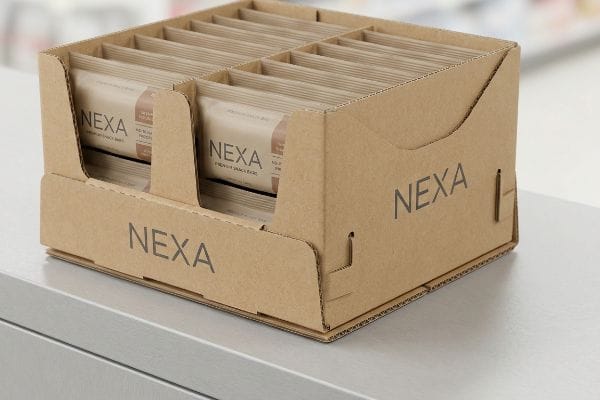
Давайте разберем точную инженерную структуру, необходимую для выживания в быстро меняющейся обстановке розничной торговли и защиты репутации вашего бренда.
Каковы 5 шагов создания экспозиции?
Переход от приблизительного цифрового эскиза к физическому серийному производству предполагает строгий оперативный контроль. Пропуск этапа гарантирует структурные узкие места и дорогостоящие списания со склада.
Создание витрины включает в себя пять конкретных этапов: разработка конструктивной стратегии, допечатная подготовка, быстрое физическое прототипирование, тщательное тестирование в условиях транспортировки и окончательное серийное производство. Последовательное выполнение этих этапов предотвращает катастрофические механические поломки, обеспечивает строгую точность цветопередачи и гарантирует полное соответствие сложным требованиям крупных розничных сетей к мерчандайзингу.
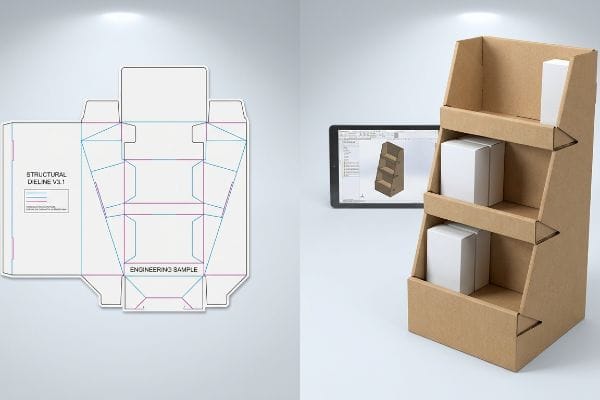
Можно предположить, что первым шагом является графический дизайн, но в мире физического производства это огромная операционная «слепая зона».
Почему рабочие процессы, ориентированные на графику, саботируют производство?
Большинство бренд-команд, естественно, начинают с выбора цветов и создания логотипов. Они передают креативный бриф дизайнерам по маркетингу, которые разрабатывают плоские концепции, основываясь на стандартной логике коммерческой печати¹.Такой подход, ориентированный на графику, предполагает, что физический картон можно легко согнуть и придать ему форму, соответствующую любому красивому изображению, которое они создают на экранах своих компьютеров.
Я постоянно вижу подобные поломки на заводских площадках. Клиент пытается сэкономить, поручая младшему дизайнеру рисовать сложные соединительные элементы непосредственно в простых веб-инструментах, полностью игнорируя механические реалии структурной геометрии САПР (систем автоматизированного проектирования). Когда мы печатаем их несвязанные векторные изображения, физическая сборка терпит неудачу — я наблюдаю, как продавец потеет и ругается, пытаясь прорезать паз, который математически невозможно согнуть, что приводит к громкому, раздражающему звуку разрывающегося картона. Импортировав предварительно сгенерированный PDF-файл, созданный в структурном программном обеспечении, вы фиксируете сложные математические вычисления на нижнем слое, сокращая трудозатраты на упаковку примерно на 20%,потому что картонные элементы фактически плавно соединяются друг с другом.
| Распространённая ошибка новичков | Профессиональное решение | Преимущества для торговых площадей |
|---|---|---|
| Разработка веб-сайтов с помощью веб-инструментов | Заблокируйте базовый слой структурного PDF-файла3 | Предотвращает отрыв язычка |
| Толщина платы не учитывается | Автоматизированный допуск на изгиб | Сборка без трения |
| Предположения о размерах розничной торговли | Соблюдайте строгие ограничения, установленные Законом об американцах с ограниченными возможностями (ADA)4 | Отказов в магазинах не зафиксировано |
Я навсегда разделяю инженерный и графический процессы. Создавая физическую математическую основу до нанесения первой капли краски, я гарантирую, что ваша рекламная кампания действительно выдержит суровые условия розничной торговли.
🛠️ За столом Харви: Ваши графические дизайнеры гадают с припусками на сгибы? 👉 Получите бесплатный аудит вырубных форм ↗ — Прямой доступ к моему рабочему месту. Никакого автоматического спама с рекламой, обещаю.
Что такое PDQ-дисплей?
Вы видите их на каждой кассе, стимулирующих мгновенные импульсивные покупки, пока вы стоите в очереди. Но разработка надежного настольного устройства требует строгого соблюдения законов физического пространства.
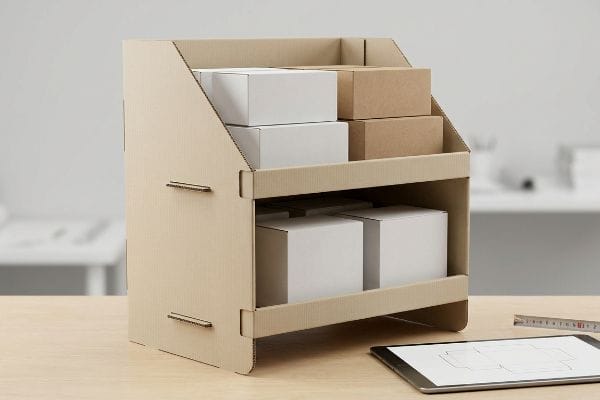
PDQ-витрина — это компактная торговая витрина, специально разработанная для быстрой установки в розничной торговле. Обычно размещаемые на прилавках или стеллажах, эти легкие конструкции из гофрированного картона предназначены для размещения небольших потребительских товаров, максимального повышения узнаваемости бренда и стимулирования мгновенных импульсных покупок в зонах с высокой проходимостью касс.
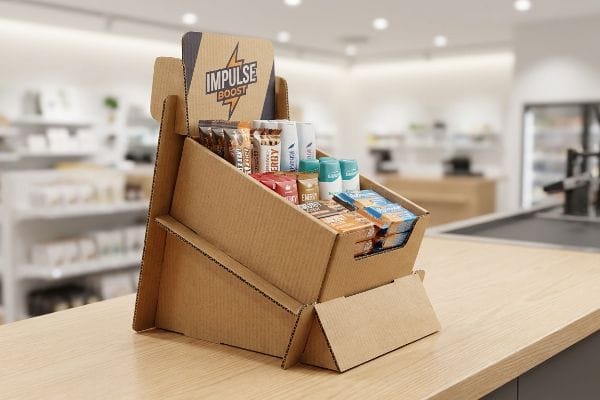
Хотя концепция кажется простой, уменьшение размеров огромной напольной витрины под небольшой кассовый аппарат сопряжено с серьезными физическими рисками.
Переломный момент в развитии компактной розничной торговли
Поскольку торговые площади в кассах строго регламентированы управляющими магазинами⁵,бренды часто пытаются максимизировать количество размещаемой продукции, устанавливая максимально высокую стойку на минимальной площади. Они исходят из предположения, что, если основание помещается в пределах утвержденных физических размеров магазина, вертикальная высота — это просто бесплатное рекламное пространство.
Такое предположение о чрезмерной высоте верхней части — потенциальная проблема. Когда вы выходите за пределы вертикального пространства, не уравновешивая основание, вы нарушаете строгое правило соотношения глубины и высоты 2:3⁶.Я помню, как в аптеке покупательница небрежно задела неустойчивую косметическую витрину; с ужасным глухим стуком вся неустойчивая конструкция опрокинулась вперед, и тяжелые стеклянные флаконы рассыпались по твердому линолеуму полу. Математически зафиксировав соотношение глубины и высоты и выдвинув скрытую гофрированную подставку, я значительно понижаю центр тяжести, предотвращая повреждение продукции и сохраняя витрину в вертикальном положении в часы пик.
| Распространённая ошибка новичков | Профессиональное решение | Преимущества для торговых площадей |
|---|---|---|
| Высокие, массивные профили с массивной верхней частью | Необходимо строго соблюдать соотношение глубин 2:37 | Предотвращает случайное опрокидывание |
| Симметричные квадратные основания | Удлинённая задняя опора для мольберта8 | Стабилизирует воздействие на потребителей |
| Перегрузка верхних уровней | Крупные товарные позиции на нижнем уровне | Понижает центр тяжести9 |
Я отказываюсь строить вертикальные башни на крошечных основаниях. Закрепив физическую геометрию в соответствии со строгими законами вращательного момента, я гарантирую, что ваш компактный торговый автомат выдержит агрессивную, быстро меняющуюся среду современной кассы.
🛠️ Рабочий стол Харви: Ваша столешница опасно неустойчива и склонна к опрокидыванию? 👉 Запросите оценку устойчивости ↗ — Скачайте безопасно. Мой почтовый ящик открыт, если у вас возникнут вопросы позже.
Как создать удачную выставку?
Простое нанесение яркого логотипа на коричневую картонную коробку не гарантирует успеха в розничной торговле. Необходим системный подход к визуальному отвлечению внимания и физической эргономике для покупателя.
Создание качественной витрины включает в себя сочетание прочности конструкции, стратегического визуального мерчандайзинга и точного планирования пространства. Необходимо разработать динамичные асимметричные макеты товаров, использовать высококонтрастную печать плашечными цветами и спроектировать интуитивно понятные механизмы пополнения запасов, чтобы привлечь внимание покупателей, обеспечивая при этом бесперебойную работу для занятых сотрудников магазина.
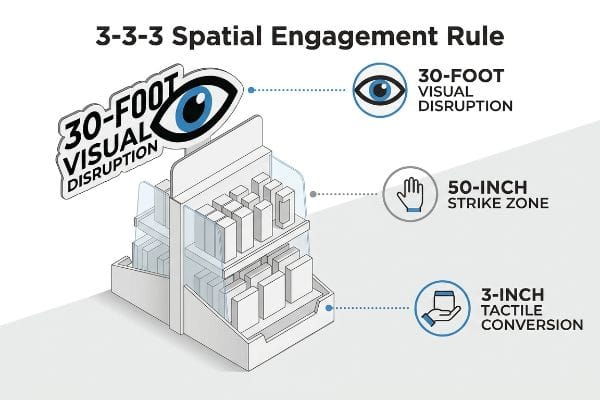
Чтобы по-настоящему завладеть вниманием покупателей, нужно отказаться от того, как выглядит изображение на плоском мониторе компьютера, и освоить географию розничной торговли.
Освоение правила пространственного взаимодействия 3-3-3
Неопытные маркетинговые команды часто проектируют торговые точки исключительно для детального осмотра, игнорируя реальную физическую ситуацию, в которой покупатели перемещаются по торговым рядам. Они напихивают на лицевую панель целые абзацы истории бренда и симметричные блоки товаров, предполагая, что потребитель остановится и прочитает все это, как учебник.
Это создает огромную когнитивную перегрузку в быстро меняющейся розничной среде. Представьте себе рекламный щит на шоссе — если напечатать мелкий текст, водители промчатся мимо. Когда я иду по торговым рядам, я постоянно вижу красиво оформленные витрины, которые полностью сливаются с фоном, потому что не привлекают визуального внимания с расстояния 9,1 метра, и наблюдаю, как покупатели с трудом выковыривают товары из плотно заставленных полок. Внедряя пространственную модель 3-3-3—используя массивную вырезанную форму для визуального воздействия на расстоянии 9 метров, оптимизируя эргономику полок до зоны воздействия в 127 см для вовлечения с расстояния 90 см и уменьшая передний удерживающий бортик для окончательного тактильного эффекта на расстоянии 7,5 см — я значительно увеличиваю поток посетителей и повышаю ваши продажи.
| Распространённая ошибка новичков | Профессиональное решение | Преимущества для торговых площадей |
|---|---|---|
| Краткие текстовые абзацы | Массивные 3D-вырезанные заголовки | Привлекает пешеходный поток на расстояние до 9 метров11 |
| Губы с высокой степенью удержания | Сузить передний спойлер до 85% видимости12 | Усиливает тактильное взаимодействие |
| Плоские симметричные сетки | асимметричные делители 3-5-713 | Создает визуальное напряжение |
Я проектирую каждый элемент таким образом, чтобы он отвечал именно пространственной психологии человека. Если ваш дизайн не может привлечь внимание спешащего покупателя, находящегося в другом конце прохода, и плавно направить его руку прямо к товару, это просто дорогостоящие потери на складе.
🛠️ Задание от Харви: Не скрывают ли фиксаторы вашего продукта основной логотип бренда от потребителей? 👉 Запросите проверку видимости ↗ — Никаких форм, которые приводят к бесконечным звонкам отдела продаж. Только чистая выгода.
Как оформить торговую витрину?
Переход от цифрового файла дизайна к масштабному физическому производству — это тот момент, когда плохо спланированные проекты по упаковке терпят неудачу. Допуски меняются, и сырье оказывает сопротивление.
Изготовление витрин для розничной торговли требует применения специализированных автоматизированных производственных процессов. На предприятиях используются высокоскоростные вырубные станки для точной разметки гофрированных листов, применяются промышленные технологии литографического ламинирования для получения ярких графических изображений на верхнем слое, а также разрабатываются специальные допуски на сгибы для обеспечения бесшовной сборки многокомпонентных изделий на заключительном этапе упаковки в рамках цепочки поставок.
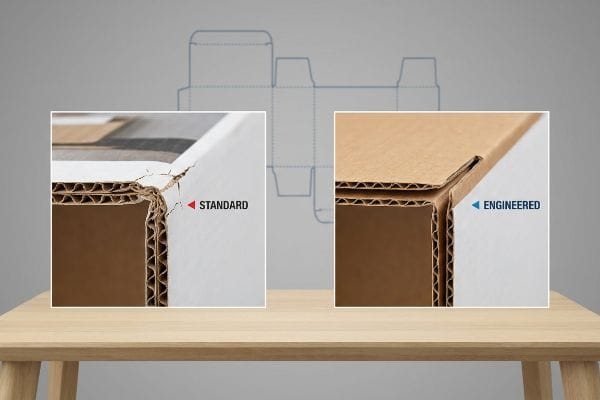
Но знания теории недостаточно, когда запускается тяжелая техника и вступает в действие микротрение массового производства.
Почему стандартные вырубные формы выходят из строя на заводе
Отделы закупок часто передают идеально нарисованные цифровые чертежи прямо в производственный цех, полагая, что прямая линия в программном обеспечении соответствует идеальному физическому сгибу. Они проектируют соединительные выступы и пазы для сгибания точно такой же ширины, как и сопрягаемая панель, полностью игнорируя физический объем, который занимает необработанный картон при сгибании под давлением.
Это не просто теория — я вижу это на испытательном полигоне, когда мы пытаемся собрать стандартные некалиброванные файлы. Когда толстый 3-миллиметровый (0,11 дюйма) кусок гофрированного картона B-типа15 сгибается на 90 градусов, он физически расходует материал, и если приемный паз не расширен, детали агрессивно заклинивают. Я измеряю сопротивление на сборочной линии: сильное трение заставляет упаковочную машину сжимать внутренние гофры, и я слышу резкий треск напечатанного верхнего листа, трескающегося под натяжением. Автоматически закладывая строгий допуск на компенсацию толщины 1,5 мм (0,05 дюйма)16 в каждый паз, я полностью устраняю заклинивание из-за трения, сокращая время сборки упаковочной машины примерно на 35 секунд на единицу и защищая рентабельность проекта.
| Распространённая ошибка новичков | Профессиональное решение | Преимущества для торговых площадей |
|---|---|---|
| Размеры паза 1:1 | Добавить припуск на изгиб штангенциркуля17 | Сборка вручную без трения |
| Игнорируя волнение на доске | Добавьте буфер влажности толщиной 1 мм18 | Выдерживает морские перевозки |
| Четкие складки под углом 90 градусов | Профилирование матрицы складок19 | Предотвращает растрескивание верхнего слоя |
На моем предприятии я отказываюсь позволять цифровым предположениям диктовать физические результаты. Математически компенсируя конкретную толщину и сопротивление сырья до начала производства, я гарантирую безупречное складывание ваших изделий на сборочной линии.
🛠️ Совет от Харви: Не позволяйте двухмиллиметровому структурному дефекту испортить запуск продаж в 500 магазинах. 👉 Пришлите мне файл с чертежами ↗ — Я проверю расчеты, прежде чем вы потратите бюджет на массовое производство.
Заключение
Вы можете выбрать дешевого поставщика, который игнорирует объем печатной платы, но когда эти математически некорректные соединительные элементы отказываются складываться на линии упаковки, замедляя ручную сборку примерно на 30%, вся ваша рентабельность инвестиций будет уничтожена. Это точная спецификация, которую используют мои 10 крупнейших розничных клиентов, чтобы гарантировать отсутствие брака при печати. Перестаньте полагаться на теоретические допуски и позвольте мне лично проверить ваши плоские конструкции с помощью моего бесплатного аудита высечки ↗, чтобы выявить фатальное механическое трение до начала массового производства.
«КРЕАТИВНЫЙ СТРУКТУРНЫЙ ДИЗАЙН НИКОГДА НЕ МОЖЕТ БЫТЬ ИГНОРИРУЕМ», https://www.bcipkg.com/creative-structural-design-can-never-be-ignored/. Профессиональные руководства по упаковке противопоставляют логику 2D-коммерческой печатной компоновки 3D-структурному проектированию, необходимому для физических дисплеев. Роль доказательства: техническое сравнение; тип источника: отраслевой справочник. Подтверждает: утверждение о том, что рабочие процессы, ориентированные на печать, непригодны для структурного проектирования. Примечание об области применения: применимо к гофрированному картону. ↩
«Анализ влияния затрат на весь процесс изготовления сборных конструкций…», https://pmc.ncbi.nlm.nih.gov/articles/PMC11920401/. Технический отчет отрасли или исследование производства предоставили бы количественные данные о сокращении трудозатрат при использовании программного обеспечения для проектирования конструкций по сравнению с ручным векторным проектированием. Роль доказательства: количественная проверка; тип источника: отраслевой отчет. Подтверждает: повышение эффективности сборочных работ при использовании программного обеспечения для проектирования конструкций. Примечание к области применения: процентное соотношение может варьироваться в зависимости от сложности отображения. ↩
«Исследование влияния перфораций на несущую способность…», https://pmc.ncbi.nlm.nih.gov/articles/PMC11396172/. Анализ того, как блокировка структурного слоя высечки в PDF-файле предотвращает графическое смещение, вызывающее физические дефекты, такие как разрыв язычка во время сборки. Роль доказательства: передовая отраслевая практика; тип источника: профессиональное руководство по производству. Подтверждает: связь между блокировкой структурного слоя и предотвращением разрыва язычка. Примечание по области применения: актуально для рабочих процессов цифрового производства. ↩
«Стандарты доступности ADA – Access-Board.gov», https://www.access-board.gov/ada/. Подтверждение того, что стандарты Закона об американцах с ограниченными возможностями (ADA) устанавливают конкретные ограничения по зазорам и выступам для торгового оборудования, чтобы обеспечить доступность. Роль доказательства: нормативное подтверждение; тип источника: государственный стандарт. Подтверждает: утверждение о том, что соблюдение ограничений ADA предотвращает отказы в приеме товаров в магазины. Примечание об области применения: в основном применяется к розничной торговле в США. ↩
«(PDF) Распределение торговых площадей – ResearchGate», https://www.researchgate.net/publication/235317356_Retail_Space_Allocation. Отраслевые стандарты планирования торговых площадей и соглашений о размещении товаров подтверждают, что зоны кассовых аппаратов строго контролируются и распределяются. Роль доказательства: фактическое подтверждение; тип источника: руководство по розничной торговле. Подтверждает: дефицит кассовых площадей. Примечание: в основном применимо к крупным торговым центрам. ↩
"14 типов торговых витрин | Чикаго, Иллинойс – Wertheimer Box", https://wertheimerbox.com/types-of-retail-displays/. Проверка соответствия стандартному соотношению глубины и высоты, используемому для предотвращения опрокидывания в компактных торговых витринах. Роль доказательства: техническая спецификация; тип источника: справочник по проектированию упаковки. Подтверждает: требование соотношения 2:3 для обеспечения стабильности. Примечание по области применения: применение к гофрированным картонным витринам. ↩
«Обеспечение устойчивости и структурной поддержки временных витрин», https://www.ud-direct.com/blog/tips-and-tricks-to-ensure-stability-and-structure-support-in-temporary-displays. Инженерные стандарты для торгового оборудования устанавливают конкретные соотношения для обеспечения устойчивости столешницы. Роль доказательства: техническая спецификация; тип источника: руководство по промышленному дизайну. Опоры: соотношение глубины 2:3 для предотвращения опрокидывания. Примечание к области применения: относится к рекламным стендам малого формата. ↩
«Честный обзор мольберта для художника, работающего на пленэре – YouTube», https://www.youtube.com/watch?v=4m7xwea7H5c. Руководства по проектированию торговых стендов подробно описывают, как удлинение мольберта увеличивает площадь опоры для предотвращения опрокидывания. Роль доказательства: стандарт проектирования; тип источника: руководство по производству. Поддержка: использование удлиненных мольбертов для стабилизации при ударах о потребителя. Примечание об области применения: применимо к складным или с подставкой. ↩
«РАЗМЕЩЕНИЕ БРЕНДА И ВЫБОР ПОТРЕБИТЕЛЯ: АНАЛИЗ В МАГАЗИНЕ…», https://pmc.ncbi.nlm.nih.gov/articles/PMC2741065/. Основные принципы физики статики объясняют, как размещение массы в самой нижней точке конструкции повышает ее устойчивость. Роль доказательства: физический закон; тип источника: учебник по инженерным дисциплинам. Подтверждает: утверждение о том, что тяжелые товары на нижнем ярусе предотвращают опрокидывание. Примечание: универсальный принцип физики. ↩
«Важность правила 3 для ваших индивидуальных витрин», https://mcintyredisplays.com/blog/custom-store-displays/. Авторитетные стандарты дизайна розничной торговли подтверждают эффективность многоуровневых зон взаимодействия, ориентированных на визуальные, физические и тактильные триггеры. Роль доказательства: проверка; тип источника: исследование эргономики розничной торговли. Поддерживает: модель конверсии 3-3-3, основанную на расстоянии. Примечание по области применения: эффективность может варьироваться в зависимости от категории товара. ↩
«Отличные витрины начинаются не в торговом зале – они… – Instagram», https://www.instagram.com/reel/DYST70vvHuo/. Анализ стандартов визуального мерчандайзинга демонстрирует, как объемные 3D-вывески увеличивают расстояние, с которого покупатели воспринимают витрину. Роль доказательства: количественная оценка эффекта; тип источника: исследование в области психологии розничной торговли. Подтверждает: эффективность 3D-заголовков в привлечении покупателей издалека. Примечание: эффективность зависит от прямой видимости и освещения магазина. ↩
«Как измерить успех розничной торговли с помощью витрин – Фрэнк Майер», https://www.frankmayer.com/blog/how-to-measure-retail-display-success/. Исследования поведения потребителей показывают, что уменьшение физических барьеров для видимости товара увеличивает вероятность тактильного взаимодействия. Роль доказательства: технические характеристики; тип источника: отчет по потребительской эргономике. Подтверждает: корреляцию между высотой края витрины и частотой тактильных ощущений. Примечание по области применения: в основном применимо к открытым витринам в местах продаж. ↩
«Услуги и стратегия визуального мерчандайзинга | T-ROC Global», https://trocglobal.com/visual-merchandising/. Принципы визуального дизайна, касающиеся «правила нечетных чисел» и асимметрии, предполагают, что нерегулярные группировки создают более динамичное визуальное напряжение, чем симметричные сетки. Роль доказательства: принцип дизайна; тип источника: руководство по визуальному мерчандайзингу. Подтверждает: использование асимметричных разделителей для привлечения внимания. Примечание: общие эстетические рекомендации, а не строгий эмпирический показатель. ↩
«Аналитическое определение жесткости на изгиб пятислойной конструкции…», https://pmc.ncbi.nlm.nih.gov/articles/PMC8777652/. Техническое объяснение припуска на изгиб и влияния толщины материала на допуски при складывании в упаковке. Роль доказательства: техническая проверка; тип источника: инженерное руководство. Подтверждает: утверждение о том, что игнорирование объема материала приводит к сбоям в сборке. Примечание об области применения: относится конкретно к гофрированному и сложенному картону. ↩
«[PDF] Технические характеристики гофрированного картона – Ассоциация Fibre Box», https://www.fibrebox.org/assets/2025/09/Walmart_Corrugated-Board_Specifications_Automation_Packaging_Standards.pdf. Техническая спецификация, разработанная отраслевыми специалистами, подтверждает стандартный диапазон толщины гофрированного картона типа B. Роль подтверждения: фактическая проверка; тип источника: техническая спецификация. Подтверждает: физические размеры используемого материала. Примечание по области применения: толщина может незначительно варьироваться в зависимости от производителя. ↩
«Оценка прочности на сжатие коробок из гофрированного картона…», https://pmc.ncbi.nlm.nih.gov/articles/PMC8467740/. В руководствах по проектированию упаковки описывается необходимость добавления допусков (компенсационных зазоров) к пазам с учетом толщины материала и радиуса сгиба. Роль подтверждения: техническая проверка; тип источника: инженерное руководство. Подтверждает: применение определенных допусков для предотвращения заклинивания материала. Примечание об области применения: точные значения допусков зависят от типа гофрированного картона и марки картона. ↩
«Полное руководство по гофрированным коробкам – Shorr Packaging», https://www.shorr.com/resources/blog/ultimate-guide-corrugated-boxes/. Техническая документация по допускам на упаковку, объясняющая, как толщина материала влияет на радиус изгиба и посадку при сборке. Роль подтверждения: техническая спецификация; тип источника: инженерное руководство. Подтверждает: необходимость припуска на изгиб в масштабе 1:1. Примечание об области применения: относится к гофрированным материалам. ↩
«Влияние относительной влажности на прочность на сжатие…», https://open.clemson.edu/all_theses/3225/. Отраслевые стандарты, касающиеся размерной стабильности и расширения материала бумажной упаковки во время морской транспортировки. Роль доказательства: эмпирический показатель; тип источника: руководство по материаловедению. Подтверждает: требование к буферу в 1 мм для влажности. Примечание к области применения: фокусируется на длительном воздействии при транспортировке. ↩
«Как отремонтировать верхний слой картона — YouTube», https://www.youtube.com/watch?v=BSUc5jrvkJQ. Техническое объяснение геометрии матрицы высечки, используемой для предотвращения обрыва волокон и растрескивания в картоне большого диаметра. Роль доказательства: производственный процесс; тип источника: руководство по промышленной высечке. Подтверждает: использование профилирования для предотвращения растрескивания листа. Примечание по области применения: применимо к тяжелым торговым витринам. ↩