आप अपने रिटेल मर्चेंडाइजर के संरचनात्मक और दृश्य तत्वों पर पूर्ण नियंत्रण रख सकते हैं, बशर्ते आप पेपरबोर्ड इंजीनियरिंग और आपूर्ति श्रृंखला लॉजिस्टिक्स के भौतिक नियमों का सम्मान करें।.
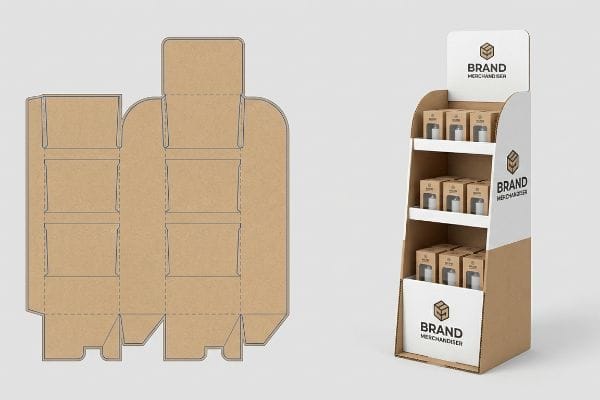
जी हाँ। आपके कार्डबोर्ड फ्लोर स्टैंड के डिज़ाइन को अपनी पसंद के अनुसार बनाना पूरी तरह से संभव है। निर्माता विशिष्ट ब्रांड आवश्यकताओं के अनुरूप संरचनात्मक डाईलाइन में बदलाव करते हैं, शेल्फ की ऊँचाई समायोजित करते हैं और फुल-कलर लिथोग्राफिक प्रिंटिंग का उपयोग करते हैं। यह अनुकूलित दृष्टिकोण सुनिश्चित करता है कि स्टैंड आपके सामान को पूरी तरह से प्रदर्शित करे और साथ ही खुदरा विक्रेताओं के आकार संबंधी सख्त नियमों का भी पालन करे।.
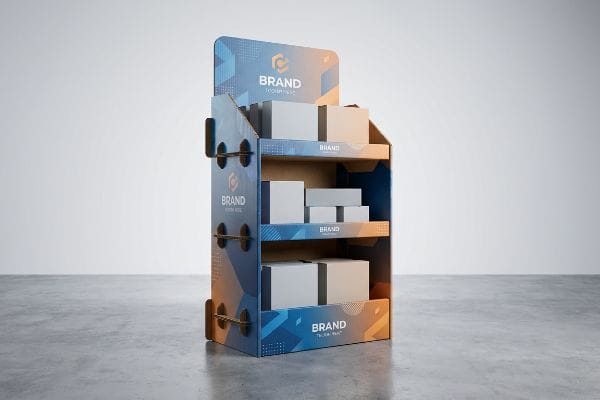
हालांकि रचनात्मक स्वतंत्रता काफी अधिक है, लेकिन 2D डिजिटल अवधारणा से भौतिक, भार वहन करने वाली संरचना में परिवर्तन के लिए नालीदार कार्डबोर्ड की यांत्रिकी की गहरी समझ आवश्यक है। आइए देखें कि यह विशिष्ट डिस्प्ले प्रकारों पर कैसे लागू होता है।.
तस्वीर के लिए कार्डबोर्ड स्टैंड कैसे बनाएं?
छोटे आकार के खुदरा विक्रेता अक्सर स्थिरता की तुलना में सौंदर्यशास्त्र को प्राथमिकता देते हैं, जिसके कारण भारी उत्पादों की व्यवस्था खुदरा काउंटर पर तुरंत विफल हो जाती है।.
किसी तस्वीर या हल्के सामान के लिए कार्डबोर्ड स्टैंड बनाने के लिए गुरुत्वाकर्षण के सटीक केंद्र की इंजीनियरिंग आवश्यक है। इसमें एक सिंगल-वॉल नालीदार शीट को काटकर और मोड़कर एक विस्तारित ईज़ल बैक बनाया जाता है, जिससे यह सुनिश्चित होता है कि ऊर्ध्वाधर बैक-पैनल एक स्थिर कोण पर टिका रहे और स्टैंड आगे की ओर न झुके।.
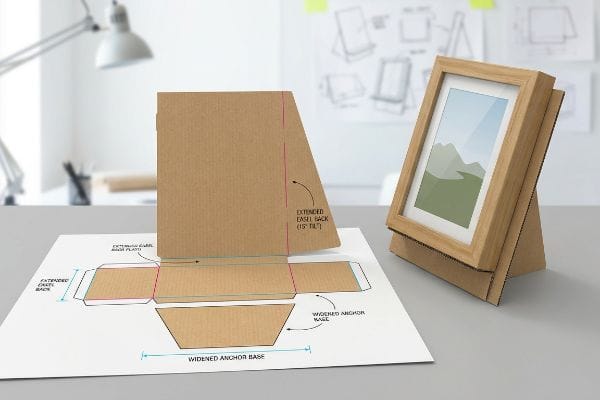
हल्के फ्रेम को सुरक्षित करना सरल लगता है, लेकिन संतुलन संबंधी समस्याएं भीड़भाड़ वाले रिटेल काउंटरों पर इसकी प्रस्तुति को जल्दी ही खराब कर देती हैं।.
ईज़ल बैक एक्सटेंशन में महारत हासिल करना
एक हल्के पीओपी (पॉइंट ऑफ परचेज़) यूनिट का निर्माण करते समय, कई डिज़ाइनर बस एक सीधी, कठोर रीढ़ काटते हैं और उसे बैक पैनल पर चिपका देते हैं। वे मानते हैं कि एक समतल 90-डिग्री कोण सबसे सीधा ऊर्ध्वाधर समर्थन प्रदान करता है1।
मैं अक्सर देखता हूँ कि ग्राहक जब संकरे चेकआउट काउंटर पर भारी कॉस्मेटिक्स या फ्रेम वाली चीज़ों को संतुलित करने की कोशिश करते हैं, तो यह दुर्घटना हो जाती है। अनुभवी डिज़ाइनर भी अक्सर इस कमी को नज़रअंदाज़ कर देते हैं और ईज़ल का कोण ज़रूरत से ज़्यादा झुका देते हैं। जब कोई जल्दबाज़ी में निकला ग्राहक पास से गुज़रता है, तो पूरी डिस्प्ले के ज़मीन पर गिरने की हल्की सी आवाज़ सुनाई देती है। मैं इस समस्या को ठीक करने के लिए एक कस्टमाइज़्ड एक्सटेंडेड ईज़ल बैक डिज़ाइन करता हूँ जिसमें एक नकली बॉटम लॉक2लगा होता है, जिससे वज़न का वितरण पीछे की ओर शिफ्ट हो जाता है। ज्यामिति में यह छोटा सा बदलाव गिरने के खतरे को पूरी तरह खत्म कर देता है, आपके सामान को नुकसान से बचाता है और स्टोर के कर्मचारियों को बार-बार गिरी हुई चीज़ों को उठाने से बचाता है।
| नौसिखियों की आम गलती | प्रो फिक्स | रिटेल-फ्लोर लाभ |
|---|---|---|
| 90 डिग्री का फ्लश बैक सपोर्ट | 15 डिग्री कोण वाला विस्तारित ईज़ल3 | आगे की ओर पलटने से रोकता है |
| मानक टेप पर निर्भर रहना | इंटरलॉकिंग नकली निचला टैब4 | असेंबली में लगने वाले 20 सेकंड का समय बचाता है |
| संकीर्ण आधार पदचिह्न | चौड़ा समलम्बाकार लंगर5 | खरीदारी के दौरान लगने वाली टक्करों से बच जाता है |
काउंटर डिस्प्ले के लिए मैं कभी भी सीधे ऊर्ध्वाधर कट पर भरोसा नहीं करता । थोड़ा पीछे की ओर झुकाव वाला डिज़ाइन यह सुनिश्चित करता है कि यूनिट मजबूती से टिकी रहे, जिससे अधिक भीड़भाड़ वाले चेकआउट क्षेत्रों में आपके ब्रांड की प्रतिष्ठा सुरक्षित रहती है।
🛠️ हार्वे का डेस्क: क्या आपको लगता है कि आपके काउंटर यूनिट पर सामान का वजन पड़ने से वह गिर जाएगा? 👉 मुझे अपनी डाइलाइन चेक करने दीजिए ↗ — सीधे मेरे डेस्क से संपर्क करें। मैं वादा करता हूँ, कोई ऑटोमेटेड सेल्स स्पैम नहीं आएगा।
घर पर डिस्प्ले स्टैंड कैसे बनाएं?
अपने गैराज में प्रोटोटाइप बनाना एक बेहतरीन शुरुआत है, लेकिन उस अवधारणा को बड़े पैमाने पर उत्पादन में बदलने से गणितीय रूप से गंभीर बाधाएं उत्पन्न होती हैं।.
घर पर डिस्प्ले स्टैंड बनाने के लिए एक बेसिक टेम्पलेट बनाना, मोटे पेपरबोर्ड को चाकू से काटना और टुकड़ों को आपस में जोड़ना शामिल है। हालांकि यह DIY तरीका साधारण विज़ुअल मॉकअप के लिए ठीक है, लेकिन इसमें वास्तविक रिटेल वातावरण में भारी सामान को सहारा देने के लिए आवश्यक लचीलेपन की सुविधा नहीं है।.
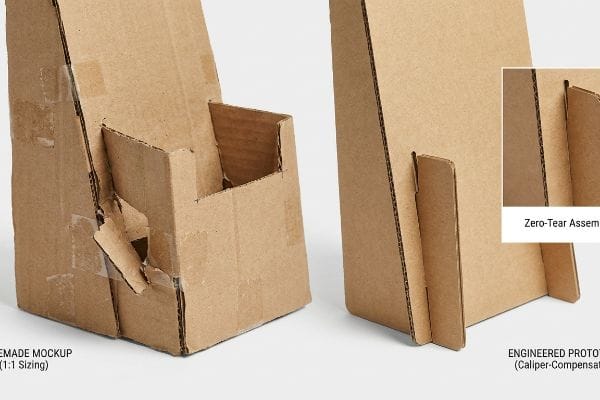
भौतिक मॉकअप बनाने से आकार को समझने में मदद मिलती है, लेकिन आप उन हाथ से बनाए गए आयामों को सीधे कारखाने की कटिंग टेबल पर नहीं भेज सकते।.
कैलिपर क्षतिपूर्ति का छिपा हुआ गणित
ब्रांड के संस्थापक अक्सर अपने इंटरलॉकिंग स्लॉट और टैब का खाका खुद बनाते हैं, और हर चीज को रूलर से सटीक रूप से मापते हैं। वे मानते हैं कि यदि एक टैब ठीक 0.12 इंच (3 मिमी) चौड़ा है , तो संबंधित रिसीविंग स्लॉट भी ठीक 0.12 इंच (3 मिमी) होना चाहिए।
DIY मॉकअप से फ़ैक्टरी ऑर्डर में बदलाव करते समय अनुभवी प्रोक्योरमेंट टीमें भी अक्सर इस समस्या में फंस जाती हैं। जब आप B-फ्लूट नालीदार कार्डबोर्ड के एक टुकड़े को 90 डिग्री पर मोड़ते हैं, तो सामग्री की मोटाई क्रीज़ के साथ जगह घेर लेती है । मैंने असेंबली टीमों को एक तंग, घर पर बने स्लॉट डिज़ाइन को जबरदस्ती जोड़ने की कोशिश में पसीना बहाते देखा है, जिसके परिणामस्वरूप अंततः कच्चा कार्डबोर्ड ज़ोरदार आवाज़ के साथ फट जाता है। मेरी सुविधा में, मैं CAD (कंप्यूटर-एडेड डिज़ाइन) सॉफ़्टवेयर के माध्यम से स्वचालित कैलिपर क्षतिपूर्ति एल्गोरिदम का उपयोग करके विशिष्ट फ्लूट प्रोफ़ाइल के आधार पर उन स्लॉट को चौड़ा करता हूँ। यह को-पैकर के लिए घर्षण रहित, बिना फटे असेंबली की गारंटी देता है, जिससे श्रम लागत में भारी कमी आती है और रिटेल फ़्लोर पर टेप से होने वाली गड़बड़ियों से बचा जा सकता है।
| नौसिखियों की आम गलती | प्रो फिक्स | रिटेल-फ्लोर लाभ |
|---|---|---|
| 1:1 स्लॉट-टू-टैब साइजिंग | कैलिपर-क्षतिपूर्ति स्लॉट चौड़ाई9 | कागज के फटने की समस्या को खत्म करता है |
| बोर्ड की मोटाई को अनदेखा करना | मोड़ों में बांसुरी गेज को फैक्टर करें10 | वर्गाकार संयोजन की गारंटी |
| हाथ से बनाए गए टेम्पलेट्स | पैरामीट्रिक सीएडी इंजीनियरिंग11 | शेल्फ को हिलने-डुलने से रोकता है |
मैं हमेशा पैरामीट्रिक सॉफ़्टवेयर का उपयोग करके DIY स्केच को शुरू से फिर से बनाता हूँ। घर पर बनाए गए रूलर से नापने से पैकिंग लाइन पर भारी घर्षण और संरचनात्मक खराबी होना तय है।.
🛠️ हार्वे का डेस्क: क्या प्रोटोटाइप को मोड़ते समय आपके इंटरलॉकिंग टैब फट रहे हैं? 👉 मुफ़्त CAD टेम्पलेट का अनुरोध करें ↗ — सुरक्षित रूप से डाउनलोड करें। बाद में कोई प्रश्न होने पर मेरा इनबॉक्स खुला है।
डिस्प्ले बनाने के 5 चरण क्या हैं?
किसी रिटेल मर्चेंडाइजर को सफलतापूर्वक लॉन्च करने के लिए स्ट्रक्चरल इंजीनियरिंग, ग्राफिक डिजाइन और सप्लाई चेन लॉजिस्टिक्स को एक ही क्रमबद्ध प्रक्रिया में संरेखित करना आवश्यक है।.
डिस्प्ले बनाने की प्रक्रिया में पाँच चरण शामिल हैं: संरचनात्मक अभियांत्रिकी, ग्राफिक डाईलाइन अनुप्रयोग, प्रीप्रेस फ़ाइल अंशांकन, भौतिक प्रोटोटाइपिंग और बड़े पैमाने पर उत्पादन। इस सख्त क्रम का पालन यह सुनिश्चित करता है कि अंतिम भौतिक इकाई आवश्यक उत्पाद भार को सही ढंग से वहन कर सके और साथ ही खुदरा दुकानों की तेज़ रोशनी में भी त्रुटिहीन दृश्य ब्रांडिंग बनाए रखे।.
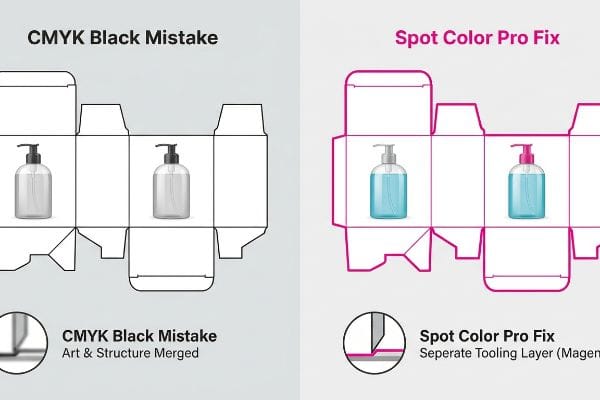
कलाकृति की मैपिंग करना भले ही सबसे अधिक दृश्यात्मक रूप से प्रभावशाली चरण प्रतीत हो, लेकिन प्रीप्रेस कैलिब्रेशन चरण यह निर्धारित करता है कि मशीन वास्तव में आपकी संरचना को सही ढंग से काटती है या नहीं।.
प्रीप्रेस टूलिंग चरण से सफलतापूर्वक गुजरना
कई रचनात्मक टीमें अपने ग्राफ़िक्स को दिए गए टेम्पलेट पर मैप करती हैं, और मानक CMYK (सियान, मैजेंटा, येलो, की) काली रेखाओं12 यह दर्शाती हैं कि कारखाने को बोर्ड को कहाँ मोड़ना या काटना चाहिए। वे मान लेते हैं कि स्वचालित कटिंग मशीनरी इन दृश्य रेखाओं को उसी तरह पढ़ती है जैसे एक मानक डेस्कटॉप प्रिंटर पढ़ता है।
कंप्यूटर न्यूमेरिकल कंट्रोल (सीएनसी) मशीनों को ऐसे समझें जैसे आँखों पर पट्टी बाँधे हुए कामगार; वे रंग नहीं देख पातीं, वे केवल विशिष्ट डेटा पथों को महसूस करती हैं। यदि आप अपनी कट लाइनों को मानक काले रंग में छोड़ देते हैं, तो प्रीप्रेस सॉफ़्टवेयर उन्हें सीधे आर्टवर्क लेयर में मिला देता है। मैंने अनगिनत फ़ाइलें देखी हैं जहाँ मशीन ने केवल दिखाई देने वाली काली आउटलाइनें छापी होतीं, लेकिन कोई भी भौतिक कट नहीं किया होता, जिससे ग्राहक को एक बेकार, ठोस बोर्ड मिलता। मैं आने वाली सभी फ़ाइलों की सख्ती से प्री-फ़्लाइट जाँच करता हूँ ताकि यह सुनिश्चित हो सके कि संरचनात्मक पथों को सटीक स्पॉट रंगों 13 को सौंपा गया है — जैसे कट के लिए 100% मैजेंटा। यह तकनीकी कदम स्टील ब्लेडों के सही ढंग से काम करने की गारंटी देता है, जिससे भारी देरी से बचा जा सकता है और उत्पादन समय-सीमा पूरी तरह से बरकरार रहती है।
| नौसिखियों की आम गलती | प्रो फिक्स | रिटेल-फ्लोर लाभ |
|---|---|---|
| कट के लिए CMYK ब्लैक का उपयोग करना | निरपेक्ष स्पॉट रंगों को निर्दिष्ट करना14 | साफ मशीन कटाई सुनिश्चित करता है |
| संरचना और कला का संयोजन | वेक्टर टूलिंग परतों को अलग करना15 | मुद्रित रूपरेखा त्रुटियों को रोकता है |
| प्रीप्रेस जांचों को छोड़ना | सख्त फ़ाइल पूर्व-उड़ान | कैंपेन लॉन्च को समय पर रखता है |
मैं स्पॉट कलर मैपिंग के बिना किसी भी फाइल को कटिंग टेबल पर नहीं जाने देता। अगर मशीन को कच्चे बोर्ड से डिज़ाइन को भौतिक रूप से निकालना नहीं आता, तो एक सुंदर डिज़ाइन भी बेकार है।.
🛠️ हार्वे का डेस्क: क्या आप सुनिश्चित नहीं हैं कि आपके ग्राफिक डिज़ाइनर ने आर्टवर्क से कट लाइनों को ठीक से अलग किया है? 👉 प्री-फ़्लाइट के लिए अपनी फ़ाइल भेजें ↗ — कोई फ़ॉर्म नहीं जो अंतहीन सेल्स कॉल को ट्रिगर करें। बस शुद्ध मूल्य।
डिस्प्ले बोर्ड बनाने में किन सामग्रियों का उपयोग किया जाता है?
सही सब्सट्रेट का चयन करना आपकी आपूर्ति श्रृंखला में सबसे महत्वपूर्ण निर्णय है, जो गतिशील भार क्षमता और माल ढुलाई की निरंतरता दोनों को निर्धारित करता है।.
डिस्प्ले बोर्ड बनाने में मुख्य रूप से नालीदार पेपरबोर्ड, सॉलिड चिपबोर्ड और कभी-कभी विशेष घटकों के लिए रिजिड फोम या प्लास्टिक का उपयोग किया जाता है। नालीदार टेस्टलाइनर और वर्जिन क्राफ्ट अभी भी उद्योग में मानक हैं, जो भारी खुदरा भार के लिए इष्टतम शॉक एब्जॉर्प्शन और संरचनात्मक संपीड़न शक्ति प्रदान करते हैं।.
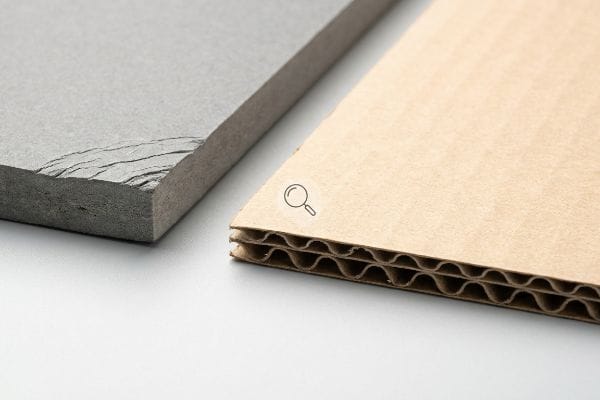
लेकिन जब मशीनें चलना शुरू हो जाती हैं और माल के वास्तविक पैलेट इन सतहों पर गिराए जाते हैं, तो केवल सिद्धांत जानना ही पर्याप्त नहीं होता है।.
कारखाने में सॉलिड चिपबोर्ड क्यों विफल हो जाता है?
जब हल्के कॉस्मेटिक काउंटर यूनिट्स को पूर्ण आकार के रिटेल-रेडी ट्रे में बदलने की कोशिश की जाती है , तो खरीदार अक्सर मोटे, बिना खांचे वाले ठोस चिपबोर्ड 16 का उपयोग करते हैं । उनका मानना है कि चूंकि ठोस बोर्ड उनके हाथों में अविश्वसनीय रूप से घना और कठोर लगता है, इसलिए इसमें भारी टॉप-लोड को संभालने के लिए आवश्यक संरचनात्मक क्षमता होती है।
प्रयोगशाला में एक डिस्प्ले को खड़ा रखना आसान है, लेकिन जब आपको देश भर में 500 डिस्प्ले भेजने हों तो कठोर वास्तविकता सामने आती है। मेरी सुविधा में, मैं अक्सर ISTA (इंटरनेशनल सेफ ट्रांजिट एसोसिएशन) कंपन परीक्षण 17 के दौरान ठोस चिपबोर्ड को दबाव में पूरी तरह से मुड़ते हुए देखता हूँ । बिना खांचे वाले सब्सट्रेट में नालीदार बोर्ड में पाए जाने वाले आंतरिक तरंग-समान मेहराब 18 नहीं होते हैं , जिसका अर्थ है कि उनमें गतिज झटके को गतिशील रूप से फैलाने के लिए कोई यांत्रिक तंत्र नहीं होता है। जब परिवहन के दौरान 25 पाउंड (11.3 किलोग्राम) का भार हिलता है, तो आप कठोर चिपबोर्ड के टूटने और चटकने की आवाज स्पष्ट रूप से सुन सकते हैं। मैं सामग्री को हल्के ई-फ्लूट नालीदार बोर्ड में बदलकर इस समस्या को दूर करता हूँ। उस आंतरिक मेहराबदार ज्यामिति का उपयोग करके, मैं गतिज झटके के अवशोषण को बहाल करता हूँ, यह सुनिश्चित करता हूँ कि ट्रे पूरी तरह से सीधी पहुँचें और ग्राहक को खुदरा विक्रेताओं द्वारा किए जाने वाले भारी शुल्क से बचाता हूँ ।
| नौसिखियों की आम गलती | प्रो फिक्स | रिटेल-फ्लोर लाभ |
|---|---|---|
| ठोस चिपबोर्ड निर्दिष्ट करना | ई-फ्लूट नालीदार में अपग्रेड करना19 | गतिज पारगमन झटके को अवशोषित करता है |
| घनत्व को शक्ति के समतुल्य मानना | आंतरिक खांचेदार मेहराबों का उपयोग करना20 | आधार के टूटने से बचाता है |
| परिवहन कंपन को अनदेखा करना | आईएसटीए पारगमन भार परीक्षण21 | रिटेलर द्वारा किए जाने वाले चार्जबैक को समाप्त करता है |
मैं ज्यामितीय इंजीनियरिंग की तुलना में कच्चे माल के घनत्व पर कभी भरोसा नहीं करता। सूक्ष्म-सूत्रबद्ध सब्सट्रेट का उपयोग करने से यह सुनिश्चित होता है कि भौतिक पैकेजिंग वैश्विक माल वितरण की कठोर गतिज वास्तविकता को झेल सके।.
🛠️ हार्वे की सलाह: 2 मिलीमीटर की संरचनात्मक खामी को 500 स्टोरों में अपना कारोबार ठप न करने दें। 👉 मुझे अपनी डाइलाइन फ़ाइल भेजें ↗ — बड़े पैमाने पर उत्पादन पर बजट बर्बाद करने से पहले मैं गणितीय गणनाओं की गहन जांच कर लूंगा।
निष्कर्ष
आप सस्ता विक्रेता चुन सकते हैं, लेकिन जब परिवहन के दौरान कंपन से वह बिना खांचे वाला ठोस चिपबोर्ड टूट जाता है, तो खुदरा विक्रेता तुरंत उसे अस्वीकार कर देते हैं और आपको हफ्तों तक महंगे मैन्युअल सुधार में लग जाते हैं। 500 से अधिक ब्रांड प्रबंधक इन शुरुआती चरण की घातक गलतियों से बचने के लिए मेरी प्रीप्रेस चेकलिस्ट का उपयोग करते हैं। बोर्ड टॉलरेंस के बारे में अंदाज़ा लगाना बंद करें और मुझे व्यक्तिगत रूप से अपनी फ़ाइलों को मेरे मुफ़्त डाइलाइन ऑडिट ↗ ताकि बड़े पैमाने पर उत्पादन शुरू होने से पहले इन छिपी हुई समस्याओं का पता लगाया जा सके।
"इंटरैक्टिव रिटेल के लिए डिस्प्ले स्ट्रक्चरल डिज़ाइन ...", https://www.bcipkg.com/display-structural-design-for-interactive-retail-displays/। रिटेल डिस्प्ले के लिए स्ट्रक्चरल मैकेनिक्स पर एक इंजीनियरिंग गाइड यह समझाएगी कि पलटने से रोकने के लिए समकोण सपोर्ट, कोण वाले सपोर्ट की तुलना में कम स्थिर क्यों होते हैं। साक्ष्य भूमिका: तकनीकी विरोधाभास; स्रोत प्रकार: स्ट्रक्चरल इंजीनियरिंग मैनुअल। सपोर्ट: स्थिरता के लिए ईज़ल एंगल की आवश्यकता। स्कोप नोट: यह स्वतंत्र रूप से खड़े कार्डबोर्ड डिस्प्ले पर लागू होता है। ↩
"ईज़ल बैक टेम्पलेट", https://ftp.copenhagenliving.com/Download_PDFS/mLA094/604912/Easel%20Back%20Template.pdf। पॉइंट-ऑफ-परचेज़ डिस्प्ले के लिए गुरुत्वाकर्षण केंद्र को स्थानांतरित करने में विस्तारित ईज़ल बैक और लॉक तंत्र की यांत्रिक प्रभावशीलता का सत्यापन। साक्ष्य भूमिका: तकनीकी सत्यापन; स्रोत प्रकार: पैकेजिंग इंजीनियरिंग मैनुअल। समर्थन: यह दावा कि विशिष्ट ज्यामिति समायोजन पलटने के खतरों को बेअसर करते हैं। कार्यक्षेत्र नोट: नालीदार कार्डबोर्ड की संरचनात्मक अखंडता पर केंद्रित। ↩
"ईज़ल चुनने के लिए संपूर्ण गाइड | ब्रोमलीज़ आर्ट सप्लाइज़", https://www.artsupplies.co.uk/blog/the-complete-guide-to-choosing-an-easel/। खुदरा दुकानों में गुरुत्वाकर्षण केंद्र की स्थिरता सुनिश्चित करने के लिए कार्डबोर्ड ईज़ल बैक के आदर्श कोण पर तकनीकी विनिर्देश। साक्ष्य भूमिका: तकनीकी विनिर्देश; स्रोत प्रकार: इंजीनियरिंग गाइड। सपोर्ट: विशिष्ट कोण के माध्यम से आगे की ओर झुकने से रोकता है। कार्यक्षेत्र नोट: छोटे आकार के कार्डबोर्ड डिस्प्ले पर लागू। ↩
"कार्डबोर्ड के लिए सबसे अच्छा गोंद (18 गोंदों का परीक्षण) – यूट्यूब", https://www.youtube.com/watch?v=VIYmWUzHNAI। पॉइंट-ऑफ-परचेज़ डिस्प्ले के लिए मैकेनिकल इंटरलॉकिंग टैब और पारंपरिक टेप एडहेसिव के बीच असेंबली समय की तुलना। साक्ष्य भूमिका: प्रदर्शन मीट्रिक; स्रोत प्रकार: उद्योग केस स्टडी। समर्थन: असेंबली समय में कमी। स्कोप नोट: मैनुअल असेंबली दक्षता पर केंद्रित। ↩
"DIY कार्डबोर्ड कटआउट स्टैंड - YouTube", https://www.youtube.com/watch?v=UwjPmv_dQzU। यह वीडियो बताता है कि संकरे आधारों की तुलना में समलम्बाकार आधार किस प्रकार आधार को बढ़ाता है और पार्श्व बलों का प्रतिरोध करता है। साक्ष्य की भूमिका: संरचनात्मक सिद्धांत; स्रोत प्रकार: भौतिकी/डिजाइन मैनुअल। आधार: ग्राहकों के प्रभावों का प्रतिरोध। विषयवस्तु संबंधी टिप्पणी: संरचनात्मक स्थिरता पर केंद्रित। ↩
"रिटेल डिस्प्ले के 14 प्रकार | शिकागो, आईएल - वर्थाइमर बॉक्स", https://wertheimerbox.com/types-of-retail-displays/। नालीदार या पेपरबोर्ड सामग्री के लिए मानक इंटरलॉकिंग टैब चौड़ाई पर विनिर्माण गाइड से तकनीकी विनिर्देश। साक्ष्य भूमिका: तकनीकी आधार रेखा; स्रोत प्रकार: उद्योग मानक। समर्थन: सामान्य DIY माप धारणा। कार्यक्षेत्र नोट: प्रोटोटाइप पेपरबोर्ड मोटाई पर लागू होता है। ↩
"पांच-परत वाली सामग्री की बेंडिंग कठोरता का विश्लेषणात्मक निर्धारण...", https://pmc.ncbi.nlm.nih.gov/articles/PMC8777652/। सामग्री की मोटाई और बेंड त्रिज्या किस प्रकार मुड़े हुए सब्सट्रेट के अंतिम आयामों को प्रभावित करते हैं, इसका तकनीकी विवरण। साक्ष्य की भूमिका: तकनीकी सत्यापन; स्रोत प्रकार: इंजीनियरिंग मैनुअल। समर्थन: बेंड अलाउंस गणनाओं की आवश्यकता। कार्यक्षेत्र संबंधी टिप्पणी: नालीदार बोर्ड मानकों के लिए विशिष्ट। ↩
"दोहरी दीवार वाले नालीदार कार्डबोर्ड पैकेजिंग का इष्टतम डिज़ाइन", https://pmc.ncbi.nlm.nih.gov/articles/PMC8950760/। उद्योग-मानक CAD टूल का सत्यापन जो फ्लूट की मोटाई के माप के आधार पर स्लॉट की चौड़ाई को स्वचालित रूप से समायोजित करते हैं। साक्ष्य की भूमिका: प्रक्रिया सत्यापन; स्रोत प्रकार: सॉफ़्टवेयर दस्तावेज़ीकरण। सहायक: सामग्री के फटने को रोकने के लिए एल्गोरिदम का उपयोग। कार्यक्षेत्र संबंधी टिप्पणी: पेशेवर पैकेजिंग डिज़ाइन सॉफ़्टवेयर पर केंद्रित। ↩
"नालीदार तख्ते की संपीडन सामर्थ्य का अनुमान ...", https://pmc.ncbi.nlm.nih.gov/articles/PMC8467740/। औद्योगिक पैकेजिंग सहनशीलता पर तकनीकी दस्तावेज, जिसमें बताया गया है कि फटने से बचाने के लिए स्लॉट की चौड़ाई को सामग्री कैलिपर के सापेक्ष समायोजित क्यों किया जाना चाहिए। साक्ष्य भूमिका: तकनीकी विनिर्देश; स्रोत प्रकार: इंजीनियरिंग मैनुअल। समर्थन: 1:1 साइजिंग से अधिक क्षतिपूर्ति की आवश्यकता। कार्यक्षेत्र नोट: विशेष रूप से नालीदार फाइबरबोर्ड पर लागू होता है। ↩
"कॉरुगेटेड बॉक्स के लिए अल्टीमेट गाइड - शोर पैकेजिंग", https://www.shorr.com/resources/blog/ultimate-guide-corrugated-boxes/। संरचनात्मक वर्गाकारता सुनिश्चित करने के लिए फ्लूट आकार (A, B, C, E) के आधार पर फोल्ड अलाउंस की गणना के लिए उद्योग मानक। साक्ष्य भूमिका: तकनीकी विनिर्देश; स्रोत प्रकार: विनिर्माण मानक। समर्थन: यह दावा कि गेज असेंबली ज्यामिति को प्रभावित करता है। स्कोप नोट: सामग्री घनत्व के अनुसार भिन्न होता है। ↩
"पैरामीट्रिक बनाम डायरेक्ट मॉडलिंग: आप किस पक्ष में हैं? – पीटीसी", https://www.ptc.com/en/blogs/cad/parametric-vs-direct-modeling-which-side-are-you-on?srsltid=AfmBOooh59Hi07wTM0C02XE1Qo4cwXeoqKpJdQRUv8OlFOucn_tsRRj2। यह विश्लेषण कि कैसे पैरामीट्रिक मॉडलिंग, स्टैटिक टेम्प्लेट्स की तुलना में संरचनात्मक पैकेजिंग में संचयी त्रुटि को कम करती है। साक्ष्य की भूमिका: तुलनात्मक विश्लेषण; स्रोत प्रकार: औद्योगिक डिज़ाइन गाइड। समर्थन: सीएडी और संरचनात्मक स्थिरता के बीच संबंध। स्कोप नोट: परिशुद्धता सहनशीलता पर केंद्रित। ↩
"कस्टम पैकेजिंग और प्रिंटिंग में डाइलाइन के लिए संपूर्ण गाइड", https://gentlever.com/dielines-for-custom-packaging-and-printing/। प्रीप्रेस डाइलाइन के लिए उद्योग मानक यह सत्यापित करते हैं कि क्या खुदरा विनिर्माण में फोल्ड/कट संकेतकों के लिए CMYK काला सार्वभौमिक मानक है। साक्ष्य भूमिका: तकनीकी विनिर्देश; स्रोत प्रकार: उद्योग मैनुअल। समर्थन: टूलिंग चिह्नों के लिए CMYK का उपयोग। स्कोप नोट: स्पॉट कलर पंजीकरण चिह्नों से भिन्न है। ↩
"एडोब इलस्ट्रेटर - कट लाइनों के लिए कौन सा रंग नमूना इस्तेमाल करें?", https://graphicdesign.stackexchange.com/questions/83118/what-color-swatch-to-use-for-cut-lines। यह तकनीकी दस्तावेज़ बताता है कि कैसे सीएनसी और डिजिटल कटिंग प्लॉटर स्पॉट कलर पदनामों का उपयोग करके मुद्रित ग्राफिक्स से कट पथों को अलग करते हैं। साक्ष्य की भूमिका: तकनीकी सत्यापन; स्रोत प्रकार: औद्योगिक मशीनरी मैनुअल। समर्थन: टूलपाथ पहचान के लिए स्पॉट रंगों की आवश्यकता। कार्यक्षेत्र संबंधी टिप्पणी: विशेष रूप से डिजिटल कटिंग और प्रीप्रेस वर्कफ़्लो पर लागू होता है। ↩
"स्पॉट बनाम प्रोसेस कलर – सिएटल प्रिंटवर्क्स", https://seattleprintworks.com/prepress/how-to-build-professional-files-with-spot-colors/। प्रिंटिंग और डाई-कटिंग मानकों से संबंधित तकनीकी दस्तावेज़ बताता है कि प्रिंट करने योग्य स्याही से अलग करने के लिए टूल पाथ में स्पॉट रंगों का उपयोग क्यों किया जाता है। साक्ष्य भूमिका: तकनीकी विनिर्देश; स्रोत प्रकार: उद्योग मैनुअल। समर्थन: स्वच्छ मशीन कट के लिए स्पॉट रंगों की आवश्यकता। कार्यक्षेत्र नोट: विशेष रूप से वेक्टर-आधारित डाई-कटिंग पर लागू होता है। ↩
"फ़ोटोशॉप में आसान चरण-दर-चरण आर्ट सेपरेशन, कोई भी कर सकता है!", https://www.youtube.com/watch?v=P7-HVhFw0Js। संरचनात्मक पैकेजिंग के लिए ग्राफ़िक डिज़ाइन दिशानिर्देश प्रिंटिंग त्रुटियों को रोकने के लिए डाईलाइन और आर्टवर्क के लिए अलग-अलग लेयर्स की आवश्यकता का विवरण देते हैं। साक्ष्य भूमिका: उद्योग की सर्वोत्तम प्रथा; स्रोत प्रकार: पेशेवर मार्गदर्शिका। सहायक: मुद्रित आउटलाइन त्रुटियों को रोकने की विधि। स्कोप नोट: वेक्टर फ़ाइल तैयार करने पर केंद्रित। ↩
"पैकेजिंग के लिए चिपबोर्ड बनाम कार्डबोर्ड तुलना गाइड", https://feeds.gmsindustries.com/blog/chipboard-box-vs-cardboard। ठोस चिपबोर्ड और नालीदार नालीदार कार्डबोर्ड की संपीडन शक्ति और भार वहन क्षमता की तकनीकी तुलना। साक्ष्य भूमिका: तकनीकी सत्यापन; स्रोत प्रकार: सामग्री विज्ञान या पैकेजिंग इंजीनियरिंग मैनुअल। समर्थन: ऊर्ध्वाधर भार के तहत ठोस कार्डबोर्ड की सापेक्ष कमजोरी। कार्यक्षेत्र नोट: संरचनात्मक संपीडन शक्ति पर केंद्रित। ↩
"बिग-बॉक्स अनुपालन के लिए खुदरा पैकेजिंग परीक्षण - इंटरटेक", https://www.intertek.com/performance-testing/packaging/retail-compliance/। आधिकारिक ISTA प्रमाणन मानक पारगमन तनाव का अनुकरण करने के लिए कंपन परीक्षण के मापदंडों को परिभाषित करते हैं। साक्ष्य की भूमिका: प्रक्रियात्मक सत्यापन; स्रोत प्रकार: उद्योग मानक। समर्थन: सामग्री बकलिंग की पहचान करने के लिए ISTA परीक्षणों के उपयोग की वैधता। कार्यक्षेत्र संबंधी टिप्पणी: पारगमन अनुकरण प्रोटोकॉल पर लागू होता है। ↩
"पेपरबोर्ड के यांत्रिक गुणों की जांच...", https://repository.rit.edu/cgi/viewcontent.cgi?article=1066&context=japr। एक इंजीनियरिंग या सामग्री विज्ञान स्रोत बताता है कि ठोस चिपबोर्ड में खांचे न होने से गतिज ऊर्जा का यांत्रिक फैलाव क्यों नहीं हो पाता है। साक्ष्य की भूमिका: तकनीकी सत्यापन; स्रोत का प्रकार: सामग्री विज्ञान की पाठ्यपुस्तक या उद्योग का श्वेतपत्र। समर्थन: बिना खांचे वाले सब्सट्रेट की संरचनात्मक विफलता। कार्यक्षेत्र संबंधी टिप्पणी: संपीडन और प्रभाव शक्ति पर केंद्रित। ↩
"ई-फ्लूट नालीदार कार्डबोर्ड क्या है? | सेफबॉक्स", https://www.cefbox.com/library/e-flute-corrugated-cardboard। संरचनात्मक अखंडता के संबंध में ठोस चिपबोर्ड के मुकाबले ई-फ्लूट नालीदार सामग्री के गुणों की तकनीकी तुलना। साक्ष्य भूमिका: तकनीकी विनिर्देश; स्रोत प्रकार: सामग्री विज्ञान मैनुअल। समर्थन: परिवहन में ई-फ्लूट की श्रेष्ठता। कार्यक्षेत्र नोट: विशेष रूप से खुदरा प्रदर्शन के लिए। ↩
"कॉरुगेटेड पेपरबोर्ड पैकेजों की संपीडन शक्ति...", https://pmc.ncbi.nlm.nih.gov/articles/PMC10054506/। नालीदार मेहराबों द्वारा ऊर्ध्वाधर भार को वितरित करके कुचलने से रोकने की प्रक्रिया का इंजीनियरिंग स्पष्टीकरण। साक्ष्य की भूमिका: यांत्रिक सिद्धांत; स्रोत प्रकार: पैकेजिंग इंजीनियरिंग पाठ्यपुस्तक। समर्थन: यह दावा कि आंतरिक मेहराब आधार को कुचलने से रोकते हैं। विषयवस्तु संबंधी टिप्पणी: ऊर्ध्वाधर संपीडन पर केंद्रित। ↩
"प्रक्रिया मानक – अंतर्राष्ट्रीय सुरक्षित परिवहन संघ", https://ista.org/process_standards.php। परिवहन कंपन और झटकों के अनुकरण हेतु ISTA (अंतर्राष्ट्रीय सुरक्षित परिवहन संघ) प्रोटोकॉल का दस्तावेज़ीकरण। साक्ष्य भूमिका: उद्योग मानक; स्रोत प्रकार: प्रमाणन निकाय। समर्थन: परीक्षण के माध्यम से खुदरा विक्रेता द्वारा किए जाने वाले शुल्क वापसी को समाप्त करने की विधि। कार्यक्षेत्र संबंधी टिप्पणी: वैश्विक शिपिंग मानकों पर लागू होता है। ↩