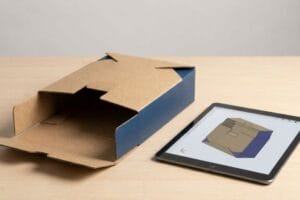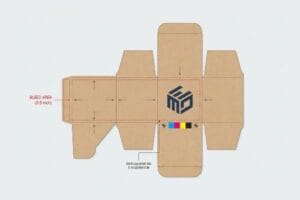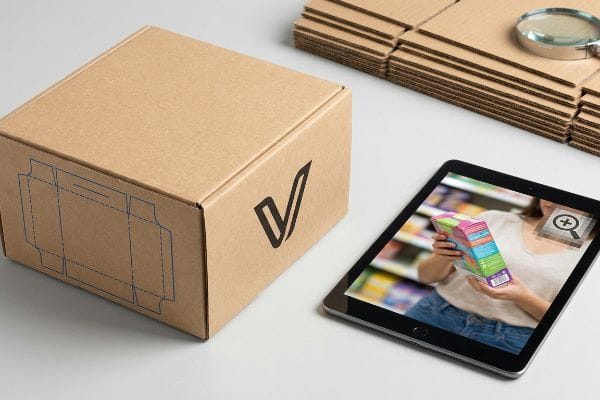
रिटेल डिस्प्ले डिजाइन करने के लिए सही फाइल टाइप चुनना जरूरी है। गलत फाइल टाइप चुनने पर आपकी पैकेजिंग प्रिंटिंग प्रेस में खराब हो जाएगी, जिससे भारी देरी होगी और आपके अभियान का रिटर्न ऑन इन्वेस्टमेंट (ROI) पूरी तरह से बर्बाद हो जाएगा।.
वेक्टर या रास्टर का चुनाव आपके डिज़ाइन तत्व पर निर्भर करता है। डाईलाइन, संरचनात्मक कट और स्पष्ट लोगो के लिए वेक्टर फ़ाइलें अनिवार्य हैं। रास्टर फ़ाइलें केवल जटिल फोटोग्राफिक कलाकृति के लिए उपयुक्त हैं। वेक्टर का उपयोग करने से सटीक स्केलिंग सुनिश्चित होती है, जबकि नालीदार प्रिंटिंग के लिए रास्टर फ़ाइलों में उच्च-रिज़ॉल्यूशन प्रबंधन की आवश्यकता होती है।.
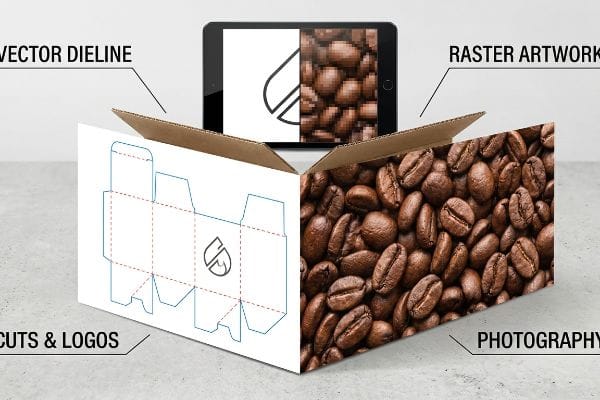
इस अंतर को समझना केवल ग्राफिक डिजाइन के बारे में नहीं है - यह सीधे तौर पर इस बात को प्रभावित करता है कि मशीनरी आपके फ्लैट-पैक्ड नालीदार कार्टन को भौतिक रूप से कैसे काटती और प्रिंट करती है, जिससे आपकी कुल स्वामित्व लागत बढ़ या घट सकती है।.
आपको रास्टर के बजाय वेक्टर कब चुनना चाहिए?
खुदरा व्यापार में सफलता के लिए सही फ़ाइल प्रकार का चयन अत्यंत महत्वपूर्ण है। संरचनात्मक सीमाओं के लिए रास्टर छवियों पर निर्भर रहने से डिज़ाइन के उद्देश्य और वास्तविक उत्पादन के बीच भ्रम की स्थिति पैदा हो जाती है।.
भौतिक कट लाइन, क्रीज़ या संरचनात्मक सीमाओं को परिभाषित करते समय रास्टर के बजाय वेक्टर का चयन करना आवश्यक है। मशीनरी रास्टर पिक्सल को नहीं पढ़ सकती; उपकरणों को नालीदार बोर्ड के साथ भौतिक रूप से जुड़ने के लिए विशिष्ट स्पॉट रंगों को निर्दिष्ट गणितीय रूप से सटीक वेक्टर पथों की आवश्यकता होती है।.
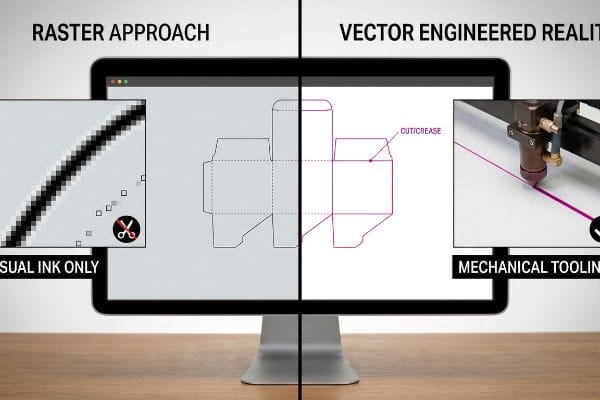
जब ब्रांड पिक्सेल आर्ट और मैकेनिकल इंजीनियरिंग के बीच की सीमाओं को धुंधला कर देते हैं, तो यह प्रीप्रेस वर्कफ़्लो को पूरी तरह से बाधित कर देता है और फ़ैक्टरी में काम रोक देता है।.
रिटेल डिज़ाइन में कट लाइनों को समझना
रिटेल डिस्प्ले डिज़ाइन करते समय, कई शुरुआती डिज़ाइनर यह मान लेते हैं कि यदि कोई रेखा उनके कंप्यूटर स्क्रीन पर दिखाई दे रही है, तो वह स्वचालित रूप से वास्तविक डिस्प्ले पर भी दिखाई देगी। वे अक्सर पिक्सेल-आधारित रैस्टराइज़्ड लेयर में सपाट काली रेखाओं के रूप में संरचनात्मक सीमाओं को प्रस्तुत करते हैं, यह मानते हुए कि प्रिंटर और कटिंग मशीनें डिज़ाइन को ठीक उसी तरह देखती हैं जैसे कोई इंसान देखता है। फ़ाइल प्रकारों की यह मूलभूत गलतफहमी अक्सर ऐसी डिज़ाइन फ़ाइलों की ओर ले जाती है जो डिजिटल रूप से तो सुंदर दिखती हैं, लेकिन उनमें संरचनात्मक निर्माण के लिए आवश्यक अंतर्निहित यांत्रिक निर्देश नहीं होते हैं ।
वास्तव में, स्वचालित कटिंग टेबल और लेज़र डाई-बोर्ड बर्नर सटीक गणितीय निर्देशांक2 । जब किसी फ़ैक्टरी को पिक्सेलेटेड कट लाइन मिलती है, तो सॉफ़्टवेयर इसे प्रिंट करने के लिए एक कलाकृति के रूप में मानता है, जिसके परिणामस्वरूप बिना किसी भौतिक कट के एक पूरी तरह से मुद्रित शीट तैयार हो जाती है। इस समस्या को हल करने के लिए, डिज़ाइनरों को इन संरचनात्मक परतों को अलग करना होगा और पिक्सेलेटेड लाइनों को गणितीय रूप से जुड़े वेक्टर पथों में परिवर्तित करना होगा जिन्हें सटीक स्पॉट रंगों3। इस कठोर फ़ाइल पृथक्करण को लागू करने से यह सुनिश्चित होता है कि आपके अंतिम खुदरा डिस्प्ले बिना उत्पादन में देरी के कुशलतापूर्वक काटे, मोड़े और असेंबल किए जाएं।
| मीट्रिक/विशेषता | रास्टर दृष्टिकोण | वेक्टर इंजीनियर्ड रियलिटी |
|---|---|---|
| मशीन पहचान | दृश्य स्याही के रूप में विलय किया गया | इसे यांत्रिक उपकरण के रूप में पढ़ें4 |
| फ़ाइल सेटअप | CMYK काले पिक्सेल | 100% मैजेंटा स्पॉट रंग5 |
| असेंबली प्रभाव | कोई शारीरिक कटौती नहीं | साफ-सुथरा और सटीक फोल्डिंग |
वेक्टर पाथ का सटीक अनुपालन यह सुनिश्चित करता है कि आपके कस्टम रिटेल डिस्प्ले को डिज़ाइन के अनुसार ही काटा, मोड़ा और असेंबल किया जाए। उचित फ़ाइल प्रबंधन प्रीप्रेस संबंधी भ्रम को दूर करता है और यह सुनिश्चित करता है कि आपका अभियान समय पर शुरू हो।
🛠️ हार्वे का डेस्क: क्या आपकी मौजूदा डाइलाइनें प्रीप्रेस में भारी देरी का कारण बन रही हैं क्योंकि फ़ैक्टरी मशीनरी आपकी पिक्सेलेटेड संरचनात्मक फ़ाइलों को पढ़ नहीं पा रही है? 👉 मुफ़्त संरचनात्मक डाइलाइन ऑडिट करवाएं ↗ — मैं 24 घंटों के भीतर हर संरचनात्मक फ़ाइल की व्यक्तिगत रूप से समीक्षा करता हूँ।
पैकेजिंग डिज़ाइन के लिए वेक्टर ग्राफिक्स का उपयोग करने का क्या लाभ है?
इसका मुख्य लाभ पूर्ण गणितीय सटीकता में निहित है। वेक्टर ग्राफिक्स अंतिम रिटेल डिस्प्ले के आकार के बावजूद त्रुटिहीन दृश्य और संरचनात्मक अखंडता बनाए रखते हैं।.
पैकेजिंग डिज़ाइन में वेक्टर ग्राफ़िक्स का उपयोग करने का लाभ यह है कि ये स्थिर पिक्सेल के बजाय गणितीय सूत्रों पर आधारित होते हैं। इससे रिज़ॉल्यूशन खोए बिना असीमित स्केलिंग संभव हो पाती है, जिससे इंटरलॉकिंग टैब, भार वहन करने वाले फोल्ड और ब्रांड टाइपोग्राफी विभिन्न डिस्प्ले साइज़ में सटीक टॉलरेंस बनाए रखते हैं।.
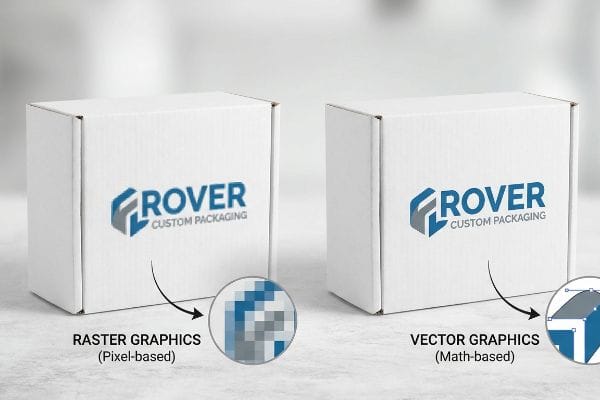
स्थिर छवियों से गतिशील, स्केलेबल गणित की ओर बढ़ना एक ऐसे डिस्प्ले को इंजीनियर करने का मूलभूत कदम है जो उच्च घर्षण वाली खुदरा आपूर्ति श्रृंखलाओं में टिक सके।.
खुदरा क्षेत्र में विस्तारशीलता का लाभ
नए ब्रांड प्रबंधकों में एक आम गलत धारणा यह है कि खुदरा अभियान के सभी पहलुओं के लिए उच्च-रिज़ॉल्यूशन रास्टर फ़ाइलें पर्याप्त हैं। वे अक्सर बुनियादी वेब-आधारित डिज़ाइन टूल पर निर्भर रहते हैं जो असंबद्ध वेक्टर आर्ट या चपटे पिक्सेल ग्रिड आउटपुट करते हैं, यह गलत धारणा रखते हुए कि एक फ़ाइल जो छोटे लैपटॉप स्क्रीन पर स्पष्ट दिखती है, वह बड़े क्लब स्टोर के पैलेट डिस्प्ले। यह दृष्टिकोण सभी ग्राफ़िक्स को केवल सतही रंग के रूप में मानता है, भौतिक खुदरा बिक्री की गतिशील आयामी स्केलिंग आवश्यकताओं को पूरी तरह से अनदेखा करता है।
भौतिक पैकेजिंग की वास्तविकता के लिए ऐसे ग्राफ़िक्स की आवश्यकता होती है जो एक स्केलेबल, गणितीय ढाँचे के रूप में कार्य करें। निश्चित पिक्सेल ग्रिड में बंधे रास्टर फ़ाइलों के विपरीत, वास्तविक वेक्टर पथ सटीक निर्देशांक और वक्रों का उपयोग करके आकृतियों को परिभाषित करते हैं6, जिससे डिज़ाइनर स्पष्टता खोए बिना लोगो और संरचनात्मक तत्वों का आकार असीमित रूप से बदल सकते हैं7।अपने डिज़ाइन को एक समर्पित वेक्टर प्रोग्राम में सुरक्षित करके, आप अपनी पैकेजिंग के मूल ज्यामितीय गणित की रक्षा करते हैं। यह सुनिश्चित करता है कि आपके ब्रांड एसेट और संरचनात्मक टेम्पलेट हर रिटेल टचपॉइंट पर स्पष्ट, पेशेवर और त्रुटिहीन रूप से संरेखित रहें।
| मीट्रिक/विशेषता | रास्टर ग्राफिक्स | वेक्टर ग्राफिक्स |
|---|---|---|
| संकल्प तर्क | निश्चित पिक्सेल ग्रिड | अनंत गणितीय मापन |
| सहनशीलता नियंत्रण | स्क्रीन व्यू तक सीमित | सटीक आयामी सटीकता |
| डिजाइन फ़ंक्शन | केवल सतही दृश्य | संरचनात्मक ढांचा एंकर |
बुनियादी संरचनात्मक गणित को सुरक्षित करके, आप यह सुनिश्चित करते हैं कि आपकी पैकेजिंग सामग्री किसी भी खुदरा वातावरण में त्रुटिहीन रूप से अनुकूलित हो जाए। एक सुसंगत, प्रीमियम ब्रांड अनुभव प्रदान करने के लिए वेक्टर फ्रेमवर्क पूरी तरह से अनिवार्य हैं।.
🛠️ हार्वे का डेस्क: क्या आपकी मौजूदा काउंटर डिस्प्ले डिज़ाइन, वेब फ़ाइलों में मौजूद संरचनात्मक गणितीय गणनाओं में खामियों के कारण, वास्तविक खुदरा भार के कारण ढहने के खतरे में है? 👉 मुफ़्त अनुपात कैलकुलेटर प्राप्त करें ↗ — 100% गोपनीय। आपके अप्रकाशित खुदरा डिज़ाइन मेरे पास सुरक्षित हैं।
क्या रास्टर या वेक्टर गुणवत्ता को कम करता है?
गलत फ़ाइल प्रकार का उपयोग करने से दृश्य गुणवत्ता पर स्पष्ट रूप से असर पड़ता है। जहाँ वेक्टर फ़ॉर्मेट की आवश्यकता है, वहाँ रैस्टर फ़ॉर्मेट का उपयोग करने से रिटेल स्टोर की तेज़ रोशनी में आपकी ब्रांडिंग बेहद खराब दिखेगी।.
जी हां, छिद्रयुक्त सतहों पर ठोस लोगो या टाइपोग्राफी के लिए रास्टर फ़ाइलों का उपयोग करने से गुणवत्ता कम हो जाती है। रास्टर फ़ाइलें ओवरलैपिंग CMYK हाफटोन डॉट्स पर निर्भर करती हैं जो असमान रूप से अवशोषित होते हैं, जिससे धुंधली छवि बनती है। वेक्टर फ़ाइलें शुद्ध स्पॉट कलर इंक फ्लडिंग की अनुमति देती हैं, जिससे स्पष्ट और उच्च-कंट्रास्ट प्रिंट गुणवत्ता सुनिश्चित होती है।.
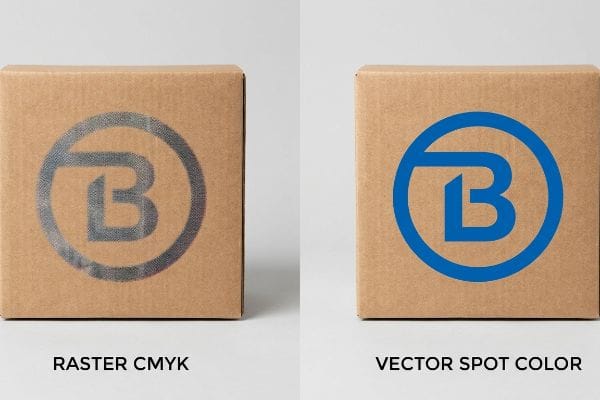
इन फ़ाइल प्रकारों में से चयन करने से यह निर्धारित होता है कि आपका ब्रांड दूर से ही अलग दिखेगा या क्लब स्टोर के शोरगुल में गुम हो जाएगा।.
शेल्फ पर ब्रांड की दृश्यता को अधिकतम करना
रिटेल लॉन्च के लिए आर्टवर्क तैयार करते समय, मार्केटिंग टीमें अक्सर ठोस कॉर्पोरेट लोगो को रैस्टराइज़्ड CMYK फॉर्मेट में प्रस्तुत करती हैं। वे यह मानकर चलती हैं कि चमकते डिजिटल मॉनिटर पर जीवंत दिखने वाली मानक चार-रंग प्रक्रिया, खुरदरी, छिद्रयुक्त नालीदार कार्डबोर्ड सतह पर भी आसानी से उतर जाएगी। यह मूलभूत चूक इस बात को नज़रअंदाज़ करती है कि मानक डिजिटल प्रिंटिंग वास्तव में कैसे काम करती है, जो पेंट किए गए रंग के ठोस ब्लॉकों के बजाय छोटे-छोटे ओवरलैपिंग हाफटोन डॉट्स के ऑप्टिकल भ्रम पर निर्भर करती है ।
भौतिक रूप से, ये ओवरलैपिंग CMYK डॉट्स कागज के रेशों में असमान रूप से अवशोषित होते हैं9, जिससे तेज फ्लोरोसेंट स्टोर लाइट में लोगो दानेदार, धुंधले और अस्पष्ट दिखाई देते हैं। उच्च दृश्यता वाली ब्रांडिंग प्राप्त करने के लिए, प्रिंटिंग से पहले इन तत्वों को वेक्टर स्पॉट रंगों में परिवर्तित करना आवश्यक है। ऑप्टिकल CMYK डॉट ब्लेंडिंग को एक सटीक रूप से मिश्रित पैंटोन स्पॉट कलर इंक से बदलने पर पिगमेंट का एक चिकना, ठोस प्रवाह बनता है10।यह सरल फ़ाइल परिवर्तन शेल्फ पर दृश्यता को नाटकीय रूप से बढ़ाता है, जिससे रिटेल गलियारे के पार से ही आपके प्रीमियम ब्रांड की प्रतिष्ठा सुरक्षित रहती है।
| मीट्रिक/विशेषता | रास्टर CMYK प्रिंटिंग | वेक्टर स्पॉट रंग |
|---|---|---|
| स्याही अनुप्रयोग | ओवरलैपिंग हाफटोन डॉट्स11 | एकल ठोस स्याही बाढ़12 |
| दृश्य परिणाम | दानेदार और धुंधला | स्पष्ट, उच्च-विपरीत घनत्व |
| सब्सट्रेट प्रतिक्रिया | असमान फाइबर अवशोषण13 | चिकना पिगमेंट कवरेज |
रैस्टराइज़्ड लोगो को वास्तविक वेक्टर स्पॉट रंगों में परिवर्तित करने से ब्रांड की प्रभावशाली दृश्यता सुनिश्चित होती है। यह रणनीतिक प्रीप्रेस समायोजन प्रत्येक उत्पादन प्रक्रिया में त्रुटिहीन रंग स्थिरता प्रदान करता है, जिससे आपके मर्चेंडाइजिंग ROI में अधिकतम वृद्धि होती है।.
🛠️ हार्वे का डेस्क: क्या आपके प्रिंट किए गए लोगो धुंधले दिख रहे हैं और ग्राहक के स्टोर में प्रवेश करने से पहले ही आपके विज़ुअल ROI को बुरी तरह प्रभावित कर रहे हैं? 👉 मुफ़्त साइटलाइन विश्लेषण का अनुरोध करें ↗ — कोई अकाउंट मैनेजर बीच में नहीं। आप सीधे स्ट्रक्चरल इंजीनियरों से बात करेंगे।
आपको रास्टर फ़ाइलों का उपयोग कब करना चाहिए?
जबकि वेक्टर कठोर संरचनात्मक गणित को निर्धारित करते हैं, जटिल फोटोग्राफी के लिए रास्टर फाइलें अनिवार्य हैं। थोक विक्रेताओं पर फोटो-यथार्थवादी डिस्प्ले के लिए उच्च-रिज़ॉल्यूशन रास्टर छवियां आवश्यक हैं।.
जटिल फोटोग्राफिक कलाकृतियों या विस्तृत जीवनशैली छवियों को पैकेजिंग पर प्रिंट करते समय रास्टर फ़ाइलों का उपयोग करना आवश्यक है। तस्वीरों में लाखों अलग-अलग रंगीन पिक्सेल होते हैं, इसलिए उन्हें वेक्टर रूप में परिवर्तित करना असंभव है। उच्च-रिज़ॉल्यूशन वाली रास्टर छवियां लिथो-लेमिनेशन प्रेस को शानदार गहराई के साथ फोटोरियलिस्टिक ग्राफिक्स को पुन: प्रस्तुत करने की अनुमति देती हैं।.
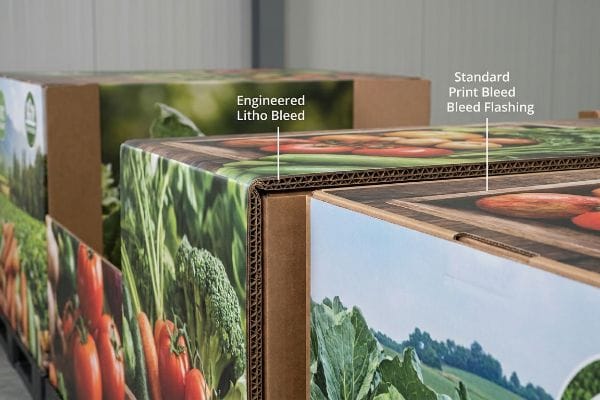
हालांकि, नालीदार बोर्ड पर भारी रास्टर फाइलों को सफलतापूर्वक तैनात करने के लिए आक्रामक प्रीप्रेस प्रबंधन की आवश्यकता होती है, खासकर स्वचालित ग्लूइंग मशीनरी की भौतिक वास्तविकताओं से निपटने के दौरान।.
लिथो-शिफ्ट ब्लीड जनादेश
मेरी फैक्ट्री में, मैं अक्सर देखता हूँ कि ग्राफिक डिज़ाइनर नालीदार कार्डबोर्ड डिस्प्ले के लिए बनाई गई विशाल रास्टर तस्वीरों पर मानक व्यावसायिक प्रिंट ब्लीड मार्जिन—जैसे कि 0.125 इंच (3.17 मिमी)—लगाते हैं। वे एक बड़े क्लब स्टोर पैलेट को हल्के बिज़नेस कार्ड की तरह मानते हैं। यह इस धारणा पर आधारित है कि लिथो-लेमिनेशन की भौतिक प्रक्रिया, जिसमें मुद्रित ऊपरी शीट को मोटे नालीदार बी-फ्लूट बोर्ड पर तेज़ी से चिपकाया जाता है, बिना किसी यांत्रिक भिन्नता के घर्षण रहित वातावरण में काम करती है। डिज़ाइनर गलत तरीके से मानते हैं कि मानक डिजिटल सुरक्षा मार्जिन औद्योगिक पैकेजिंग असेंबली की तेज़ गति वाली भौतिक वास्तविकताओं को गणितीय रूप से कवर कर लेंगे।
यह सिर्फ़ सिद्धांत नहीं है—मैंने परीक्षण के दौरान इसे बुरी तरह विफल होते देखा है, जब हम स्वचालित माउंटिंग मशीनरी के ज़रिए भारी रास्टर फ़ाइलें चलाते हैं। लिथो-लेमिनेशन में बोर्ड कैलिपर और तेज़ गति के घर्षण के कारण स्वाभाविक रूप से ज़्यादा यांत्रिक सहनशीलता की आवश्यकता होती है। 3.17 मिमी का छोटा सा ब्लीड मार्जिन बोर्ड के खिसकने को ढकने के लिए बिल्कुल अपर्याप्त है, जिसके परिणामस्वरूप "फ्लैशिंग" होती है—कच्चे भूरे कार्डबोर्ड के किनारे दिखाई देते हैं जो फ़ोटोग्राफ़िक भ्रम को पूरी तरह से बिगाड़ देते हैं। हाल ही में, एक ग्राहक का 300 DPI रास्टर आर्टवर्क अपर्याप्त मार्जिन के साथ आया, और माउंटिंग के दौरान, कागज़ ठीक 0.28 इंच (7.1 मिमी) खिसक गया। मैंने प्रीप्रेस फ़ाइल को रोका और भौतिक कट लाइन से आगे 0.5 इंच (12.7 मिमी) का सख्त ब्लीड मार्जिन लागू किया, जिससे लेमिनेशन खिसकने के खिलाफ एक सुरक्षा जाल बन गया और 12% स्क्रैप दर को रोका जा सका।.
| मीट्रिक/विशेषता | मानक प्रिंट ब्लीड | इंजीनियर्ड लिथो ब्लीड |
|---|---|---|
| मार्जिन का आकार | 0.125 इंच (3.17 मिमी)14 | 0.5 इंच (12.7 मिमी)15 |
| मैकेनिकल शिफ्ट | कच्चे भूरे किनारों को उजागर करता है | बांसुरी के चारों ओर पूरी तरह से लिपट जाता है16 |
| उत्पादन स्क्रैप | फ्लैशिंग का उच्च जोखिम | कोई दृश्य दोष नहीं |
मैं सभी भारी रास्टर फ़ाइलों पर आक्रामक ब्लीड मार्जिन की मांग करता हूं। लिथो-लेमिनेशन की कठोर भौतिक वास्तविकताओं को ध्यान में रखते हुए, यह सुनिश्चित किया जाता है कि आपकी उच्च-स्तरीय फोटोग्राफी पूरी तरह से रैप हो, जिससे एक निर्बाध प्रीमियम सौंदर्य बरकरार रहे।.
🛠️ हार्वे का डेस्क: क्या अपर्याप्त प्रीप्रेस ब्लीड के कारण किनारों पर भूरापन दिखाई दे रहा है और प्रमुख खुदरा विक्रेताओं द्वारा आपके उच्च-स्तरीय ग्राफिक डिस्प्ले अस्वीकार किए जा रहे हैं? 👉 मुफ़्त प्रीप्रेस मार्जिन ऑडिट प्राप्त करें ↗ — मैं 24 घंटों के भीतर प्रत्येक संरचनात्मक फ़ाइल की व्यक्तिगत रूप से समीक्षा करता हूँ।
निष्कर्ष
स्केलेबल वेक्टर गणित और उच्च-रिज़ॉल्यूशन रास्टर फोटोग्राफी के बीच तालमेल बिठाना ही एकमात्र तरीका है जिससे धुंधले लोगो और प्रीप्रेस फ्लैशिंग से आपके मास्टर कार्टन को फैक्ट्री में खराब होने से बचाया जा सके। हाल ही में, एक बड़े राष्ट्रीय स्तर पर लॉन्च से पहले हुई इंजीनियरिंग समीक्षा में 2 मिमी की घातक टॉलरेंस त्रुटि पकड़ी गई। यदि आप सैद्धांतिक फाइलों के भौतिक रूप से विफल होने से परेशान हैं, तो मुझे अपनी निःशुल्क वेक्टर अलाइनमेंट और स्ट्रक्चरल डायलाइन ऑडिट सेवा ताकि खुदरा बिक्री के लिए एकदम सही कैलिब्रेटेड उत्पाद सुनिश्चित हो सकें।
"वेक्टर बनाम रास्टर लेजर कटिंग | संचालन – डिजाइन महाविद्यालय", https://design.ncsu.edu/operations/510/laser-cutter-vector-vs-raster-laser-cutting/। [डाई-कटिंग और सीएनसी मशीनरी के लिए उद्योग तकनीकी नियमावली निर्दिष्ट करती है कि भौतिक कटाई करने के लिए उपकरण को पिक्सेल डेटा के बजाय गणितीय वेक्टर निर्देशांक की आवश्यकता होती है। साक्ष्य भूमिका: तकनीकी विनिर्देश; स्रोत प्रकार: औद्योगिक विनिर्माण मार्गदर्शिका। समर्थन: उत्पादन के लिए वेक्टर फ़ाइलों की आवश्यकता। कार्यक्षेत्र नोट: स्वचालित कटिंग और क्रीजिंग उपकरणों पर लागू होता है।] ↩
"लाइटबर्न 52 में कटिंग बोर्ड वेक्टर कैसे बनाएं", https://www.youtube.com/watch?v=pu2do9IR1A8। [सीएनसी कटिंग और लेजर मशीनरी के लिए तकनीकी दस्तावेज़ बताता है कि भौतिक टूल पथ रैस्टराइज़्ड इमेज डेटा के बजाय कोऑर्डिनेट-आधारित वेक्टर डेटा द्वारा संचालित होते हैं]। साक्ष्य भूमिका: तकनीकी विनिर्देश; स्रोत प्रकार: तकनीकी मैनुअल। समर्थन: वैक्टर के लिए हार्डवेयर आवश्यकता। कार्यक्षेत्र नोट: सीएनसी-चालित औद्योगिक कटिंग उपकरणों पर लागू होता है। ↩
"ग्राफिक दिशानिर्देश – डीलाइन बॉक्स और डिस्प्ले", https://www.delinebox.com/graphic-guidelines/। [पैकेजिंग और प्रिंट उत्पादन दिशानिर्देश निर्दिष्ट करते हैं कि संरचनात्मक कट और क्रीज लाइनों को विशिष्ट स्पॉट रंग दिए जाने चाहिए ताकि आरआईपी सॉफ्टवेयर उन्हें गैर-मुद्रण पथ के रूप में पहचान सके]। साक्ष्य भूमिका: उद्योग मानक; स्रोत प्रकार: उत्पादन मार्गदर्शिका। समर्थन: स्पॉट रंग निर्धारण की आवश्यकता। कार्यक्षेत्र संबंधी टिप्पणी: विशिष्ट रंगों के नाम निर्माता के अनुसार भिन्न हो सकते हैं। ↩
"अपने वेक्टर टूलपाथ में महारत हासिल करें: रास्टर बनाम ऑफसेट रणनीतियों की व्याख्या", https://academy.learnyourcnc.com/newsletters/lycnc-weekly-newsletter/posts/2024-09-15-newsletter। [सीएनसी और प्लॉटिंग हार्डवेयर के लिए तकनीकी दस्तावेज़ बताता है कि यांत्रिक कटिंग के लिए वेक्टर पथों को निर्देशांक-आधारित टूलपाथ के रूप में कैसे व्याख्यायित किया जाता है]। साक्ष्य भूमिका: तकनीकी सत्यापन; स्रोत प्रकार: तकनीकी मैनुअल। समर्थन: मशीन पहचान के लिए वैक्टर का उपयोग। कार्यक्षेत्र नोट: विशेष रूप से डिजिटल कटिंग मशीनरी पर लागू होता है। ↩
"पैकेजिंग प्रिंटिंग में CMYK बनाम स्पॉट रंग", https://meyers.com/meyers-blog/cmyk-vs-spot-colors-in-packaging-printing-what-cpg-brands-need-to-know/। [पैकेजिंग उद्योग के मानक विज़ुअल आर्टवर्क से गैर-प्रिंटिंग कट लाइनों को अलग करने के लिए विशिष्ट स्पॉट रंगों, अक्सर 100% मैजेंटा, के उपयोग को निर्दिष्ट करते हैं]। साक्ष्य भूमिका: प्रक्रिया सत्यापन; स्रोत प्रकार: प्रिंटिंग उद्योग हैंडबुक। समर्थन: वेक्टर फ़ाइल सेटअप मानक। कार्यक्षेत्र नोट: खुदरा और संरचनात्मक डिज़ाइन में सामान्य अभ्यास। ↩
"वेक्टर ग्राफिक्स – विकिपीडिया", https://en.wikipedia.org/wiki/Vector_graphics। [कंप्यूटर ग्राफिक्स पर तकनीकी दस्तावेज़ बताता है कि वेक्टर पथ निश्चित पिक्सेल ग्रिड के बजाय गणितीय समीकरणों और निर्देशांकों द्वारा परिभाषित होते हैं]। साक्ष्य भूमिका: तकनीकी परिभाषा; स्रोत प्रकार: कंप्यूटर ग्राफिक्स पाठ्यपुस्तक। समर्थन: वेक्टर छवियों का गणितीय आधार। कार्यक्षेत्र नोट: मानक बेज़ियर वक्र कार्यान्वयन पर लागू होता है। ↩
"वेक्टर बनाम रास्टर ग्राफिक्स: तथ्य, मिथक और मिथक", https://vox-pop-uli.com/vox-voice/vector-vs-raster-graphics-facts-myths-and-legend/। [प्रामाणिक डिज़ाइन मैनुअल पुष्टि करते हैं कि वेक्टर ग्राफिक्स रिज़ॉल्यूशन-स्वतंत्र होते हैं, जिससे पिक्सेलेशन के बिना किसी भी आकार में स्केलिंग संभव होती है]। साक्ष्य भूमिका: तकनीकी विनिर्देश; स्रोत प्रकार: व्यावसायिक ग्राफिक डिज़ाइन हैंडबुक। समर्थन: रास्टर की तुलना में वैक्टर का स्केलेबिलिटी लाभ। स्कोप नोट: आउटपुट डिवाइस के भौतिक रिज़ॉल्यूशन द्वारा सीमित। ↩
"10 CMYK रंग पृथक्करण और हाफटोन को समझना… – YouTube", https://www.youtube.com/watch?v=lG4oK0_rlAw. [एक तकनीकी मुद्रण मैनुअल यह समझाएगा कि CMYK प्रक्रिया मुद्रण में विभिन्न डॉट घनत्वों के माध्यम से निरंतर टोन का अनुकरण करने के लिए हाफटोन स्क्रीन का उपयोग किया जाता है। साक्ष्य भूमिका: तकनीकी तंत्र; स्रोत प्रकार: मुद्रण उद्योग पाठ्यपुस्तक। समर्थन: रास्टर-आधारित रंग पुनरुत्पादन की प्रकृति। कार्यक्षेत्र नोट: मानक प्रक्रिया मुद्रण पर लागू।] ↩
"[PDF] हाफटोन – गेटी संग्रहालय", https://www.getty.edu/conservation/publications_resources/pdf_publications/pdf/atlas_halftone.pdf. [स्याही-सब्सट्रेट परस्पर क्रिया पर तकनीकी दस्तावेज़ बताता है कि हाफटोन डॉट पैटर्न छिद्रयुक्त सतहों पर असमान अवशोषण का कारण कैसे बनते हैं]। साक्ष्य की भूमिका: तकनीकी सत्यापन; स्रोत प्रकार: मुद्रण विज्ञान की पाठ्यपुस्तक। समर्थन: इस दावे का कि CMYK छिद्रयुक्त कागज पर दानेदार दृश्य उत्पन्न करता है। विषयवस्तु: छिद्रयुक्त सब्सट्रेट पर केंद्रित। ↩
"स्पॉट कलर बनाम प्रोसेस कलर प्रिंटिंग – पैनटोन", https://www.pantone.com/articles/technical/spot-vs-process-color?srsltid=AfmBOoocXEtI51dY276hD-ps5ABnx2OIzW0pexDk7yNDtMzFOd1TDsNa. [स्पॉट कलर के लिए उद्योग मानक यह सत्यापित करते हैं कि प्री-मिक्स्ड इंक ऑप्टिकल डॉट ब्लेंडिंग की आवश्यकता के बिना एकसमान कवरेज प्रदान करते हैं]। साक्ष्य भूमिका: तकनीकी विनिर्देश; स्रोत प्रकार: प्रिंटिंग मैनुअल। समर्थन: यह दावा कि स्पॉट कलर से सॉलिड पिगमेंट फ्लड प्राप्त होता है। कार्यक्षेत्र नोट: पेशेवर प्रेस प्रिंटिंग पर लागू होता है। ↩
"सीएमआईके रंग मॉडल", https://en.wikipedia.org/wiki/CMYK_color_model। [एक तकनीकी मुद्रण मार्गदर्शिका बताती है कि कैसे रास्टर सीएमवाईके प्रक्रियाएं चार रंगों के ओवरलैपिंग हाफटोन डॉट्स का उपयोग करके पूर्ण स्पेक्ट्रम का भ्रम पैदा करती हैं]। साक्ष्य भूमिका: तकनीकी परिभाषा; स्रोत प्रकार: मुद्रण मैनुअल। समर्थन: रास्टर स्याही अनुप्रयोग विधि। कार्यक्षेत्र नोट: मानक ऑफसेट और डिजिटल सीएमवाईके मुद्रण से संबंधित है। ↩
"विशेष स्याही: डिज़ाइन संबंधी विचार (भाग 2)", https://www.youtube.com/watch?v=4SIpksPUvGM। [स्पॉट कलर प्रिंटिंग के लिए उद्योग मानक एक ही, पूर्व-मिश्रित पिगमेंट को डॉट पैटर्न के बजाय निरंतर प्रवाह के रूप में लगाने का वर्णन करते हैं]। साक्ष्य भूमिका: तकनीकी विनिर्देश; स्रोत प्रकार: प्रिंटिंग मानक। समर्थन: वेक्टर स्याही अनुप्रयोग विधि। कार्यक्षेत्र नोट: विशेष रूप से पैनटोन या कस्टम स्पॉट रंगों पर लागू होता है। ↩
"स्पॉट कलर और CMYK कलर के बीच अंतर", https://www.deprintedbox.com/blog/spot-vs-process-color/। [स्याही-सब्सट्रेट परस्पर क्रिया पर पदार्थ विज्ञान अनुसंधान इंगित करता है कि ठोस स्याही परतों की तुलना में हाफटोन पैटर्न असंगत अवशोषण का कारण बन सकते हैं]। साक्ष्य की भूमिका: अनुभवजन्य साक्ष्य; स्रोत प्रकार: पदार्थ विज्ञान पत्रिका। समर्थन: सब्सट्रेट प्रतिक्रिया अंतर। स्कोप नोट: प्रभावशीलता सब्सट्रेट की सरंध्रता पर निर्भर करती है। ↩
"प्रिंट उत्पादन में ब्लीड, मार्जिन और ट्रिमिंग को समझना", https://www.ballantine.com/understanding-bleeds-margins-and-trimming-in-print-production/। [उद्योग मानक प्रिंटिंग गाइड वाणिज्यिक ऑफसेट और डिजिटल प्रिंटिंग के लिए न्यूनतम ब्लीड आवश्यकता को परिभाषित करते हैं]। साक्ष्य भूमिका: आधारभूत मीट्रिक; स्रोत प्रकार: प्रिंटिंग मैनुअल। सपोर्ट: मानक ब्लीड विनिर्देश। स्कोप नोट: सामान्य फ्लैट-शीट प्रिंटिंग पर लागू होता है। ↩
"लिथोग्राफिक लेमिनेशन – पैकलेन", https://packlane.com/support/lithographic-lamination?srsltid=AfmBOorvcd7lBzvP8phKO8Vpfoj6GlA-3lN5GhAzpISD8Vq-4v5p2FUH। [नालीदार सतहों पर लिथो-लेमिनेशन के लिए तकनीकी विनिर्देशों में पंजीकरण शिफ्ट की भरपाई के लिए बड़े ब्लीड की आवश्यकता होती है]। साक्ष्य भूमिका: तकनीकी विनिर्देश; स्रोत प्रकार: विनिर्माण मार्गदर्शिका। समर्थन: लिथो-ब्लीड आवश्यकताएँ। कार्यक्षेत्र नोट: नालीदार कार्डबोर्ड माउंटिंग के लिए विशिष्ट। ↩
"कॉरुगेटेड बॉक्स फ्लूट के प्रकार और उनके उपयोग को समझना", https://nagpalindustries.com/understanding-corrugated-box-flute-types-their-uses/। [पैकेजिंग इंजीनियरिंग दस्तावेज़ बताता है कि विस्तारित ब्लीड मार्जिन कैसे सुनिश्चित करते हैं कि माउंटिंग प्रक्रिया के दौरान मुद्रित शीट कॉरुगेटेड फ्लूट्स को पूरी तरह से ढक ले]। साक्ष्य भूमिका: तकनीकी व्याख्या; स्रोत प्रकार: पैकेजिंग इंजीनियरिंग मैनुअल। सहायक: यांत्रिक विस्थापन शमन। कार्यक्षेत्र नोट: फ्लूटेड कार्डबोर्ड सब्सट्रेट से संबंधित। ↩