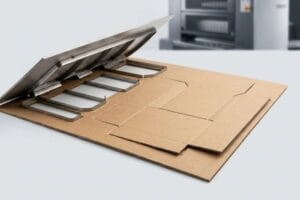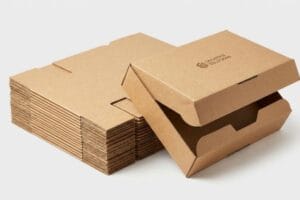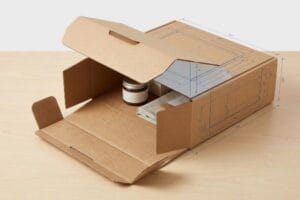
Vous souhaitez que votre présentoir de comptoir attire l'attention, mais les supports en acrylique standard se fondent dans le décor. Découvrons comment des présentoirs en carton ondulé sur mesure captent efficacement le regard des clients.
Oui. La personnalisation d'un présentoir de table implique la conception de structures ondulées spécifiques adaptées aux dimensions de votre produit. Les présentoirs de comptoir sur mesure pour points de vente permettent aux marques d'optimiser leur image de marque, d'intégrer des en-têtes découpés sur mesure et d'ajuster précisément l'angle des étagères, garantissant ainsi une visibilité maximale et une stabilité optimale en caisse.
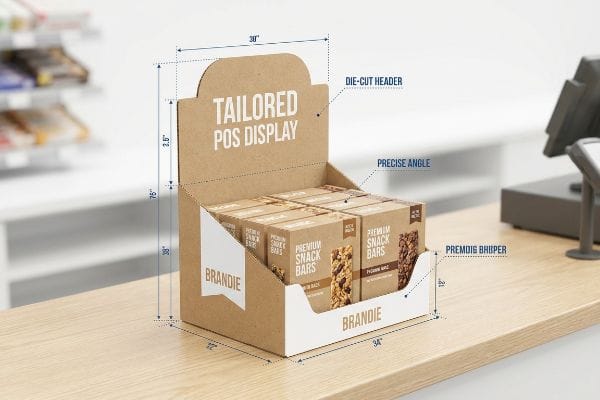
Mais savoir qu'on peut personnaliser un produit ne représente que la moitié du chemin ; comprendre comment le concevoir pour l'environnement physique du commerce de détail est ce qui détermine le succès ou l'échec de la plupart des campagnes.
Comment décorer un plateau de table ?
Pour créer un support de vente visuellement attrayant, il ne suffit pas d'apposer un logo sur une boîte. Un style réussi exige de comprendre comment l'encre interagit avec le support papier.
La conception d'un présentoir de table exige l'application de techniques spécifiques de gestion des couleurs et de finitions structurelles au carton ondulé. Un stylisme professionnel privilégie l'impression en aplat de couleurs plutôt que l'impression en quadrichromie, garantissant ainsi la netteté et l'éclat des logos de la marque sous un éclairage intense, sans que le grain des trames ne soit altéré.

Un beau fichier sur votre écran peut rapidement se transformer en un amas brouillé sur la chaîne de production si vous négligez la chimie de l'encre.
Éviter l'effet boueux en demi-teintes dans le stylisme de vente au détail
De nombreux graphistes exportent simplement leurs illustrations numériques sous forme de fichiers CMJN standard, en supposant que la presse d'impression correspondra parfaitement à ce qu'ils voient sur leurs écrans numériques rétroéclairés1.Ils comptent sur ces quatre encres standard pour mélanger visuellement et créer les couleurs exactes de leur marque d'entreprise sur l'unité finale.
Je constate que même les équipes marketing les plus expérimentées tombent dans ce piège lors de la conception de leurs premiers tirages d'impression. Elles soumettent des fichiers standard, mais lorsque ces minuscules points de trame superposés atteignent la surface poreuse du papier test ondulé non scellé, l'absorption est irrégulière. Je sens physiquement les fibres rugueuses du papier non scellé frotter contre mon pouce lorsque j'inspecte ces premiers échantillons, révélant un logo granuleux et délavé, affreux sous les néons agressifs des magasins. Plutôt que de les laisser imprimer un résultat aussi brouillon, j'impose un protocole d'impression en aplat de couleur, utilisant des encres PMS (Pantone Matching System) précisément mélangées pour garantir un rendu de marque dense et contrasté, préservant ainsi l'esthétique de toute la campagne.
| Erreurs courantes des débutants | La solution pro | Avantage du magasin |
|---|---|---|
| S'appuyant sur un mélange standard à quatre couleurs | Imposer un éclairage de couleur spécifique | Assure un contraste maximal du logo |
| Impression directe sur papier kraft non scellé | Spécifier un revêtement de qualité supérieure | Empêche les graphismes délavés |
| Faire confiance à un écran numérique rétroéclairé | Approbation d'un échantillon de prélèvement physique | Garantit la fidélité des couleurs de la marque |
Je ne laisse jamais mes clients risquer leur logo principal avec un mélange d'encres. Une couleur d'accompagnement dédiée garantit une netteté exceptionnelle, rehaussant considérablement la valeur de votre marque dès la caisse.
🛠️ Le bureau d'Harvey : Vous craignez que vos illustrations numériques ne paraissent ternes sur du carton ? 👉 Demandez un audit couleur préalable ↗ — Accès direct à mon bureau. Zéro spam commercial automatisé, promis.
Le dimensionnement de votre carte d'en-tête ne se résume pas à maximiser l'espace publicitaire. Il faut trouver un équilibre entre l'impact visuel et les contraintes liées à l'affluence en caisse.
Le dimensionnement correct d'une bannière de table exige le respect strict d'un rapport profondeur/hauteur afin d'éviter tout basculement. Si la largeur standard de l'en-tête correspond à l'emprise au sol, la hauteur totale doit impérativement respecter un rapport calculé avec la profondeur de la bannière, garantissant ainsi une stabilité absolue même en cas d'utilisation intensive par les consommateurs.
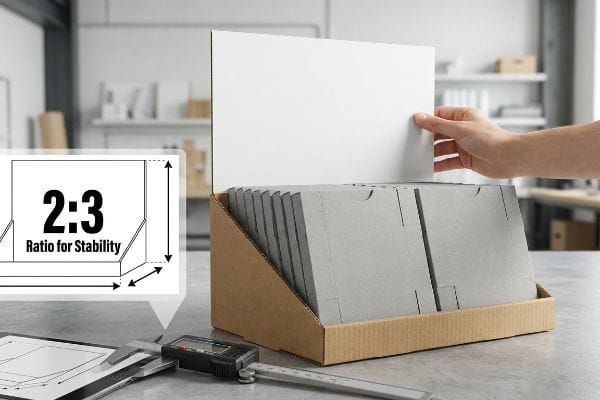
Repousser les limites de la taille peut sembler une excellente stratégie marketing, mais la physique finit toujours par l'emporter.
La règle des proportions pour la stabilité des comptoirs
Les équipes d'approvisionnement cherchent souvent à maximiser la hauteur de leurs bannières arrière afin d'attirer l'attention des clients situés au fond des rayons. Elles partent du principe que, tant que le support tient sur le comptoir de la caisse, le panneau d'affichage vertical peut s'étendre jusqu'à la hauteur requise par le visuel.
Un dimensionnement incorrect de ces supports est une erreur fréquente que je repère dès les premières phases de prototypage. Une marque peut commander une immense bannière de 457,2 mm (18 pouces) de haut sur une base étroite de 152,4 mm (6 pouces) de profondeur. Or, lorsque je charge le prototype avec des produits cosmétiques lourds, le centre de gravité se déplace dangereusement vers l'arrière. Un simple contact suffit à faire vaciller l'ensemble, et le bruit sourd du présentoir qui bascule sur ma table de test prouve qu'il ne résistera pas à une forte activité en magasin. J'impose systématiquement un rapport profondeur/hauteur de 2:3,ce qui stabilise la structure et évite les rejets coûteux et catastrophiques des détaillants dus à des risques de basculement.
| Erreurs courantes des débutants | La solution pro | Avantage du magasin |
|---|---|---|
| Déploiement des bannières à leur hauteur maximale | Respect du rapport structurel de 2:33 | Élimine les risques de basculement vers l'arrière |
| Conception d'une base étroite | Extension d'un support arrière de chevalet4 | Crée un centre de gravité stable |
| Charger des objets lourds en hauteur | Maintenir le poids ancré bas5 | Résiste à une forte interaction avec les clients |
Je limite systématiquement la hauteur des têtes de gondole avant le lancement de la production. Protéger le centre de gravité de votre présentoir est le seul moyen de garantir la sécurité de vos produits dans les zones à fort passage.
🛠️ Le bureau d'Harvey : Vous vous demandez si votre en-tête actuel est trop lourd en haut ? 👉 Faites un test de stabilité ↗ — Téléchargement sécurisé. Ma boîte de réception reste ouverte si vous avez des questions.
Comment puis-je concevoir ma table ?
La conception de votre présentoir de caisse exige une précision qu'un logiciel graphique de base ne peut tout simplement pas fournir. Il vous faut des calculs structurels avant même d'appliquer les éléments de finition.
La conception de votre présentoir nécessite l'importation d'un gabarit structurel dans votre logiciel graphique avant l'ajout des éléments graphiques. Plutôt que de dessiner des découpes physiques à partir de zéro, les concepteurs doivent ancrer un fichier CAO (Conception Assistée par Ordinateur) précalculé sur leur couche inférieure, garantissant ainsi la précision mécanique de tous les pliages et mécanismes de verrouillage.
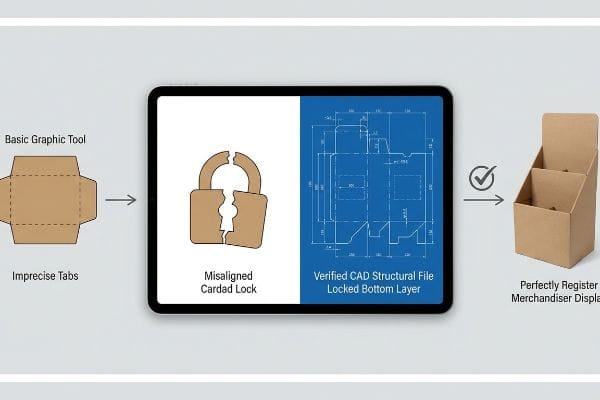
Miser sur une belle mise en page sans fondations structurelles solides est le moyen le plus rapide de faire dérailler le lancement d'un produit.
Fixation de l'ancrage du fichier structurel
Les marques émergentes cherchent souvent à simplifier leur processus de production en demandant à leurs jeunes graphistes de dessiner directement des languettes simples à l'aide d'outils graphiques en ligne. Elles considèrent la mise en page comme une simple toile vierge, partant du principe que les formes standard s'assembleront facilement une fois imprimées.
Je constate que cette simple négligence engendre d'énormes problèmes lorsque les cartes imprimées arrivent sur la chaîne de montage. Les outils web de base ne produisant que des images vectorielles ou raster non assemblées, sans tenir compte de l'épaisseur du carton, les languettes ne s'alignent tout simplement pas. J'imagine le bruit strident et frustrant des fibres de papier brut déchirées lorsqu'un opérateur de conditionnement tente de forcer un verrouillage mal aligné, finissant par recouvrir le produit de haute qualité d'un affreux ruban adhésif transparent. Pour résoudre ce problème, je fournis un PDF structurel pré-conçu et verrouillé que les concepteurs placent simplement sur leur couche inférieure, garantissant ainsi la protection des calculs de pliage complexes et économisant des centaines d'heures de travail fastidieux à l'assemblage.
| Erreurs courantes des débutants | La solution pro | Avantage du magasin |
|---|---|---|
| Dessiner des onglets dans les outils web de base | Utilisation de fichiers structurels CAO vérifiés6 | Empêche les verrous en carton déchiré |
| Modification des lignes du modèle | Verrouillage de la couche structurelle inférieure | Garantit un assemblage parfaitement d'équerre |
| En négligeant l'épaisseur du matériau | Application des tolérances de pliage automatisées7 | Permet de gagner des heures de conditionnement manuel |
Je dissocie strictement les calculs structurels du processus de conception esthétique. En utilisant un gabarit fixe, vous garantissez que votre vision esthétique se traduira parfaitement en une réalité structurellement solide.
🛠️ Harvey's Desk : Vous avez du mal à aligner vos illustrations avec des plis complexes ? 👉 Demandez votre gabarit de découpe personnalisé ↗ — Pas de formulaires interminables qui vous inondent d'appels commerciaux. Uniquement de la valeur.
Comment présenter des produits sur une table ?
Pour mettre en valeur vos produits, il est indispensable d'avoir des étagères parfaitement d'équerre et de niveau. Si vos étagères s'affaissent ou se courbent lors du montage, la présentation visuelle est instantanément compromise.
La présentation de produits sur une table exige la conception d'étagères à plusieurs niveaux parfaitement nivelées, avec une compensation d'épaisseur précise. En calculant l'épaisseur physique du carton ondulé lors des pliages à angle droit, les fabricants garantissent que les plateaux de produits reposent parfaitement d'équerre, évitant ainsi tout affaissement inesthétique et assurant une visibilité optimale pour le consommateur.
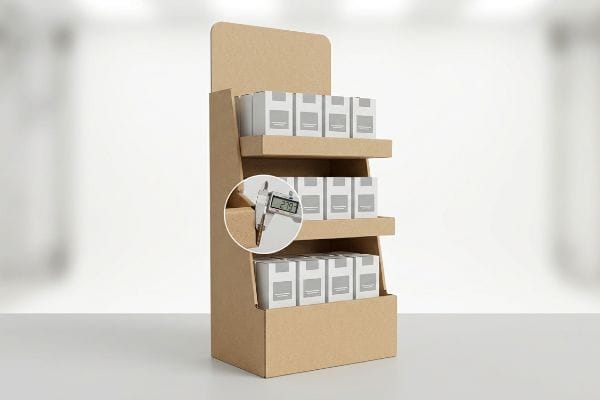
Faire tenir un seul écran droit en laboratoire est facile, mais voici la dure réalité lorsqu'on en expédie 500 à une usine de conditionnement.
Le danger d'un étrier de pliage non compensé
Les concepteurs créent fréquemment des fentes imbriquées pour les étagères de produits à plusieurs niveaux dans les logiciels d'illustration standard à la même largeur que le panneau correspondant8.Ils supposent que si une languette d'étagère est dessinée à exactement 2,0 pouces (50,8 mm) de large, la fente de réception doit également mesurer exactement 2,0 pouces (50,8 mm) de large pour assurer un ajustement parfait.
Dans mon atelier, je constate régulièrement que cette hypothèse théorique entraîne une défaillance structurelle immédiate lors des tests d'assemblage de préproduction. Lorsqu'une plaque de 3 mm d'épaisseur (cannelure B)à 90 degrés pour former une étagère, elle consomme physiquement de la matière. Si cette tolérance de pliage n'est pas prise en compte mathématiquementunedéformation importante du panneau arrière. J'ai effectué des mesures micrométriques sur un lot récent défectueux et j'ai prouvé qu'une plaque plus épaisse n'était pas nécessaire ; il suffisait d'un jeu précis de 2,79 mm (0,11 pouce) plus large dans la fente pour compenser le rayon extérieur du pli. En imposant cette micro-tolérance, j'ai permis de réduire le temps d'assemblage pour le conditionnement à façon de 42 secondes par unité, d'éliminer complètement les déchirures des feuilles supérieures et de faire économiser au client environ 3 250 $ en frais de main-d'œuvre sur sa production standard.
| Erreurs courantes des débutants | La solution pro | Avantage du magasin |
|---|---|---|
| Dessiner des créneaux de réception à tolérance zéro | compensation d'étrier de pliage d'ingénierie | Empêche le gauchissement des panneaux arrière |
| Forcer les languettes serrées lors de l'assemblage | Ajout de jeux précis au millimètre près | Réduit considérablement le temps de conditionnement manuel |
| Utilisation d'un logiciel de conception plate standard | Utilisation d'un logiciel de conception paramétrique | Maintient les étagères de produits parfaitement à niveau |
Je ne me fie jamais aux dimensions standard des emplacements pour la conception d'une étagère porteuse. Le calcul précis de l'épaisseur de pliage est le seul moyen de garantir que vos produits reposent parfaitement à niveau sur la surface de vente.
🛠️ Conseils d'Harvey : Un défaut structurel de 2 millimètres ne doit pas compromettre le déploiement dans 500 magasins. 👉 Envoyez-moi votre fichier de gabarit ↗ — Je vérifierai la robustesse des calculs avant que vous n'investissiez votre budget dans une production de masse.
Conclusion
Vous pouvez choisir un fournisseur en fonction de ses coûts unitaires bas, mais si une fente d'étagère non compensée se déforme sur la chaîne de montage, ralentissant le conditionnement d'environ 30 %, votre marge de lancement est anéantie. Cette attention portée à la compensation de l'épaisseur est précisément la fiche technique utilisée par mes 10 principaux clients du secteur de la distribution pour garantir zéro rejet d'impression. Cessez de tâtonner avec des tolérances de pliage inflexibles et laissez-moi analyser personnellement vos fichiers structurels grâce à mon audit de préproduction gratuit ↗ afin de détecter les erreurs critiques avant la découpe.
« Pourquoi les couleurs imprimées ne correspondent pas à celles affichées à l’écran – RVB vs CMJN », https://centexprinting.com/why-your-printed-colors-dont-match-your-screen-rgb-vs-cmyk/ . [Ce document technique sur la colorimétrie explique la différence fondamentale entre la synthèse additive de la lumière RVB et la synthèse soustractive des encres CMJN]. Rôle de la preuve : fondement théorique ; type de source : manuel de colorimétrie. Sujet : l’écart inhérent entre l’affichage à l’écran et le rendu imprimé. Remarque: applicable à tous les flux de production numérique vers impression.
« Comment choisir la hauteur de votre présentoir ? », https://popdisplay.me/how-to-choose-your-retail-display-height/ . [Les normes d'ingénierie du secteur pour les présentoirs de vente au détail fournissent des ratios calculés pour garantir que le centre de gravité reste à l'intérieur de l'emprise au sol et ainsi éviter tout basculement]. Rôle de la preuve : Vérification technique ; type de source : Norme industrielle/Guide d'ingénierie. Éléments pris en compte : La mesure spécifique de la stabilité structurelle. Remarque : La stabilité réelle peut varier en fonction du poids des produits exposés.
« Supports de bannières rétractables : le guide complet », https://showfiredisplays.com/complete-guide-to-retractable-banner-stands/?srsltid=AfmBOor1y-DGQ2mh1_bv1xFmdiN0Uu0Ho_zaOVIZjvOY8oKxPtr5nHB3 . [Une source faisant autorité en matière de conception de signalétique ou d'ingénierie structurelle confirmerait le rapport hauteur/base spécifique de 2:3 requis pour éviter le basculement des présentoirs de table]. Rôle de la preuve : Spécification technique ; type de source : Norme de conception industrielle. Éléments justifiant : Rapport hauteur/base optimal pour la stabilité. Remarque concernant la portée : Spécifique aux présentoirs de point de vente légers.
« Panneaux de comptoir à support chevalet : signalétique imprimée personnalisée – 40 Visuals », https://40visuals.com/printed-visuals-retail-store-signage/easel-back-counter-cards/. [Les guides de conception pour les présentoirs de point de vente expliqueraient comment l’augmentation de la profondeur du support arrière du chevalet empêche le basculement vers l’arrière]. Rôle de la preuve : Solution technique ; type de source : Manuel de fabrication. Supports : Méthode d’élargissement de la base. Note sur la portée : Limité aux présentoirs utilisant des supports de type chevalet .
« Pourquoi les pieds de table sont-ils inclinés ? », https://www.jibases.com/en-us/blog/why-table-bases-tip/. [Les principes de la physique mécanique démontrent qu'abaisser le centre de gravité en répartissant le poids à la base augmente la stabilité face aux forces extérieures]. Preuve : Principe physique ; source : Manuel d'ingénierie. Arguments : Répartition du poids pour la stabilité. Note : Application générale de la physique du centre de masse .
« Conception d'emballages avec un logiciel de CAO : Guide étape par étape – Esko », https://www.esko.com/en/blog/packaging-design-with-cad-software. Les normes industrielles en matière de conception d'emballages exigent que les fichiers structurels générés par CAO garantissent des tolérances et des lignes de pliage précises afin d'éviter la défaillance des fermetures en carton. Rôle de la preuve : vérification technique ; type de source : manuel d'ingénierie de l'emballage. Argumentaire : nécessité de la CAO pour l'intégrité structurelle. Remarque : Spécifique aux matériaux en carton ondulé ou en carton compact .
« Qu'est-ce que le facteur K ? | Explication de la tolérance de pliage de la tôle », https://www.youtube.com/watch?v=kUizKC1gkg0. Les tolérances de pliage calculées tiennent compte de l'épaisseur physique du matériau afin de garantir un alignement correct des plis et un assemblage efficace. Preuve : spécification technique ; type de source : manuel de génie mécanique. Sujet : impact de l'épaisseur du matériau sur le temps d'assemblage. Remarque : s'applique aux cartons et aux papiers cartonnés de différentes épaisseurs .
« Le guide ultime des boîtes en carton ondulé », https://www.shorr.com/resources/blog/ultimate-guide-corrugated-boxes/ . [Les guides techniques sur la conception d'emballages structurels expliquent pourquoi le dimensionnement des fentes identique à celui des panneaux correspondants ne tient pas compte de l'épaisseur du matériau]. Type de preuve : factuelle ; type de source : manuel technique. Sujet : erreurs de conception courantes dans l'industrie. Précision : concerne spécifiquement l'épaisseur du matériau ondulé.
« Carton ondulé et qualités de matériaux – cannelure – Packaging Strategies », https://www.packagingstrategies.com/articles/96269-corrugated-board-and-material-grades . [Les guides de spécifications des matériaux pour l'emballage en carton ondulé définissent l'épaisseur standard du carton cannelure B à environ 3 mm]. Rôle de la preuve : Vérification factuelle ; type de source : Spécification technique. Appuie : L'utilisation de dimensions de matériaux standard. Remarque : L'épaisseur exacte peut varier légèrement selon le fabricant.
« Constructions en carton : Calcul de la tolérance de pliage 1 – YouTube », https://www.youtube.com/watch?v=j1n5ojAbAic. [Les manuels d'ingénierie d'emballage expliquent comment calculer la tolérance de pliage pour tenir compte du déplacement et de la compression du matériau lors des pliages à angle droit]. Rôle de la preuve : Validation technique ; type de source : Manuel d'ingénierie. Appuie : L'affirmation selon laquelle le non-respect de la tolérance de pliage entraîne un flambage de la structure. Note de portée : Les formules varient en fonction de l'épaisseur du matériau et du type de cannelure .