Comprendre le merchandising en magasin commence par identifier précisément comment et où interagir avec les clients avant leur passage en caisse. Analysons les mécanismes de ces conversions cruciales à l'étape finale.
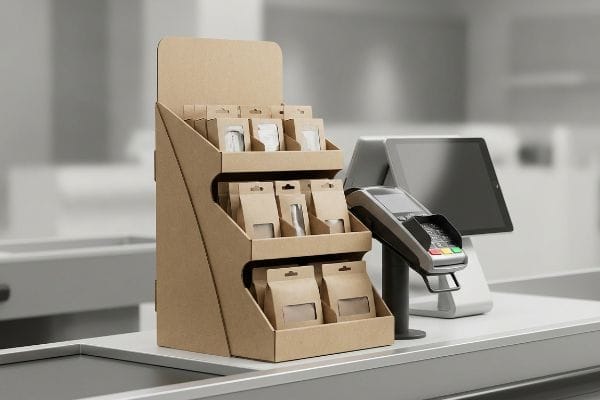
Un présentoir de point de vente est un dispositif de merchandising spécialisé, stratégiquement placé à proximité immédiate ou directement sur la caisse. Ces présentoirs compacts incitent aux achats impulsifs de dernière minute en exploitant les derniers instants d'inattention du client avant de finaliser son paiement, quel que soit le contexte commercial.
Mais comprendre la définition théorique ne suffira pas à sauver votre marque au moment de fabriquer et d'expédier ces unités vers un magasin physique. Voyons comment ces structures se comportent concrètement dans des conditions de vente réelles.
Quels sont les quatre types d'affichage de base ?
Pour se repérer dans l'espace commercial encombré, il est essentiel de savoir précisément quel format structurel correspond à votre implantation promotionnelle et à vos objectifs de campagne.
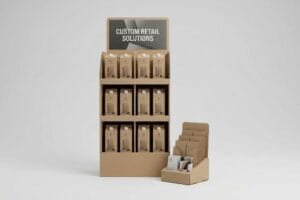
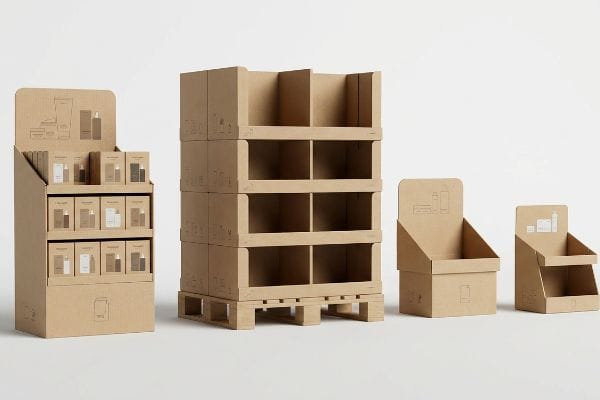
Les quatre types de présentoirs de base sont les présentoirs sur pied, les présentoirs de comptoir, les présentoirs sur palettes et les plateaux prêts à la vente. Chaque format répond à un besoin spatial et logistique spécifique, allant d'une présence massive sur l'espace à des présentations compactes et ciblées pour inciter à l'achat impulsif près de la caisse.
Choisir entre un présentoir de sol et un plateau de comptoir est facile lors d'une présentation, mais choisir le mauvais format structurel conduit à un chaos absolu lors du montage en magasin.
Pourquoi choisir le mauvais type d'écran nuit au retour sur investissement
Même les équipes d'approvisionnement les plus expérimentées tentent souvent de réduire la taille des campagnes publicitaires de grande envergure à des unités de comptoir plus petites afin de réaliser des économies sur l'ingénierie structurelle. Elles partent du principe qu'en conservant le même gabarit et en le réduisant simplement de moitié¹, on obtiendra automatiquement un format miniature parfaitement fonctionnel.
Je constate constamment cette erreur lorsqu'une marque me remet un fichier CAO (Conception Assistée par Ordinateur) réduit, conçu pour une palette, en espérant qu'il serve de plateau de caisse. La réalité les rattrape aussitôt lorsque le vendeur tente de le plier : le carton brut se déchire bruyamment, car les languettes de fixation n'ont pas été adaptées à cette échelle réduite. J'interviens alors et applique systématiquement ma règle stricte du ratio 2:3 entre la profondeur et la hauteursur tous les modèles de comptoir. En recalibrant le centre de gravité spécifiquement pour les comptoirs, j'empêche les présentoirs de basculer sous le poids des produits, évitant ainsi aux gérants de magasin frustrés de jeter votre marque à la poubelle.
| Erreurs courantes des débutants | La solution pro | Avantage du magasin |
|---|---|---|
| Réduction des grandes lignes de découpe au sol | Réingénierie des languettes pour les petites échelles3 | Empêche le déchirement du carton |
| En ignorant le rapport de profondeur 2:34 | Ancrer le centre de gravité | Empêche les unités de basculer |
| Surcharge des plateaux de comptoir compacts | Adaptation de la charge utile à la résistance de la flûte5 | Prolonge la durée de vie de l'écran |
Je n'autorise jamais les marques à réduire des présentoirs complexes à de minuscules comptoirs sans une refonte mathématique complète. Appliquer les proportions structurelles adéquates dès le départ garantit que vos présentoirs résistent aux manipulations brusques des clients et arrivent bien jusqu'à la caisse.
🛠️ Le bureau d'Harvey : Vos présentoirs de comptoir compacts s'effondrent sous le poids des produits ? 👉 Laissez-moi repenser votre gabarit ↗ — Accès direct à mon bureau. Zéro spam commercial automatisé, promis.
Quelle est la différence entre un présentoir PLV et un présentoir de point de vente (PDV) ?
Ces termes sont souvent utilisés indifféremment lors des réunions marketing, mais les traiter de manière identique sur un site de production garantit un rejet immédiat par les détaillants.
La différence entre un présentoir PLV et un présentoir de point de vente réside dans leur emplacement et leur finalité. Les présentoirs PLV occupent les allées principales pour perturber le comportement d'achat général, tandis que les présentoirs de point de vente sont placés spécifiquement à la caisse pour inciter aux achats impulsifs immédiats et peu réfléchis.
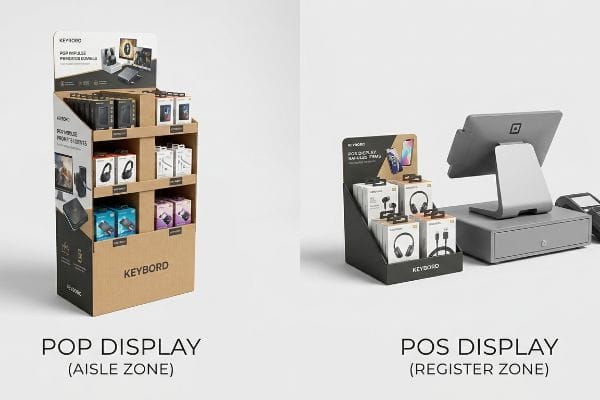
Estomper les frontières entre ces deux zones peut sembler acceptable sur un tableau d'inspiration numérique, mais cela entraîne des sanctions importantes pour non-conformité lorsqu'un camion décharge sa marchandise au magasin.
Les limites spatiales des présentoirs PLV par rapport aux présentoirs de point de vente
Les directeurs marketing conçoivent souvent une campagne évolutive où un grand présentoir de sol sert également de comptoir de vente. Ils prévoient un format standardisépartantdu principe que le gérant du magasin le placera là où il y a de la place.
J'intercepte systématiquement ces fichiers hybrides avant qu'ils n'atteignent les tables de découpe CNC (Commande Numérique par Calculateur) car ils ne respectent pas les normes de conformité strictes en vigueur dans le commerce de détail. Si vous tentez d'installer un présentoir de sol encombrant sur un comptoir de caisse, le responsable du magasin le refusera immédiatement car il ne respecte pas la plage de portée avant de 381 à 1219 mm (15 à 48 pouces) imposée par la loi américaine sur les personnes handicapées (ADA)<sup>7. Dans mon usine, nous séparons définitivement les processus de conception : les fichiers PLV sont strictement liés à la limite de palette de 1219 × 1016 mm (48 × 40 pouces)<sup>8</sup>, tandis que les fichiers POS sont adaptés aux dimensions du comptoir de transaction. Cette séparation des conceptions évite la mise au rebut de caisses enregistreuses non conformes, préserve vos relations avec les détaillants et optimise votre budget de déploiement.
| Erreurs courantes des débutants | La solution pro | Avantage du magasin |
|---|---|---|
| Conception d'unités universelles | Séparation des pipelines POP et POS | Garantit l'acceptation du détaillant |
| Ignorer les zones de portée avant | Conception pour une fenêtre de 15 à 48 pouces9 | Maintient les registres accessibles |
| Placer les appareils encombrants près des caisses enregistreuses | Verrouillage des fichiers de point de vente aux dimensions du comptoir10 | Empêche le rejet du gestionnaire |
Je refuse de construire des unités hybrides qui contreviennent de conformité des points de vente . Verrouiller vos fichiers structurels en fonction des indicateurs de performance spécifiques à chaque allée ou caisse dès le départ garantit une approbation fluide au niveau du magasin et élimine les pertes financières liées aux refacturations locales.
🛠️ Le bureau de Harvey : Vos vendeurs en magasin enfreignent-ils involontairement les règles de sécurité concernant l’accès aux caisses ? 👉 Auditez votre espace de vente ↗ — Téléchargez en toute sécurité. Je reste à votre disposition pour toute question.
Qu'est-ce qu'un exemple de présentoir de point de vente ?
Observer une application concrète permet de comprendre comment ces petites structures se comportent réellement dans l'environnement intense et rapide d'une file d'attente en caisse.
Un exemple de présentoir de point de vente est un plateau de comptoir compact contenant du baume à lèvres, des piles ou des cartes-cadeaux, placé directement à côté de la caisse. Ces petits présentoirs sont dotés d'un support arrière allongé et de rebords spéciaux assurant leur stabilité lorsque les clients prennent rapidement les articles en caisse.
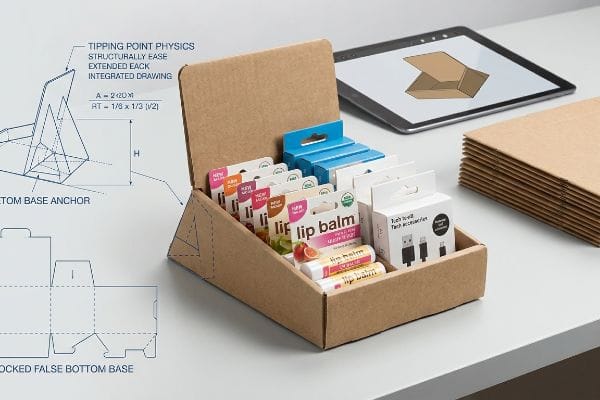
Un simple plateau de comptoir semble être la chose la plus facile au monde à fabriquer, jusqu'au moment où il est chargé de marchandises lourdes.
Exemples de physique du point de basculement pour les comptoirs
Lors du lancement d'un nouveau baume à lèvres ou d'un petit accessoire technologique, les marques se tournent naturellement vers un plateau à plusieurs niveaux standard11.Elles approuvent les rendus esthétiques, supposant que la base pliée de base pourra contenir sans problème un paquet dense de produits lourds et liquides.
Lorsque je place ces plateaux non calibrés sur la surface de test, je ressens immédiatement un balancement inquiétant : le carton se déforme sous le poids de la charge. Les clients pressés à la caisse heurtent ces présentoirs instables, ce qui provoque leur chute sur le sol en lino. Pour remédier à ce problème, j'applique le protocole Tipping Point Physics, qui consiste à concevoir un support arrière allongé ou un faux fond verrouillé de12 pouces , élargissant ainsi mathématiquement la base. Cet ancrage structurel élimine complètement le balancement, garantissant une stabilité à toute épreuve à votre présentoir même lors des pics d'affluence et évitant ainsi des dommages coûteux aux produits en caisse.
| Erreurs courantes des débutants | La solution pro | Avantage du magasin |
|---|---|---|
| Faire confiance aux rendus à base plate | Conception d'un dos de chevalet allongé13 | Empêche les unités de tomber vers l'avant |
| En ignorant les marchandises à forte concentration de marchandises | Ajout d'un faux fond verrouillé14 | Stabilise la structure de l'écran |
| Utilisation de plateaux à paroi simple non ancrés | Élargir l'empreinte mathématique15 | Résiste à un trafic de caisse agressif |
Je calcule toujours le point de basculement précis avant même de lancer une seule feuille de tissu. Intégrer un ancrage géométrique discret à l'arrière de votre plateau de comptoir garantit sa stabilité face aux achats impulsifs.
🛠️ Harvey's Desk : Vos petits plateaux de caisse vacillent-ils à chaque fois qu'un client heurte le comptoir ? 👉 Optimisez votre structure ↗ — Fini les formulaires qui déclenchent des appels commerciaux incessants. Uniquement de la valeur ajoutée.
Quelle est la définition simple d'un point de vente (POS) ?
Réduire le concept à son essence même permet d'éliminer le jargon marketing et de recentrer la conversation sur l'utilité transactionnelle concrète.
En termes simples, un point de vente (PDV) est l'endroit physique où un client effectue un achat. Dans le domaine du merchandising, il désigne les présentoirs, plateaux et autres structures spécialement conçus pour s'intégrer autour de la caisse et favoriser les achats impulsifs.
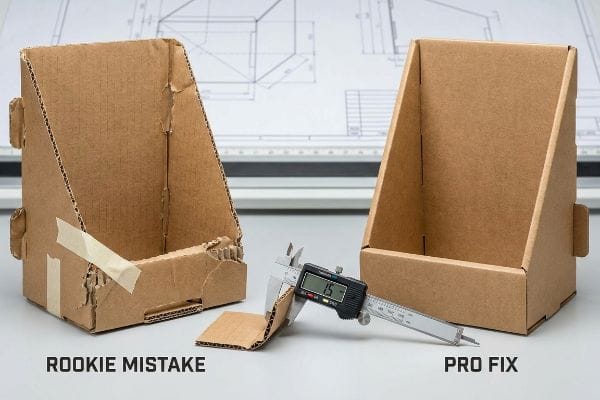
Faire tenir un seul écran debout dans un laboratoire est facile, mais voici la dure réalité lorsqu'on en expédie 500 dans le monde physique.
Pourquoi les gabarits de découpe standard pour points de vente échouent-ils en usine ?
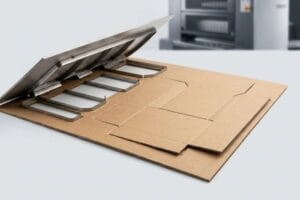
Les graphistes conçoivent souvent, dans les logiciels de conception numérique, des languettes emboîtables et des fentes de pliage à la largeur exacte du panneau correspondant. Ils partent du principe que si une languette mesure 50,8 mm (2 pouces) de large à l'écran, la fente de réception doit également mesurer exactement 50,8 mm (2 pouces) de large¹⁶pour garantir un ajustement parfait.
Dans mon usine, je constate régulièrement que cette erreur de calcul numérique provoque des pannes massives sur les chaînes d'assemblage lors du conditionnement physique. Lorsque mon équipe mesure l'épaisseur du carton ondulé plié avec un micromètre numérique, la mesure révèle une perte de matière de 1,5 mm (0,059 pouce)à chaque pli à 90 degrés. Le tracé numérique ne prenant pas en compte cette marge, les encoches sont trop étroites, obligeant les opérateurs à écraser les cannelures internes et à déchirer le carton pour assembler les pièces. En traitant automatiquement chaque fichier avec un algorithme paramétrique de compensation d'épaisseur, j'élargis artificiellement les encoches de réception de 1,5 mm, réduisant ainsi le temps d'assemblage de 42 secondes par unité et permettant à mes clients de réaliser d'importantes économies sur la main-d'œuvre lors d'une production standard.
| Erreurs courantes des débutants | La solution pro | Avantage du magasin |
|---|---|---|
| Dessin des languettes et des fentes à l'échelle 1:1 | Application des tolérances de pliage de l'étrier18 | Élimine les déchirures du carton |
| Consommation d'épaisseur de carte négligée | Élargissement des fentes de millimètres exacts | Réduit le temps d'assemblage de 42 secondes19 |
| Assemblage manuel forcé des pièces | Utilisation d'un logiciel de calcul structurel paramétrique | Garantit une mise en place du magasin sans friction |
Les dessins numériques plats ne peuvent être reproduits fidèlement dans l'espace physique sans compensation mathématique. Calculer précisément la tolérance de pliage de votre support avant l'impression est le seul moyen de garantir un assemblage sans frottement sur la ligne d'emballage.
🛠️ Conseils d'Harvey : Un défaut structurel de 2 millimètres ne doit pas compromettre le déploiement dans 500 magasins. 👉 Envoyez-moi votre fichier de gabarit ↗ — Je vérifierai la robustesse des calculs avant que vous n'investissiez votre budget dans une production de masse.
Conclusion
Vous pouvez négliger l'épaisseur du matériau, mais si des fentes non calibrées provoquent des déchirures du carton lors de l'assemblage, vous rencontrerez des problèmes de friction importants, ce qui ralentira la ligne de conditionnement d'environ 30 % et anéantira votre marge bénéficiaire. Plus de 500 responsables de marque utilisent ma checklist prépresse pour éviter précisément ces erreurs fatales en début de production. Ne vous laissez plus guider par des approximations : laissez-moi analyser vos fichiers de structure grâce à mon Audit de découpe gratuit ↗ afin de détecter les erreurs critiques avant le lancement de la production en série.
« CONCEPTION STRUCTURELLE DES PRÉSENTATEURS POUR LE COMMERCE DE DÉTAIL INTERACTIF… », https://www.bcipkg.com/display-structural-design-for-interactive-retail-displays/. Explication technique de l'influence de la mise à l'échelle linéaire sur l'épaisseur des matériaux, les tolérances de pliage et la stabilité structurelle dans la conception des emballages. Rôle de la preuve : validation technique ; type de source : manuel d'ingénierie de l'emballage. Appuie : l'affirmation selon laquelle une simple mise à l'échelle ne permet pas de produire des formats miniatures fonctionnels. Note sur le champ d'application : s'applique aux présentoirs en carton ondulé et en carton rigide .
« 14 types de présentoirs de vente au détail | Chicago, IL – Wertheimer Box », https://wertheimerbox.com/types-of-retail-displays/. Vérification des normes industrielles ou des principes d'ingénierie structurelle concernant le rapport profondeur/hauteur afin de garantir que le centre de gravité empêche le basculement des présentoirs PLV. Preuve : spécification technique ; source : manuel de conception de points de vente ou guide d'ingénierie structurelle. Justification : le rapport mathématique spécifique pour la stabilité du comptoir. Remarque : la stabilité peut également dépendre de la densité du matériau et de la répartition du poids du produit .
« Influence des lignes de pliage analogiques et numériques sur les propriétés mécaniques… – PMC », https://pmc.ncbi.nlm.nih.gov/articles/PMC9268991/. Les guides techniques sur la conception des lignes de découpe expliquent pourquoi une simple mise à l'échelle proportionnelle est insuffisante et pourquoi des ajustements spécifiques des languettes sont nécessaires pour éviter la rupture du matériau. Niveau de preuve : bonnes pratiques de conception ; type de source : guide de conception professionnel. Argument : nécessité de repenser la conception des languettes pour éviter le déchirement du carton. Note sur la portée : se concentre sur la précision structurelle des lignes de découpe .
« WAC 296-307-52030 : – | WA.gov », https://app.leg.wa.gov/wac/default.aspx?cite=296-307-52030 . Un manuel sectoriel sur l’ingénierie structurelle des présentoirs de points de vente permettrait de vérifier le rapport spécifique requis pour maintenir un centre de gravité stable. Rôle de la preuve : spécification technique ; type de source : manuel sectoriel. Appuie : l’ utilisation d’un rapport spécifique pour éviter le basculement des présentoirs. Note de portée : spécifique aux présentoirs de sol autoportants.
« [PDF] Spécifications du carton ondulé – Fibre Box Association », https://www.fibrebox.org/assets/2025/09/Walmart_Corrugated-Board_Specifications_Automation_Packaging_Standards.pdf . Les normes d'ingénierie de l'emballage définissent l'influence des différentes dimensions de cannelures sur la capacité de charge et l'intégrité structurelle des présentoirs en carton. Rôle de la preuve : spécification du matériau ; type de source : manuel technique. Sujet : relation entre la résistance des cannelures et la durée de vie des présentoirs. Note relative au champ d'application : s'applique aux matériaux en carton ondulé.
« PLV vs. Présentoirs de point de vente : la différence – TPH Global Solutions », https://www.tphinc.com/custom-point-of-purchase-pop-pos-retail-store-displays-packaging-blog/retail-pop-vs-pos-displays-what-you-need-to-know/. Les normes professionnelles de merchandising définissent des limites dimensionnelles spécifiques pour les présentoirs de comptoir et de sol afin de garantir la conformité et la sécurité des détaillants. Preuve : validation technique ; source : manuel sectoriel. Affirmation : que les formats universels ne sont pas adaptés à la PLV et aux présentoirs de point de vente. Précision : l'étude porte sur les contraintes spatiales physiques .
« Chapitre 3 : Parties manipulables – Access-Board.gov », https://www.access-board.gov/ada/guides/chapter-3-operable-parts/ . Vérification des plages de mesure spécifiques pour la portée vers l’avant selon les normes d’accessibilité de l’ADA pour les environnements de vente au détail. Rôle de la preuve : Vérification technique ; type de source : Réglementation gouvernementale. Appuie : Exigences de conformité à l’ADA pour les présentoirs de points de vente. Note de portée : Concerne spécifiquement la portée sans obstacle.
« Dimensions standard des palettes | Avec tableau », https://www.kampspallets.com/standard-pallet-sizes-with-chart/ . Confirmation des dimensions standard des palettes GMA utilisées dans la distribution de détail . Rôle de la preuve : Vérification des spécifications ; type de source : Norme industrielle. Application : Contraintes de dimensionnement des présentoirs PLV. Note relative à la portée : Norme pour la logistique nord-américaine.
« [PDF] Ergonomie et conception : Guide de référence », https://ehs.oregonstate.edu/sites/ehs.oregonstate.edu/files/pdf/ergo/ergonomicsanddesignreferenceguidewhitepaper.pdf. Les normes industrielles relatives aux zones d'accessibilité ergonomiques dans les commerces de détail valident les plages de distance spécifiques pour l'accessibilité client. Rôle de la preuve : spécification technique ; type de source : guide industriel. Appuie : la fenêtre spatiale définie pour les zones d'accessibilité frontale. Note sur la portée : peut varier selon le secteur du commerce de détail .
« Le guide ultime des dimensions des comptoirs de caisse : conception… », https://kaguyasu.com/blogs/blog/the-ultimate-guide-to-cashier-counter-dimensions-design-functionality-and-customization?srsltid=AfmBOoq2YABH3qDpExNacHMCCdcaG47ZdkEvoCeTtNhNj-EDYEDyLpD-. Les directives des établissements de vente au détail exigent généralement que les présentoirs de point de vente respectent des contraintes d'encombrement strictes afin de garantir l'efficacité et la sécurité du passage en caisse. Rôle de la preuve : exigence opérationnelle ; type de source : guide des établissements de vente au détail. Appuie : la nécessité d'harmoniser la conception des présentoirs de point de vente avec les dimensions existantes des comptoirs. Note sur la portée : S'applique aux présentoirs physiques de comptoir. ↩
« Présentoirs de point de vente (PLV) – Stora Enso », https://www.storaenso.com/en/products/corrugated-packaging-solutions/point-of-sale-displays . Vérification de l’utilisation courante des plateaux à plusieurs niveaux pour les lancements de produits en petites quantités. Type de preuve : vérification des pratiques du secteur ; source : guide de merchandising. Constat : la prévalence de ce format de présentoir. Précision: limité aux présentoirs de comptoir.
« Lot de 6 chevalets métalliques pliables et réglables pour affiches de mariage… », https://www.homedepot.com/p/Aoibox-6-Pack-Foldable-Adjustable-Metal-Easel-Stand-for-Poster-Wedding-Sign-Display-with-Portable-Bag-Black-5-lbs-29A1124B168/340121771. Vérification technique de la manière dont les modifications structurelles apportées à la base augmentent l'emprise au sol et abaissent le centre de gravité afin d'éviter le basculement des présentoirs en magasin. Rôle de la preuve : validation technique ; type de source : normes de merchandising ou de conception structurelle. Appuie : allégation relative aux mécanismes de stabilité. Remarque sur la portée : limité aux supports PLV temporaires en carton .
« Types de présentoirs de point de vente – PopDisplay », https://popdisplay.me/types-of-point-of-sale-displays/ . Explication technique du fonctionnement du support arrière allongé, qui déplace le centre de gravité et empêche le basculement vers l'avant. Preuve : validation technique ; type de source : guide d'ingénierie structurelle. Supports : mécanisme de stabilité. Remarque : s'applique aux présentoirs de comptoir légers.
« Assurer la stabilité et le support structurel des présentoirs temporaires », https://www.ud-direct.com/blog/tips-and-tricks-to-ensure-stability-and-structure-support-in-temporary-displays. Analyse des techniques de lestage utilisées dans la conception de présentoirs de vente au détail pour abaisser le centre de gravité des charges importantes en partie supérieure. Preuve : validation technique ; source : manuel de conception industrielle. Objectif : stabilité des éléments lourds en partie supérieure. Précision : ce document porte sur la mise en œuvre de bases lestées .
« Planification de l’emballage et de la logistique pour les présentoirs de vente au détail – Frank Mayer », https://www.frankmayer.com/blog/packaging-and-logistics-planning-for-retail-displays/. Explication de la relation entre la surface d’appui et l’angle de basculement dans les environnements à fort trafic. Rôle de la preuve : validation technique ; type de source : physique de l’équilibre statique. Supports : durabilité lors du passage en caisse. Note de portée : Principe général de la stabilité mécanique .
« Conception de pièces en tôle avec languettes et encoches – SendCutSend », https://sendcutsend.com/blog/designing-sheet-metal-parts-with-tab-and-slots/?srsltid=AfmBOooZ1QL0R-wAgnRGUw8zeQLylkb2P-VsCTwl79aqMPkPpWXIYTI9 . Ce guide de référence en ingénierie d'emballage explique pourquoi l'ajout de tolérances basées sur l'épaisseur du matériau est nécessaire pour un ajustement fonctionnel. Preuve : spécification technique ; type de source : manuel de conception structurelle. Justifie : la nécessité d'un jeu dans les languettes d'emboîtement. Note relative à la portée : spécifique aux tolérances de fabrication physique.
« Détermination analytique de la rigidité en flexion d'un emballage à cinq couches… », https://pmc.ncbi.nlm.nih.gov/articles/PMC8777652/ . Vérification de l'épaisseur standard du matériau cannelé E et de la consommation physique de matériau (tolérance de pliage) requise pour les pliages à 90° dans les emballages en carton ondulé. Rôle de la preuve : validation technique ; type de source : manuel d'ingénierie de l'emballage. Appui : mesure physique du matériau consommé. Note de portée : s'applique aux spécifications standard de la cannelure E.
« [PDF] Les rigidités en flexion du carton ondulé », https://www.fpl.fs.usda.gov/documnts/pdf1992/luo92a.pdf. Explication technique montrant comment la prise en compte de l'épaisseur du matériau lors du pliage permet d'éviter les fissures et les déchirures. Rôle de la preuve : validation technique ; type de source : manuel d'ingénierie de l'emballage. Appui : L'efficacité des tolérances de pliage pour réduire les défaillances du matériau. Note de portée : Spécifique aux supports à base de papier .
« Les risques cachés d'un mauvais assemblage de présentoirs de point de vente (et comment les éviter…) », https://www.eliteprintingandpackaging.com/blog/the-hidden-risks-of-poor-pos-display-assembly-and-how-to-avoid-them/. Données empiriques démontrant la réduction de temps spécifique obtenue grâce à une découpe précise des fentes, adaptée à l'épaisseur du support. Rôle de la preuve : vérification métrique ; type de source : rapport d'efficacité de production. Appuie : la corrélation entre la précision des fentes et la vitesse d'assemblage en point de vente. Note de portée : temps moyen basé sur la complexité standard d'une unité de point de vente .