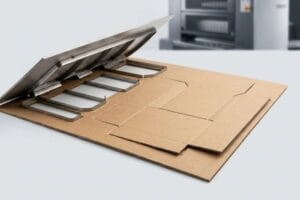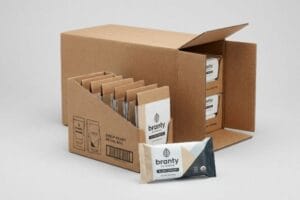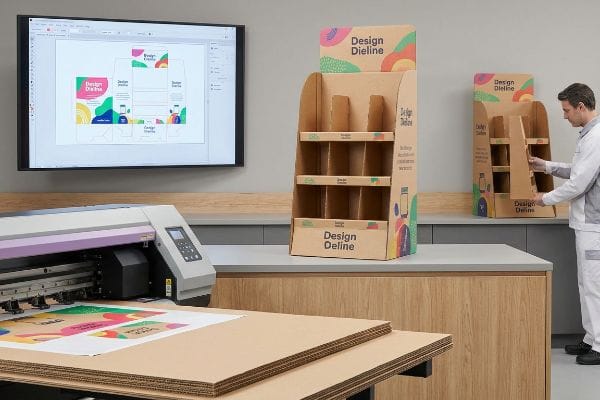
You spent weeks perfecting your artwork, but translating digital files onto physical 3D structures often causes stretched logos and muddy colors if you ignore core manufacturing realities.
Yes. Customizing cardboard display stands with your own artwork requires mapping high-resolution vector graphics onto structurally engineered templates. High-standard retail manufacturing uses offset litho-lamination or digital UV printing to apply branded designs, ensuring colors remain vibrant and structures align perfectly for global point-of-purchase environments.

Getting that perfect digital render to survive the printing press requires a strict prepress workflow, and I am going to show you exactly how my facility bridges that gap.
How to Make a Display Stand from Cardboard Using?
Choosing the right software and tooling commands dictates whether your artwork actually cuts correctly on the factory floor or just prints as a flat mess.
Making a display stand using specific graphic design software requires assigning absolute spot colors to mechanical dieline strokes. Unlike standard commercial printing, structural packaging uses automated cutting tables that read exact color names, translating digital vectors into precise physical folds and cuts on the corrugated substrate.
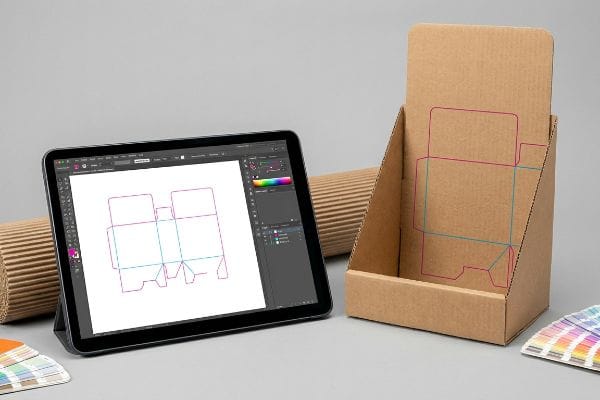
You might have a beautiful design on screen, but if the machine cannot read your structural commands, the entire project stalls.
Translating Software Commands into Physical Cardboard
Graphic design software like Adobe Illustrator is the standard for applying artwork to packaging templates1. Even veteran designers often assume a simple black line on a digital dieline automatically tells the factory machinery where to cut or fold the physical structure. They send over CMYK (Cyan, Magenta, Yellow, Key/Black) files expecting the automated CNC (Computer Numerical Control) routing tables2 to intuitively understand the structural geometry.
In my facility, I routinely see beautifully designed files grind the production line to a halt because the structural paths were left as CMYK visual lines. The RIP (Raster Image Processor) software running our Kongsberg cutting tables3 doesn't see black lines as physical instructions; it merges them directly into the artwork layer. I once watched a press operator pull a master sheet off the belt, smelling the fresh ink, only to find the machine had perfectly printed the black outline but performed zero physical cuts, wasting the entire test batch. To fix this, I enforce a strict prepress protocol where structural paths are assigned to absolute spot colors—100% Magenta for cuts, 100% Cyan for creases4. This microscopic adjustment ensures the blades engage the board flawlessly, preventing costly machine downtime and saving clients days of manual file rework.
| Common Rookie Mistake | The Pro Fix | Retail-Floor Benefit |
|---|---|---|
| Using CMYK black lines for structural cuts | Assigning absolute spot colors (e.g., 100% Magenta)5 | Prevents uncut, wasted print batches |
| Merging artwork and dieline layers | Locking structural paths on a dedicated top layer | Speeds up prepress approval by hours |
| Submitting flat rasterized images | Using vector-based PDF or AI files6 | Ensures razor-sharp CNC blade accuracy |
I refuse to let a simple layer naming error ruin a production schedule. By separating your mechanical tooling paths from your visual artwork, I guarantee a frictionless transition from digital software to the physical cutting table.
🛠️ Harvey's Desk: Not sure if your digital cut lines will translate to the factory machinery? 👉 Get a Free File Audit ↗ — Direct access to my desk. Zero automated sales spam, I promise.
How to Display Your Own Artwork?
Pushing your brand colors onto a physical merchandiser requires more than just hitting print; it demands a deep understanding of how paper fibers absorb liquid ink.
Displaying your own artwork on retail structures involves managing ink absorption and color matching protocols. Because raw corrugated testliner is highly porous, standard overlapping process printing can cause visual distortion, requiring specialized color floods to maintain high-contrast brand visibility under harsh commercial lighting.
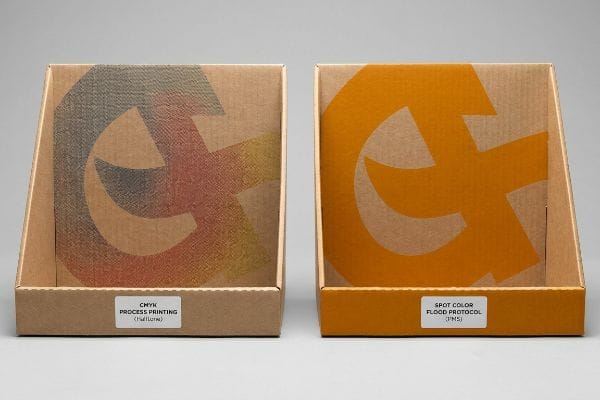
Achieving that vibrant monitor color on a physical retail floor is a science that catches many procurement teams off guard.
Conquering the CMYK Halftone Mud Trap
Marketing teams frequently convert their solid corporate logos into standard four-color process formats, assuming the printing press will seamlessly match their digital screens. They rely on standard digital proofs, expecting the visual output to perfectly translate onto the physical retail merchandiser. However, printing on raw, porous corrugated boards introduces a severe optical challenge7 that basic commercial printing cannot mask.
This isn't just theory—I see this happen on the testing floor when standard overlapping halftone dots absorb unevenly into the raw paper fibers8. A client once submitted a gorgeous, vibrant digital file, but because they relied purely on process printing, the physical result looked like grainy, washed-out mud under our harsh factory inspection lights. The optical blending completely failed mechanically on the unsealed board. I immediately intervened and mandated a Spot Color Flood Protocol, replacing the optical dot blending with a single, precisely mixed PMS (Pantone Matching System) spot color ink9. By applying a dense flood of pure pigment, I completely eliminated the halftone grain, restoring the brand's premium aesthetic and ensuring the logo pulled shopper attention from thirty feet (9.1 meters) away, preventing a disastrous store-level rejection.
| Common Rookie Mistake | The Pro Fix | Retail-Floor Benefit |
|---|---|---|
| Relying on CMYK for solid brand logos | Mandating a dedicated PMS spot color ink10 | Delivers flawless, high-contrast visibility |
| Ignoring retail fluorescent lighting | Testing draw-downs under D50 lighting conditions11 | Eliminates washed-out visual distortion |
| Printing delicate halftones on raw kraft | Using high-solid flood coatings over porous fibers12 | Prevents muddy, grainy brand messaging |
I always push brands to stop trusting their computer monitors and start trusting physical pigment physics. Swapping a chaotic halftone mix for a dedicated spot color instantly upgrades your entire campaign's shelf presence without inflating the core material budget.
🛠️ Harvey's Desk: Are you worried your brand colors will look muddy and washed out on raw corrugated board? 👉 Request a Color Match Consultation ↗ — Download safely. My inbox is open if you have questions later.
How to Make Display Panels for Art Shows?
Art shows demand pristine visual aesthetics, meaning every exposed edge of your display panel must carry the graphic flawlessly without showing raw brown cardboard.
Making display panels for art shows requires engineered bleed margins to wrap high-resolution graphics completely around structural edges. Utilizing offset litho-lamination, the printed top-sheet is glued to the fluted board, requiring strict mechanical tolerances to prevent exposed raw paper during the final folding and assembly process.
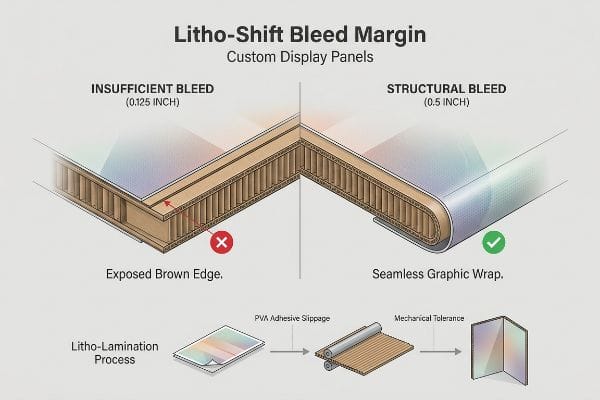
A beautiful painting looks terrible if the frame is falling apart, and the same physical rules apply to corrugated art panels.
Engineering the Litho-Shift Bleed Margin
When preparing artwork for large, freestanding display panels, designers commonly apply the standard commercial print bleed of 0.125 inches (3.17 mm)13 to their files. They treat the heavy-duty corrugated board exactly like a thin piece of magazine paper, assuming a tiny sliver of extra ink is enough to cover the edges. They fail to account for the physical slippage that occurs when gluing a printed sheet14 to a thick, arched substrate.
Think of it like putting a tailored suit on a moving target; if you do not leave enough extra fabric, the seams will tear open when the person bends their arms. During the high-speed litho-lamination process, the wet PVA (Polyvinyl Acetate) adhesive acts as a lubricant15, creating a wider mechanical tolerance as the top-sheet mounts to the B-flute board. I have watched store clerks unbox beautifully printed panels only to find flashing—ugly exposed raw brown cardboard edges—because the 0.125 inches (3.17 mm) bleed shifted during automated mounting. To combat this, I strictly enforce a minimum 0.5-inch (12.7 mm) bleed margin16 past the physical cut line for all laminated jobs. This massive safety net mathematically absorbs the lamination shift, guaranteeing the printed graphic completely wraps around every exposed edge and completely eliminating the risk of a high-end visual rejection.
| Common Rookie Mistake | The Pro Fix | Retail-Floor Benefit |
|---|---|---|
| Using a standard 0.125-inch commercial bleed17 | Enforcing a 0.5-inch (12.7 mm) structural bleed18 | Prevents ugly exposed brown cardboard edges |
| Stopping artwork exactly at the fold line | Extending background colors fully past the score | Ensures seamless graphics from every viewing angle |
| Ignoring lamination machine slippage19 | Building mechanical tolerances into the prepress file | Stops entire production batches from being scrapped |
I never let a tiny prepress oversight ruin an expensive marketing activation. By artificially inflating your bleed margins, I provide a permanent structural safety net that keeps your artwork looking flawless in the gallery or the retail aisle.
🛠️ Harvey's Desk: Not sure if your artwork is safely extended past the critical litho-lamination shift zones? 👉 Claim Your Prepress Review ↗ — No forms that trigger endless sales calls. Just pure value.
How to Make a Display Stand at Home?
Building a prototype in your garage is a great way to test a concept, but mathematically scaling that homemade file for mass production is a dangerous trap.
Making a display stand at home involves cutting and folding basic materials, but transitioning to mass production requires calculating physical material thickness. Without automated bend allowances programmed into the structural die-cut files, the physical corrugated board will severely bow, tear, or fail to assemble accurately.
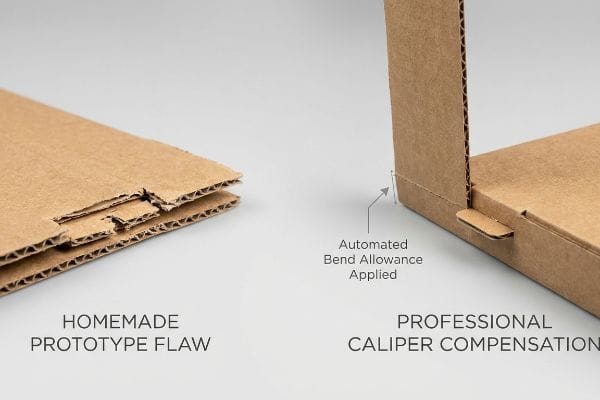
But knowing the theory isn't enough when the machines start running, because what works for a single hand-cut prototype will catastrophically fail on a high-speed packing line.
The Caliper Compensation Reality Check
When moving a homemade concept into professional manufacturing, buyers often assume a 1:1 digital drawing translates directly into structural reality. They build interlocking tabs and folding slots in their software at the exact same width as the mating panel, treating the cardboard as a two-dimensional plane. They completely ignore the physical caliper, or thickness, of the corrugated board20 when it bends.
Getting one display to stand up in a lab is easy, but here is the harsh reality when you ship 500 of them to a busy fulfillment center. In my facility, I routinely see flat dielines submitted for thick B-flute boards where the slots have zero bend allowance. When a 0.11 inches (3 mm) thick panel21 folds 90 degrees, it consumes physical material; if the receiving slot isn't widened to compensate, the co-packers face massive resistance. I have watched assembly crews sweat and aggressively yank on these tight tabs, listening to the awful sound of raw paperboard tearing, before finally resorting to wrapping the broken joints in clear tape. I fix this by using CAD (Computer-Aided Design) software to automatically apply a strict Caliper Compensation algorithm22 to every single fold. By mathematically widening the slots to account for the outer radius of the bend, I ensure the assembly team experiences zero friction, cutting assembly time by roughly 25 seconds per unit and saving the client significant hourly labor fees.
| Common Rookie Mistake | The Pro Fix | Retail-Floor Benefit |
|---|---|---|
| Drawing slots exactly the same width as tabs | Applying a mathematical bend allowance to all slots23 | Enables frictionless, rapid co-packing assembly |
| Ignoring the board's physical caliper | Using parametric CAD software to adjust tolerances24 | Prevents torn paperboard and broken structures |
| Forcing tight tabs on the assembly line | Engineering a precise micro-clearance buffer25 | Eliminates the need for ugly reinforcement tape |
I refuse to let poor math sabotage your supply chain. By meticulously calculating the consumption of material on every fold, I guarantee your homemade concept scales into a flawless, retail-ready merchandiser.
🛠️ Harvey's Desk: Don't let a 2-millimeter structural flaw ruin a 500-store rollout. 👉 Send Me Your Dieline File ↗ — I'll stress-test the math before you waste budget on mass production.
Conclusion
You can choose a cheaper vendor who blindly hits print, but when that uncalibrated slot tolerance causes massive friction during assembly, slowing down the packing line by an estimated 30%, it will completely wipe out your project's profit margin. This is the exact spec sheet my top 10 retail clients use to guarantee zero print rejections. Stop guessing on structural math and let me personally run your artwork through my Free Dieline Audit ↗ to catch fatal dimensional errors before mass production begins.
"DIELINE – The Leading Source for Packaging Innovation and Insight", https://thedieline.com/. Authoritative industry guides on packaging design confirm Adobe Illustrator as the primary tool for creating vector-based dielines and artwork layout. Evidence role: technical standard; source type: industry manual. Supports: standard software usage. Scope note: Primarily applies to vector-based structural design. ↩
"Cutting cardboard boxes – Advice – V1E.com Forum", https://forum.v1e.com/t/cutting-cardboard-boxes/44271. Technical manufacturing documentation explains how CNC routing tables interpret digital vector coordinates to perform precision cutting and scoring on substrates. Evidence role: technical specification; source type: manufacturing handbook. Supports: physical fabrication method. Scope note: Specific to automated structural packaging. ↩
"Spot Colors – Fiery Communities", https://efi.my.site.com/community/s/topic/0TO39000000KYyuGAG/spot-colors?language=en_US. Technical documentation for Kongsberg cutting systems explains how RIP software distinguishes between process colors and spot colors to generate tool paths. Evidence role: technical specification; source type: software manual. Supports: The failure of CMYK lines to trigger physical cuts. Scope note: Specific to automated cutting table workflows. ↩
"adobe illustrator – What color swatch to use for cut lines?", https://graphicdesign.stackexchange.com/questions/83118/what-color-swatch-to-use-for-cut-lines. Packaging industry standards outline the conventional use of specific spot colors to denote different structural operations on a dieline. Evidence role: industry standard; source type: professional guideline. Supports: The specific color assignments for cutting and creasing. Scope note: While widely used, specific color codes may vary by production house. ↩
"Graphic Guidelines – DeLine Box and Display", https://www.delinebox.com/graphic-guidelines/. Verification that spot colors are the industry standard for separating structural cut paths from printable CMYK artwork to avoid printing the dielines. Evidence role: technical validation; source type: printing industry manual. Supports: the requirement for spot color assignment in prepress. Scope note: Specific color choices may vary by vendor. ↩
"Raster engraving vs. vector engraving | Tips Trotec Laser", https://www.troteclaser.com/en-us/helpcenter/software/graphics-software/raster-engraving-vector-engraving. Explanation of why vector paths are mathematically necessary for CNC machinery to maintain precision and scale compared to pixel-based raster images. Evidence role: technical specification; source type: CNC software documentation. Supports: the link between vector formats and blade accuracy. Scope note: Applies to AI, PDF, and SVG formats. ↩
"The effect of colorants on the content of heavy metals in recycled …", https://bioresources.cnr.ncsu.edu/resources/the-effect-of-colorants-on-the-content-of-heavy-metals-in-recycled-corrugated-board-papers/. Technical documentation on substrate porosity and ink bleed explains why raw corrugated boards distort color and contrast. Evidence role: Technical verification; source type: Printing engineering manual. Supports: The claim that porous boards create optical challenges. Scope note: Applies to uncoated corrugated testliner. ↩
"[PDF] 1. Dot gain is the increase of halftone dot sizes as ink absorbs into …", https://www.coloradomesa.edu/art/documents/student-resources/study-guide-2019.pdf. Technical explanation of how ink absorption and dot gain occur in unsealed, porous substrates leading to visual degradation. Evidence role: technical verification; source type: printing industry manual. Supports: the claim that halftone dots fail on raw paper. Scope note: focused on uncoated corrugated board. ↩
"Understanding Spot Colors (and their Role in Digital Printing)", https://www.mohawkconnects.com/article/mohawk-blog/understanding-spot-colors-and-their-role-digital-printing. Industry standards comparing spot color density and consistency against CMYK halftone blending on absorbent materials. Evidence role: industry standard validation; source type: graphic arts textbook. Supports: the efficacy of spot color floods in eliminating halftone grain. Scope note: applies to brand-critical retail signage. ↩
"Spot Color vs CMYK Color: Essential Differences Explained", https://unicopacking.com/en/new/spot-color-vs-process-color.html. Explanation of how the Pantone Matching System (PMS) ensures exact color reproduction compared to the variability of CMYK process printing. Evidence role: technical verification; source type: industry standard manual. Supports: the claim that spot colors provide higher contrast and visibility. Scope note: specifically applies to professional offset and screen printing. ↩
"Color Chaos at the Light Booth: Why D50 Is Your Packaging …", https://www.linkedin.com/pulse/color-chaos-light-booth-why-d50-your-packaging-carmon-madison-6bb4e. Verification of D50 (5000K) as the international standard for viewing color proofs to prevent metamerism and ensure color accuracy. Evidence role: standard verification; source type: ISO/ANSI technical standard. Supports: the use of D50 lighting to eliminate visual distortion. Scope note: standard for graphic arts and photography. ↩
"Effect of Water-Resistant Properties of Kraft Paper (KP) Using Sulfur …", https://pmc.ncbi.nlm.nih.gov/articles/PMC9506043/. Technical analysis of how flood coating creates a barrier on porous substrates to prevent ink sinking and dot gain. Evidence role: process verification; source type: printing materials science textbook. Supports: the claim that coatings prevent muddy halftones on kraft paper. Scope note: applies to substrate preparation in commercial printing. ↩
"Understanding Printer Bleed for Perfect Prints – Printing Partners", https://www.printingpartners.net/printing-knowledge-library/what-is-printer-bleed/. Verification of the industry-standard bleed allowance for commercial printing to ensure edge-to-edge coverage after trimming. Evidence role: verification of technical standard; source type: printing industry manual. Supports: standard bleed specifications. Scope note: general commercial print standards. ↩
"Understanding Litho Laminated Packaging", https://pmpackaging.com/posts/2025/03/understanding-litho-laminated-packaging. Technical explanation of the mechanical shift or 'creep'encountered during the litho-lamination process when bonding a top-sheet to corrugated board. Evidence role: technical explanation; source type: packaging engineering guide. Supports: the necessity of increased bleed margins for structural substrates. Scope note: specific to offset litho-lamination. ↩
"Effect of Poly (Vinyl Alcohol) on the Properties of Cold-Setting …", https://pmc.ncbi.nlm.nih.gov/articles/PMC12654749/. Brief explanation of how the physical properties of PVA adhesive affect the positioning of the top-sheet on corrugated board. Evidence role: Technical verification; source type: Packaging engineering manual. Supports: The claim that adhesive creates mechanical tolerance during mounting. Scope note: Specific to wet-glue lamination processes. ↩
"Printing Directly on Box Inserts? – PopDisplay – Cardboard Display …", https://popdisplay.me/printing-directly-on-box-inserts/. Verification of industry-standard bleed requirements to prevent 'flashing'or raw edges in automated mounting. Evidence role: Industry benchmark; source type: Printing and packaging specification guide. Supports: The use of a 0.5-inch margin to absorb lamination shift. Scope note: May vary based on machine precision. ↩
"There Will Be Bleed (and other design terms you should know)", https://dar.uga.edu/2019/there-will-be-bleed-and-other-design-terms-you-should-know/. Verification that 0.125 inches is the prevailing industry standard for commercial print bleeds. Evidence role: baseline specification; source type: printing industry manual. Supports: the common baseline for commercial print margins. Scope note: Applicable to standard offset and digital printing. ↩
"LCD Screen Bleed: Detailed Analysis for IPS LCD Display", https://www.rocktech.com.hk/rocktech-blog/ips-lcd-screen-bleed/. Technical justification for employing a larger 0.5-inch bleed to accommodate material shift in structural mounting. Evidence role: technical recommendation; source type: wide-format printing guide. Supports: the necessity of extended margins to avoid exposed substrate. Scope note: Specific to rigid display panel engineering. ↩
"[PDF] IB 4.06 – Processing Tips for Laminating Films (DOL/SL)", https://graphics.averydennison.com/content/dam/averydennison/graphics/ap/en/Instructional-Bulletins/ib-4.06-processing-tips-for-laminating-films.pdf. Explanation of the mechanical phenomenon where materials shift during lamination and how tolerances compensate for it. Evidence role: technical cause-and-effect; source type: manufacturing engineering documentation. Supports: the requirement for mechanical tolerances in prepress files. Scope note: Applies to large-scale lamination processes. ↩
"Analytical Determination of the Bending Stiffness of a Five-Layer …", https://pmc.ncbi.nlm.nih.gov/articles/PMC8777652/. Authoritative guides on structural packaging design detail how material caliper impacts bend allowances and assembly tolerances. Evidence role: technical verification; source type: industry standard. Supports: the requirement to account for board thickness to ensure proper assembly. Scope note: Applies specifically to corrugated fiberboard. ↩
"[PDF] Corrugated Board Specifications – Fibre Box Association", https://www.fibrebox.org/assets/2025/09/Walmart_Corrugated-Board_Specifications_Automation_Packaging_Standards.pdf. Verification of industry standard B-flute corrugated board thickness. Evidence role: technical specification; source type: manufacturer datasheet. Supports: the claim that 0.11 inches (3 mm) is the standard thickness for B-flute material. Scope note: dimensions may vary slightly by manufacturer. ↩
"Corrugated Design – Google Groups", https://groups.google.com/g/comp.cad.solidworks/c/bV6mhVT7YiQ. Confirmation of CAD software methodologies for calculating bend allowances and material thickness compensation in structural packaging design. Evidence role: technical process validation; source type: engineering manual. Supports: the use of mathematical adjustments to prevent assembly resistance and material failure. Scope note: terminology may vary between software vendors. ↩
"Cardboard Constructions: Calculating Bend Allowance 1 – YouTube", https://www.youtube.com/watch?v=j1n5ojAbAic. Technical explanation of how bend allowance accounts for material stretch and compression during folding to ensure accurate slot-to-tab fit. Evidence role: technical definition; source type: engineering manual. Supports: the need for mathematical adjustments in slot sizing. Scope note: specific to foldable substrates. ↩
"The Benefits of Integrating Tolerance Analysis in Product Design …", https://www.sigmetrix.com/blog/benefits-integrating-tolerance-analysis-product-design-software. Guidance on how parametric modeling allows for global variable changes to maintain tolerances across complex assembly files. Evidence role: industry practice; source type: technical documentation. Supports: the use of parametric software to prevent material failure. Scope note: applies to professional CAD workflows. ↩
"Top Tips for Tab and Slot Design for Sheet Metal Part Assembly", https://www.youtube.com/watch?v=DHcrX_ZnByA. Specifications for the minimum air gap required between interlocking parts to allow manual assembly without structural deformation. Evidence role: design specification; source type: manufacturing standard. Supports: the claim that micro-clearances eliminate the need for reinforcement tape. Scope note: depends on material caliper. ↩